---
title: "Why an AI API key must never go in a web page or app"
description: "Anyone can read a key in a web page or app. Keep it on your own server, add limits there, and know what to do if it leaks."
topic: "AI systems"
chapter: "use-an-ai-service"
order: 9
minutes: { plain: 6, deep: 12 }
prerequisites: ["Reading short Python functions", "What an HTTP request and response are", "Basic git: add, commit, log"]
seo_title: "Is it safe to put my OpenAI API key in frontend JavaScript?"
date: 2026-10-18
---
# Why an AI API key must never go in a web page or app
An AI API key (the secret code that tells an AI company whom to bill) is a password that spends your money, and a web page hands everything in it to every visitor. In a pretend case, a stranger copies a key from a page and sends 1,000 requests in 10 seconds at $0.005 each: $5.00. Keep the key on a server that caps how often one network address (the number your internet connection shows to websites) may call, and the stranger gets 14 requests through: $0.07. All numbers are pretend, priced as in [What is a token?](https://spicyshark.co/learn/what-is-a-token/).
## In one minute
No: whatever a page holds can be read by whoever loads it, so an API key in frontend JavaScript (code that runs in a visitor's browser) is public, and anyone who copies it can spend your money. Putting the key in a page is like taping a card number to a shop window. The fix is a small server of your own (a program on a computer you control) that holds the key, asks the AI company for the answer and refuses callers who ask too much. If a key leaks, cancel it, make a new one, then check what was spent.
## Explore the numbers
[Open the widget](https://spicyshark.co/learn/api-key-in-the-browser/widget.html). Press Send, open the Network tab, then let the pretend stranger run up the meter. Switch to "On my server" and try 1, 20 and 100 addresses.
## How it works
### A key is a password that spends money
A program asks an AI model for an answer by sending a request to the company's API (where to send a question, and the rules for asking). Every request carries an API key, and the company bills whoever holds it: the key says whose bill it is, not who is typing.
OpenAI's API overview (read 2026-10-18) says "Don't share it with others or expose it in any client-side code such as browsers or apps." Client-side code runs on the visitor's own device.
### Anything sent to a browser can be read
A web page is a set of files your server sends to each visitor's browser, so whatever is in them is on the visitor's computer. The developer tools (a panel built into browsers) list each request the page makes, in a tab called Network, with what it carries.
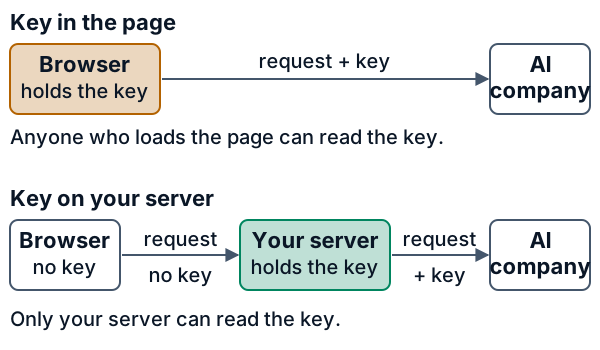
An app is no different. An Android app is an APK, and the APK Analyzer page (read 2026-10-18) says "APKs are files that follow the ZIP file format", the format of ordinary compressed folders, so anyone with the app can open it. Leaks are common: a study of public GitHub repositories (Meli and colleagues, 2019) found thousands of new secrets leaked daily.
### What does not protect a key
- **Hiding it in the code.** Scrambling the code only makes it harder to read. The request still carries the real key, so the Network tab shows it.
- **CORS.** CORS (cross-origin resource sharing) is a browser rule about which other sites a page may read from (MDN, read 2026-10-18). It does not check who is asking, and a program that is not a browser ignores it.
### The fix: your own server holds the key
Put a small server between the page and the AI company. The page sends its question to a route on your server (a path it answers, here `/api/chat`); the server reads the key from an environment variable (a named setting kept outside the code), adds it and sends the request on.
A server alone is not enough: with no limits it forwards a stranger's 1,000 requests too. $5.00 again.
### Limits only a server can add
Your server can check each request before it spends money.
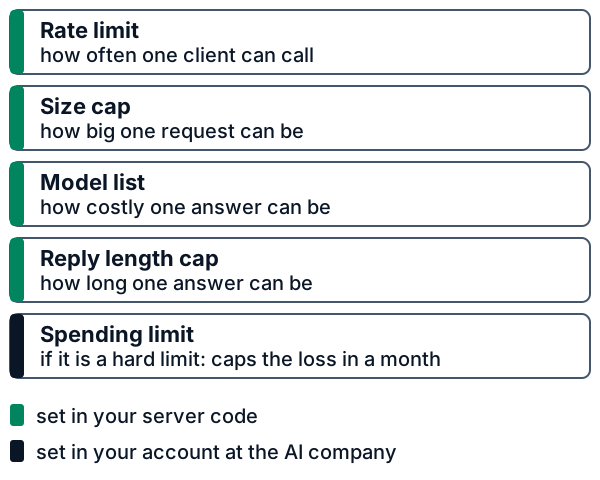
- **Rate limit.** A cap on how often one client, here one network address, may call. Over it, the server answers with status code 429 ("Too Many Requests"), a number that says how a request went.
- **Size cap.** A request whose content (its body) is above a set size is refused with status code 413 ("Content Too Large").
- **Model list and reply cap.** Only the models you chose are accepted, and the server, not the page, sets the longest reply it asks for.
- **Spending limit.** If it is a hard limit, the AI company stops requests at a monthly amount you set, even when your code has a bug. Check that yours stops requests and is not only an email alert. Usage is tracked with a delay, so a small overshoot is possible.
The server also never writes the key to its log (the file where it records what it did).
The rate limit here is a bucket of tickets: it holds a few (3 in the picture, 5 in the widget), gains one every second, and each request takes one.
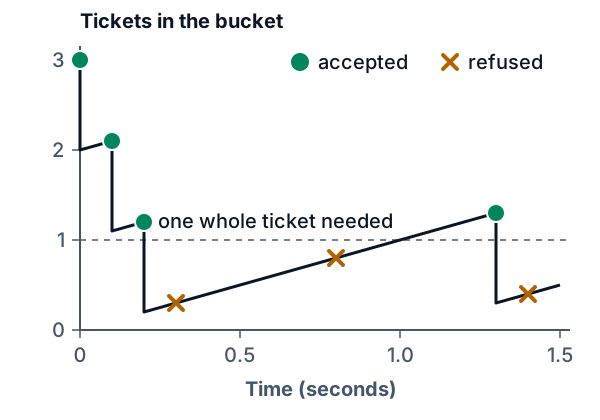
Each address has its own bucket, so more addresses get more requests: 1 address gets 14 of 1,000 through ($0.07), 20 get 280 ($1.40) and 100 get all 1,000 ($5.00). If it is a hard limit, the spending limit caps the loss when every other check fails.
### If a key leaks
Treat a key as leaked once it has been in a page, a public repository (a project folder tracked by a tool called git), a chat or a log. In order:
1. **Revoke the key** at the AI company (cancel it). GitHub's guide to leaked secrets (read 2026-10-18) says "as a first step you need to revoke and/or rotate that secret."
2. **Make a new key** (rotating it) and put it only in your server's environment variable.
3. **Check the usage** for requests you did not make, then clean up where it leaked.
Deleting is not revoking. Git keeps every earlier version in its history, a list of saved snapshots called commits. Commit a `.env` file (a file of those settings) and delete it in the next commit, and the first commit still holds the key: `git log -p` shows it.
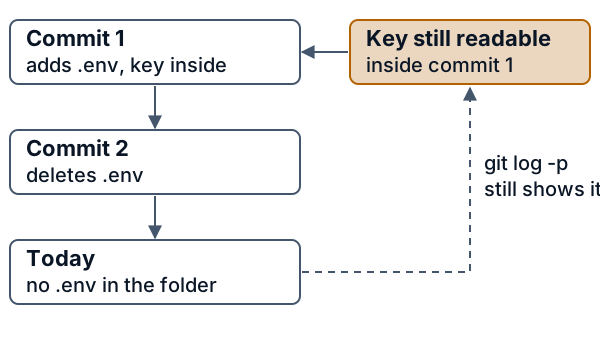
The better habit: list `.env` in `.gitignore`, a file that tells git which files to leave out, before the first commit. GitHub's secret scanning (it looks for key-shaped text in uploads) catches some leaks; it is a net, not the plan.
## What this means when you build
- **Call the AI company only from your own server.** If a tutorial puts the key in a page script, use a server route.
- **Read the names.** Build tools (programs that package your app) such as Vite and Next.js copy variables named `VITE_...` or `NEXT_PUBLIC_...` into the code the browser receives. Name secrets without those prefixes.
- **Set a monthly spending limit that stops requests, not only an alert, and add the server checks before the first user.** Use separate keys for development and production, so one leak is revoked alone (Claude Help Center, read 2026-10-18).
- **Keep keys out of git, logs, chat and screenshots.** If a key was ever committed, revoke it.
## Go deeper
*Optional, for readers who write Python. The code is in the `code/` folder: `keyproxy.py` is the server and `test_keyproxy.py` its tests. `python3 show_numbers.py` prints every number above.*
### The token bucket by hand
One word needs care. A "token" in this section is a ticket in a bucket that counts requests. It has nothing to do with the tokens an AI model reads. `TokenBucket` holds up to `capacity` tickets and gains `rate` tickets per second; a request takes one whole ticket or is refused.
```python
class TokenBucket:
"""Holds up to `capacity` tickets and gains `rate` tickets per second. A request spends one.
(The word "token" here has nothing to do with the tokens an AI model reads.)
"""
def __init__(self, capacity, rate, now):
self.capacity, self.rate = capacity, rate
self.level, self.last = float(capacity), now
def take(self, now):
"""Spend one ticket. Return 0.0 if allowed, else the seconds until a ticket is available."""
self.level = min(self.capacity, self.level + (now - self.last) * self.rate)
self.last = now
if self.level >= 1:
self.level -= 1
return 0.0
return (1 - self.level) / self.rate
```
`take` first adds the tickets earned since the last call, never going above `capacity`, then spends one if a whole ticket is there. If not, it returns how long until one arrives, `(1 - level) / rate` seconds, and spends nothing. Time arrives as the argument `now`, so a test can move the clock without waiting. The table is the bucket from the figure, with 3 tickets and 1 a second:
| Time (s) | Tickets before | Outcome |
|---|---|---|
| 0.0 | 3.0 | accepted |
| 0.1 | 2.1 | accepted |
| 0.2 | 1.2 | accepted |
| 0.3 | 0.3 | refused, try again in 0.7 s |
| 0.8 | 0.8 | refused, try again in 0.2 s |
| 1.3 | 1.3 | accepted |
| 1.4 | 0.4 | refused, try again in 0.6 s |
Check one row by hand: the request at 0.0 left 2 tickets, so at 0.1 the bucket holds 2 + 0.1 x 1 = 2.1.
`scenario.py` runs the stranger from the widget: 1,000 requests spaced evenly over 10 seconds, so 100 a second, against a bucket of 5 that gains 1 a second for each address. The price is the pretend $0.005 a request (500 input tokens at $2 per million plus 400 output tokens at $10 per million).
| Setup | Accepted | Pretend bill |
|---|---|---|
| Key in the page | 1,000 | $5.00 |
| Server, no limits | 1,000 | $5.00 |
| Server, rate limit, 1 address | 14 | $0.07 |
| Server, rate limit, 20 addresses | 280 | $1.40 |
| Server, rate limit, 100 addresses | 1,000 | $5.00 |
One address gets 14, not 15: 5 tickets at the start plus 9.99 seconds at 1 a second before the last request is 14.99 tickets, and only whole requests count.
### The server, one check at a time
`Config` holds the settings. The comment on the first field is the point: a config that prints itself must not print the key.
```python
@dataclass
class Config:
api_key: str = field(repr=False) # repr=False: printing the config must not print the key
upstream_url: str
allowed_models: frozenset
max_body_bytes: int = 4096
max_output_tokens: int = 300
bucket_capacity: int = 5
refill_per_second: float = 1.0
timeout_seconds: float = 10.0
```
This server sends no CORS headers, and nothing in it relies on them. MDN (read 2026-10-18) says "browsers restrict cross-origin HTTP requests initiated from scripts"; that is a rule for browsers. The server still receives requests from any caller, so the checks below are what protect the bill.
`config_from_env` reads `AI_API_KEY`, `AI_UPSTREAM_URL` and `AI_MODELS` from the environment. When one is missing it exits with a message that names the three variables and never prints a value. It strips spaces around model names and refuses an upstream address that does not start with `https://` unless the host is this computer, so a typo cannot send the key in clear text. `make_app` returns a WSGI app (Python's standard interface between a web server and an application), so a test can call it as a function. The client is `environ["REMOTE_ADDR"]`, the address of whoever opened the connection; the code never reads `X-Forwarded-For`, which the client writes.
The cheap checks run first, before the body is read and before any money is spent:
```python
if client not in buckets:
buckets[client] = TokenBucket(cfg.bucket_capacity, cfg.refill_per_second, clock())
wait = buckets[client].take(clock())
if wait:
return fail(429, "too many requests", [("Retry-After", str(math.ceil(wait)))])
length = environ.get("CONTENT_LENGTH") or ""
if not (length.isascii() and length.isdigit()):
return fail(411, "length required")
length = length.lstrip("0") or "0" # leading zeros do not change the number
if len(length) > 9 or int(length) > cfg.max_body_bytes: # refuse before reading a byte of the body
return fail(413, "request too large")
raw = environ["wsgi.input"].read(int(length))
```
Every request takes a ticket, even one that fails a later check, so junk costs a stranger part of the allowance too. A missing or odd `Content-Length` gets 411, because the server will not read a body of unknown size. Leading zeros are stripped first, so `0000000005` means 5. A length of more than nine digits then gets 413 before conversion, because recent Python versions raise an error on numbers of more than 4,300 digits, zeros included. MDN's pages on 429 (with its `Retry-After` header) and 413 (Content Too Large), read 2026-10-18, define the other two statuses. Then the request is checked and rebuilt:
```python
try:
data = json.loads(raw)
model, messages = data["model"], data["messages"]
except (ValueError, KeyError, TypeError, RecursionError):
return fail(400, "send JSON with model and messages")
if not isinstance(model, str) or not isinstance(messages, list) or not messages:
return fail(400, "send JSON with model and messages")
if model not in cfg.allowed_models:
return fail(400, "model not allowed")
# The server builds the upstream request: the client cannot add options such as a longer reply.
upstream_body = json.dumps(
{"model": model, "messages": messages, "max_tokens": cfg.max_output_tokens}).encode()
request = urllib.request.Request(cfg.upstream_url, upstream_body, method="POST", headers={
"Authorization": "Bearer " + cfg.api_key, "Content-Type": "application/json"})
try:
with opener.open(request, timeout=cfg.timeout_seconds) as upstream:
answer = upstream.read(MAX_REPLY_BYTES)
except Exception as exc: # an error body can repeat what we sent, so log only a code or a class name
log.warning("client=%s upstream=%s", client, getattr(exc, "code", type(exc).__name__))
return fail(502, "upstream failed")
return reply(200, answer.replace(cfg.api_key.encode(), b"[removed]"))
```
`RecursionError` is in the except list because on Python 3.11 and earlier, a body of about a thousand `[` in a row makes the JSON parser run out of stack; the test makes it raise on purpose. The server forwards an allowed `model`, a non-empty `messages` list and a `max_tokens` it chose. Anything else the client sent, such as a longer reply or a `stream` option, is dropped. The key appears once, in the `Authorization` header of the outgoing request. The last line removes the exact key from the provider's answer in case a careless provider repeats it back. A key in some other form would pass, so this is a last net, not the main defence.
One detail guards the key on the way out. Python's `urllib` follows a redirect and, in the lesson's test, sends the header to the new address. The opener is built with a handler that refuses to follow redirects:
```python
class NoRedirect(urllib.request.HTTPRedirectHandler):
"""Python's urllib would resend the Authorization header to wherever a redirect points."""
def redirect_request(self, *args, **kwargs):
return None
```
All output goes through two small functions, and the log line is built from the address and the status code only:
```python
def reply(status, body, extra=()):
log.info("client=%s status=%d", client, status) # no path, no headers, no body
start_response(f"{status} {HTTPStatus(status).phrase}", [
("Content-Type", "application/json"), ("Content-Length", str(len(body))), *extra])
return [body]
def fail(status, message, extra=()):
return reply(status, json.dumps({"error": message}).encode(), extra) # fixed text, never input
```
Error messages are fixed text, so the app copies nothing the client sent into a response or a log line. The web server around it keeps its own access log, though, and Python's standard one prints the whole request line, path included, so a request whose path is the key would put the key in the log. `PathFreeHandler` replaces both log methods with a line that holds only the client address and the status code:
```python
class PathFreeHandler(WSGIRequestHandler):
"""The standard handler prints each request line, path included, to stderr. This one prints the address and status."""
def log_request(self, code="-", size="-"):
sys.stderr.write(f"client={self.client_address[0]} status={code}\n")
def log_message(self, format, *args): # protocol errors quote the request line, so print none of it
sys.stderr.write(f"client={self.client_address[0]} protocol error\n")
```
`log_request` covers ordinary requests; `log_message` covers protocol errors such as a malformed request line, which the standard handler quotes in full. `main`, which `__main__` calls, passes the class to `make_server` as `handler_class`. For a malformed request line the standard error page can still repeat a bad word back to the sender, but that reply is not logged. OWASP's secrets guide (read 2026-10-18) says secrets should not be logged in plain text.
### Proof it works
```bash
cd lessons/api-key-in-the-browser/code && python3 -m pytest -q
```
The proxy checks in `test_keyproxy.py` run against a fake provider on `127.0.0.1`, so they touch no network and need no key. The fake can behave badly on purpose: it can repeat the `Authorization` header in its answer, return an error that quotes it, put it in the status line's reason phrase, answer slowly or redirect. Each check has a test that fails without it:
| Check | A test that fails when it is removed |
|---|---|
| Rate limit | `test_sixth_request_in_a_burst_is_refused_and_never_reaches_the_provider` |
| One bucket per address | `test_each_client_address_has_its_own_bucket` |
| Address from `REMOTE_ADDR` only | `test_a_forwarded_for_header_cannot_buy_a_fresh_bucket` |
| Size cap before reading | `test_body_over_the_cap_is_refused_before_it_is_read` |
| Wait time rounds up | `test_retry_after_rounds_a_fraction_of_a_second_up` |
| Model list | `test_a_model_that_is_not_on_the_list_is_refused_and_not_forwarded` |
| Server sets the reply length | `test_good_request_is_forwarded_with_the_key_and_the_server_sets_the_limits` |
| No redirect | `test_a_redirect_is_not_followed_so_the_key_is_not_sent_elsewhere` |
| Key out of the config's printout | `test_printing_the_config_does_not_print_the_key` |
| Request line out of the server's log | `test_the_servers_own_access_log_leaves_out_the_request_line` and `test_main_serves_with_the_path_free_handler` |
| Upstream address must be https | `test_an_upstream_address_that_is_not_https_is_refused_unless_it_is_this_computer` |
The test that matters most is `test_the_key_is_in_no_response_body_header_or_log_line`. For each of six provider behaviours it sends eight requests, among them an oversized body, malformed JSON, a wrong method, a missing length and a path that is the key. It then checks every response body, every response header and every captured log record for the key. A scan that finds nothing proves little unless the key was really there to find, so a second test first shows that the provider received the key and repeated it, and that the lesson's server replaced it with `[removed]`.
Switching off one check in a copy of `keyproxy.py` makes a named test fail each time. That held for the rate limit, the per-address buckets, trusting `X-Forwarded-For`, the size cap, the model list, a client-set `max_tokens`, redirects, the scrub of the answer, `repr=False`, rounding `Retry-After` down, dropping the digit bound on `Content-Length`, logging the provider's error body or reason phrase, and printing the request line in the server's own log. Other tests check that the widget's JavaScript bucket gives the same answers as `TokenBucket` (the test runs it under Node.js), that a deleted `.env` is still in `git log -p`, and that every Python block in this lesson is a verbatim excerpt of `keyproxy.py`.
### Leaks, history and scanners
The plain layer says revoke first. The reasons come from how git and its hosts behave.
- **Prefixes.** Vite copies variables whose names start with `VITE_` into the code it sends to browsers, and its documentation (read 2026-10-18) says they "should not contain sensitive information such as API keys".
- **History stays.** `test_git_history.py` builds a throwaway repository and shows two things: a `.env` listed in `.gitignore` stays out of the first commit, and one `git add --force` followed by a delete leaves the key readable in `git log --all -p`. GitHub's guide (read 2026-10-18) says that once the secret is rotated, rewriting history "may not be warranted", and that you cannot remove sensitive data from other users' clones.
- **Templates help.** The Next.js documentation (read 2026-10-18) notes that its starter template adds `.env` files to `.gitignore` and says "You almost never want to commit these files". It also writes `NEXT_PUBLIC_` values into the JavaScript sent to the browser at build time.
- **Secret scanning.** GitHub's secret scanning (read 2026-10-18) is free and automatic on public repositories, covers the full history of all branches, and tells the provider about partner secrets so it can revoke them. Push protection blocks a push that contains a secret.
- **gitleaks.** It is an open-source (MIT) scanner you run yourself. Its README (read 2026-10-18) describes a `git` mode that scans history with `git log -p`, a `dir` mode for files, and a pre-commit hook, and says the project now gets only security patches.
All of these work by pattern, so a key in a shape they do not know goes unseen.
### Where this is used in practice
The pattern is common in public tools. LiteLLM's proxy server issues its own "virtual keys" to callers; its documentation (read 2026-10-18) says each key can carry a list of allowed models, a spend budget and request and token rate limits, which overlaps with the checks above. OpenAI's Realtime guide (read 2026-10-18) has the browser ask a developer-controlled server to mint an ephemeral key (a temporary one) and says "Just ensure that you only use standard OpenAI API keys on the server, not in the browser." Google's key guidance (read 2026-10-18) says "The client should pass requests to the server, which can add the credential and issue the request."
On spending limits, the providers separate an alert from a limit. OpenAI's production guide (read 2026-10-18) says spend alerts "send notifications when usage exceeds a certain dollar amount", while "Hard spend limits stop affected API traffic when tracked spend reaches the limit." Google Cloud's budgets page (read 2026-10-18) warns "Setting an alerts-only budget doesn't automatically cap Google Cloud or Google Maps Platform usage or spending" and mentions "delays in usage reporting". So the backstop needs a hard limit, and the stop can come a little late. Anthropic's rate limits page (read 2026-10-18) says spend limits "set a maximum monthly cost an organization can incur", and that you can set your own below the tier's cap.
### What this server leaves out
- **Many addresses.** One bucket per address does not stop a stranger who has 100 addresses (the table above). Set the provider's spending limit, and add limits per user once your app has accounts. Anthropic's rate limits page (read 2026-10-18) says limits are enforced at the organization level, so a stranger's requests and your own draw on one allowance.
- **A proxy in front.** Behind a reverse proxy or a hosting platform, `REMOTE_ADDR` is the proxy's address, so every visitor would share one bucket. Reading a forwarded address is safe only from a proxy you control, which is why the code does not do it.
- **Memory.** `buckets` gets one entry per address and never shrinks. A long-running server needs a cleanup.
- **Exact-string scrub.** The answer is cleaned of the exact key only.
- **Shared and wide addresses.** Everyone behind one shared address, such as an office, draws on one bucket, while a home connection often gets a whole range of IPv6 addresses, so a stranger can change address on every request.
- **One request at a time.** The `main` function uses the standard library's small demo server to keep the lesson to one file. It serves one connection at a time with no read timeout, so a client that sends part of a request and goes quiet blocks everyone else. Use a production server for real traffic.
- **No streaming.** The answer is read in full, up to `MAX_REPLY_BYTES`.
- **Provider details.** URLs and field names differ between providers, so check your provider's reference before you reuse `upstream_body`.
- **Environment variables.** They are the common way to pass a key, but the OWASP secrets guide (read 2026-10-18) notes that they are "generally accessible to all processes and may be included in logs or system dumps", and prefers a secret manager where you have one.
## Skills this lesson builds
- Find a secret in a build folder and in a repository's history, and move the call it served behind a server route.
- Load secrets from environment variables or a secret manager, keep `.env` out of git, and scan history with a tool such as gitleaks.
- Implement and test a token bucket, a body-size cap and a model allowlist, and return 429 and 413 with the right headers.
- Respond to a leaked key in order: revoke, replace, check usage, clean history, and say what each step can and cannot undo.
- Test that a secret never reaches a response, a header or a log line, and show the test can fail.
**Portfolio project:** build a small chat page and a server route that calls a model through a fake upstream you wrote. Publish tests that scan every response, header and log line for the key, a table of what a stranger with 1, 20 and 100 addresses can still do, and a short note that says which limits you set at the provider.
## Check yourself
1. A friend says: "I made the key safe by splitting it into three strings and joining them in the page's script." Is it safe?
Answer
No. The page still has to send the whole key in the request, so the Network tab shows it however the code hid it, and anyone can read the script too. Scrambling the code makes it harder to read, not impossible. The key has to leave the page and live on a server.Answer
Revoke the key at the AI company, make a new one, put it only in the server's environment variable, and check the usage for requests you did not make. Deleting the file leaves the first commit in the history, where `git log -p` still shows the key, and other people may hold copies of the repository. Rewriting history is a clean-up step you may skip once the key is revoked.Answer
Time 0: 2 tickets, accepted, leaves 1. Time 0.5: 1 + 0.25 = 1.25, accepted, leaves 0.25. Time 1.0: 0.25 + 0.25 = 0.5, refused; the wait is (1 - 0.5) / 0.5 = 1.0 second, and the refusal spends nothing. Time 2.0: 0.5 + 0.5 = 1.0, accepted (it needs at least 1), leaves 0. So 0, 0.5 and 2.0 are accepted.Answer
The client writes `X-Forwarded-For`. A stranger could send a new value with every request and get a fresh, full bucket each time, which would switch the rate limit off. `REMOTE_ADDR` comes from the connection itself. The test `test_a_forwarded_for_header_cannot_buy_a_fresh_bucket` checks it. Behind a proxy you control, the forwarded header can be right to use, but only from that proxy.Answer
The monthly spending limit at the AI company, if it is a hard limit that stops requests; an alert only sends a message and stops nothing. Usage is tracked with a delay, so a small overshoot is possible, but the loss stays near the amount you set. A hard limit also stops your own app, for every real user, until the limit is raised or the month ends, so it is the backstop and not the plan. The server checks and per-user limits should keep requests from getting that far.