---
title: "Build a tiny model server you can read end to end"
description: "A model server is a cache, a batcher and metrics around the model. Build all three in under 150 lines and read the waits it reports."
topic: "AI systems"
chapter: "plan-and-measure"
order: 31
minutes: { plain: 6, deep: 19 }
prerequisites: ["Percentages and simple fractions", "Bytes and gigabytes", "Reading short Python functions"]
seo_title: "How does an AI model server work? Build a tiny one"
date: 2026-10-20
---
# Build a tiny model server you can read end to end
A model server is three small parts around the model: a cache that keeps each chat's memory between words ([lesson 22](https://spicyshark.co/learn/paged-kv-cache/)), a batcher that steps many chats together ([lesson 24](https://spicyshark.co/learn/how-an-ai-server-answers-many-people-at-once/)), and metrics that tell you how fast each user is served ([lesson 27](https://spicyshark.co/learn/why-average-speed-is-misleading/)). All three fit in one 141-line Python program, with a toy in place of the model. At 10 chats a second, 1 chat in 100 (p99) waits more than 0.042 s for its first word. At 40 a second the cache fills 0.39 s in, new chats queue, and that wait is 3.49 s, about 80 times longer, while the p99 gap between two words grows only from 21.0 to 31.3 ms. Doubling the cache moves the limit that binds and cuts the wait to 0.93 s.
## In one minute
Picture a restaurant kitchen. The dining room sends the orders, which hang on a rail: the queue. One cook works several plates at once, adding one step to every plate on each pass: the batcher. Each table's order holds shelf space while it cooks: the cache. A manager with a clipboard notes how long each table waited for its first dish and how long between dishes: the metrics.
The cook takes an order off the rail only if two things hold: the shelf has room for it, and a plate is free. If the shelf is full, memory is the wall. If the cook already has as many plates as one pass allows, the batch limit is the wall. From the dining room both look the same, a long wait. The clipboard tells them apart: how long the rail is, and how full the shelf. Read the slowest 1 in 100 (p99), not the average, because that is the table that leaves.
## Explore the numbers
[Open the widget](https://spicyshark.co/learn/build-a-tiny-model-server/widget.html). It runs the program's server on 400 invented chats and opens on the heavy run: 40 chats a second, 240 cache pages, 16 chats at most per step. The sentence on top says the cache fills at 0.39 s and 1 chat in 100 waits more than 3.49 s for its first word. Drag Cache pages to 480: the wall becomes the batch limit and the wait falls to 0.93 s. Drag Chats a second to 10: the queue vanishes and the wait is 0.042 s. Under More settings, Shuffle the chats puts the same chats in another order. The numbers shift: 0.93 s at 480 pages becomes 0.39 to 1.22 s, and about 80 times becomes 74 to 108. At limit 16, the order of the settings and the walls at 240 and 480 pages stay.
## How it works
### The picture, step by step
A kitchen is a model server. Here are its six steps, numbered as in Figure 1. TTFT, time to first token, is a chat's wait for its first word. TBT, time between tokens, is the gap between its words.
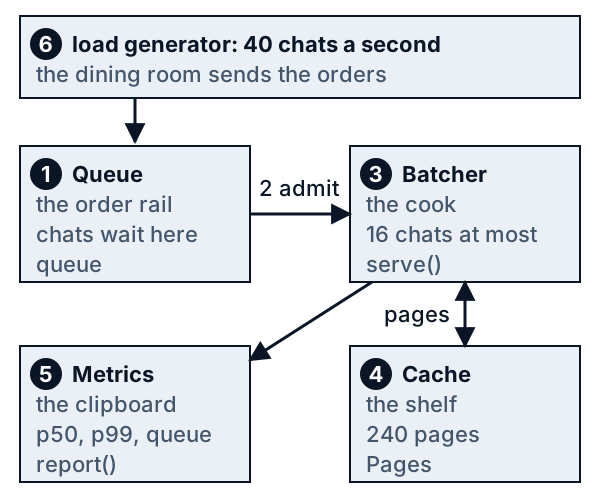
*Figure 1. The tiny server as a kitchen. Each number is a step below.*
1. **A request arrives and waits.** It joins the queue, the order rail, until the batcher has room.
2. **The batcher admits it when the cache has pages free.** A chat gets in when the batch has a place and the cache can promise every page the chat will need. The toy knows each reply's length, so it can promise all of its pages; a real server cannot, and fills later (Go deeper). The cache is lesson 22's pool of 16-token pages.
3. **One step gives every admitted chat its next word, together.** A step costs lesson 24's formula, and a step with 16 chats of 220 tokens takes 8.1 ms where 1 chat of 34 tokens takes 7.9 ms.
4. **The cache grows a page when a chat fills its last one.** When the chat ends, all its pages go back.
5. **Metrics record the waits:** TTFT and TBT for every chat, the queue length and the cache pages in use.
6. **The load generator sends chats at random times** at a stated rate, and the server reports p50 and p99, the waits that 50 and 99 in 100 stay within.
### Each step in code
One real line of the program does each step. The files are in `code/`, and the line numbers are those of this lesson's files.
| Step | The code line | What it does |
|---|---|---|
| 1. Queue the request | `tiny_server.py:85`
`queue.append(sent)` | The chat joins the back of the queue. |
| 2. Admit it if it fits | `tiny_server.py:90`
`no_place, no_pages = len(running) + len(joining) == limit, promised + need > pages` | The chat is held out if the batch is full, or if the pages it needs are not free. |
| 3. Step everyone together | `tiny_server.py:96`
`seconds = step_seconds([prompts[i] + made[i] for i in running], sum(prompts[i] for i in joining))` | One step takes lesson 24's time for every running chat plus the prompts being read. |
| 4. Take a page | `tiny_server.py:57`
`table.append(self.free.popleft())` | A chat that fills its last page takes the next free one. Line 60 gives them all back. |
| 5. Record the waits | `tiny_server.py:120`
`ttft = [f - a for f, a in zip(run.first, arrive)]` | The wait for the first word is the time of the first word minus the time of arrival. |
| 6. Send load, read the clipboard | `tiny_server.py:131`
`return report(workload, rate, serve(workload, rate, pages, limit))` | One call sends the chats at a rate and returns p50, p99 and the rest. |
### A real run
`trace.py` runs the heavy rate on the 400 chats and prints what the server does. Run it from the repository root:
```bash
cd lessons/build-a-tiny-model-server/code && python3 trace.py
```
Phone readers: slide the box sideways to see every column.
```text
heavy load: 40 chats a second, a cache of 240 pages, at most 16 chats per step
the first chats arrive
chat 0: sent at 0.000 s, prompt 34 tokens, reply 10 tokens, needs 3 pages
chat 1: sent at 0.003 s, prompt 157 tokens, reply 27 tokens, needs 12 pages
chat 2: sent at 0.018 s, prompt 457 tokens, reply 23 tokens, needs 30 pages
chat 3: sent at 0.019 s, prompt 248 tokens, reply 41 tokens, needs 19 pages
the first steps
step start took chats new queue pages held + owed left
1 0.000 s 7.9 ms 1 1 0 3 + 0 237
2 0.008 s 8.1 ms 2 1 0 13 + 2 225
3 0.016 s 7.9 ms 2 0 0 13 + 2 225
4 0.024 s 36.4 ms 4 2 0 58 + 6 176
5 0.060 s 29.5 ms 6 2 0 96 + 8 136
the cache fills at step 35
step start took chats new queue pages held + owed left
34 0.381 s 8.1 ms 11 0 0 181 + 57 2
35 0.389 s 8.1 ms 11 0 2 181 + 57 2 next chat waits for: cache
36 0.397 s 8.1 ms 11 0 2 181 + 57 2 next chat waits for: cache
37 0.405 s 8.1 ms 11 0 2 182 + 56 2 next chat waits for: cache
the clipboard: the same 400 chats, three runs
run rate first word p50 / p99 between words p50 / p99 queue pages wall
light 10 0.014 s 0.042 s 7.9 ms 21.0 ms 0 182 none
heavy 40 2.206 s 3.492 s 8.1 ms 31.3 ms 94 225 cache
heavy, 480 pages 40 0.317 s 0.928 s 8.1 ms 31.6 ms 40 343 batch
```
Read it against the six steps.
- **Steps 1 and 2.** The first four chats arrive within 19 ms and each is admitted at once, with all its pages promised: chat 0 needs 3 (44 tokens at 16 a page), chat 2 needs 30. In `held + owed`, held pages are in use, owed pages are promised but not yet taken, and `left` is what remains of the 240.
- **Step 3.** Trace step 1 takes 7.9 ms with one chat. Trace step 4 takes 36.4 ms, not because it has 4 chats but because 2 are new and the step reads their prompts, 457 and 248 tokens. Every running chat waits through it.
- **Step 4.** At trace step 35, 181 pages are held and 57 more are owed to chats still growing. Only 2 of 240 are left and the next chat in line needs 3, so it waits, with 11 of the 16 places used. The cache is full by promise, before it is full by use. Figure 2 shows it: pages promised reach the ceiling at 0.39 s and stay there, and the queue reaches 45 chats by 3 s.
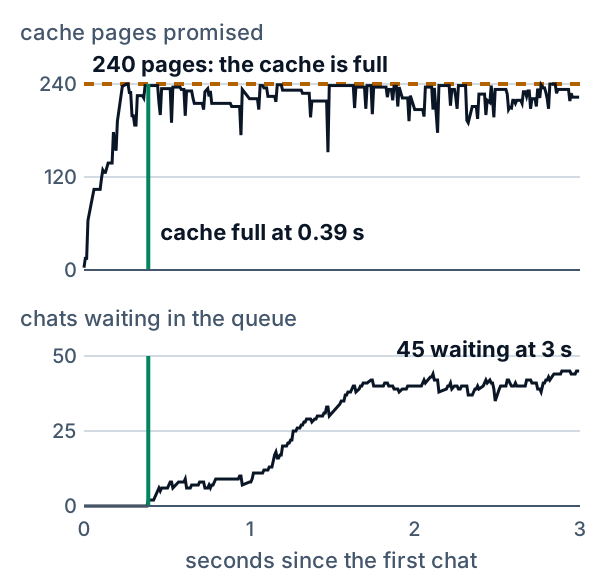
*Figure 2. The cache fills 0.39 s in, and the queue grows from then on.*
- **Step 5.** The last block is the clipboard. At 10 a second no chat waits for a place and the p99 wait for the first word is 0.042 s. At 40 it is 3.49 s, about 80 times as long, while the p99 gap between words grows by about half, from 21.0 to 31.3 ms (Figure 3). A chat waits in the queue before its first word. Once admitted it is stepped every time. A step with no new chat takes about 8 ms, so the slow gaps are the steps that read new prompts.
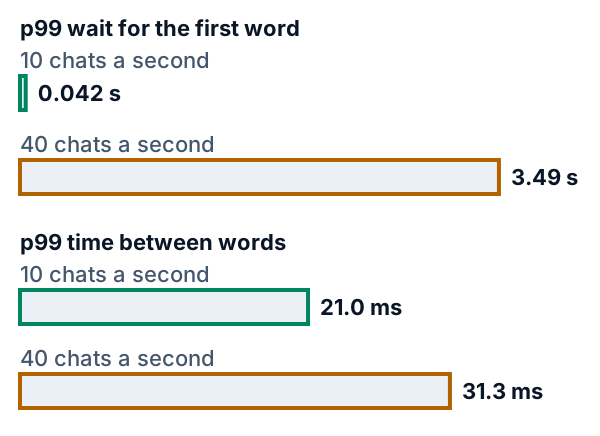
*Figure 3. At 240 pages and 16 chats, the wait for the first word grows about 80 times; the gap between words grows by about half.*
- **Step 6.** The last row gives the same chats 480 pages. They peak at 343 pages in use, no step is held out for pages, and the 16-chat limit is the wall: the p99 wait is 0.93 s. Figure 4 adds the other moves. 960 pages gives the same 0.93 s, and raising the limit to 24 as well cuts the wait to 0.16 s, at a small price: the p99 gap between words rises from 31.3 to 31.6 to 33.8 ms.
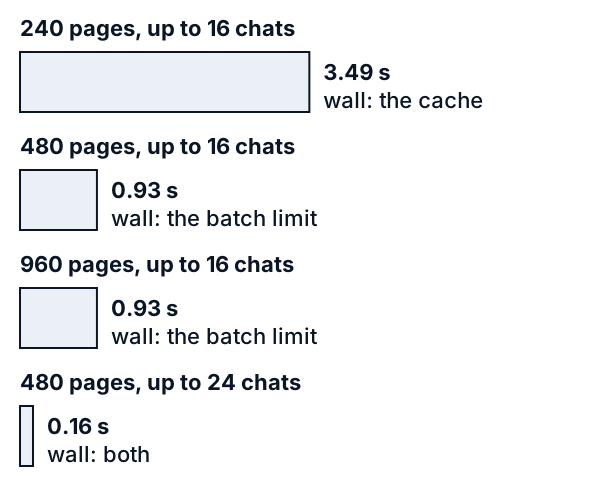
*Figure 4. More cache moves the wall, more again changes nothing, and a bigger batch moves it further.*
## Your turn
The third run doubled the cache. See what doubling it again does.
1. In `code/trace.py`, change line 7 to `MORE_PAGES = 960`.
2. Run `python3 trace.py` again in the `code` folder.
Look at the last row. Is the wait for the first word shorter than with 480 pages? What does the pages column say about why?
What you should see
Only the last block changes, and only in the label:
```text
the clipboard: the same 400 chats, three runs
run rate first word p50 / p99 between words p50 / p99 queue pages wall
light 10 0.014 s 0.042 s 7.9 ms 21.0 ms 0 182 none
heavy 40 2.206 s 3.492 s 8.1 ms 31.3 ms 94 225 cache
heavy, 960 pages 40 0.317 s 0.928 s 8.1 ms 31.6 ms 40 343 batch
```
The p99 wait is 0.928 s again, digit for digit. The server used at most 343 of the 960 pages, so the cache was never the wall and the 16-chat limit is. More pages cannot help now. A higher batch limit can (Figure 4).
## What this means when you build
- **Read the queue and the cache together.** A growing queue with a nearly full cache means memory binds: here 225 of 240 pages held. A growing queue with free pages means the batch binds: 343 of 480 held. More cache helps only in the first case.
- **Keep the first word and the words between apart.** At 40 a second the p99 wait for the first word grew about 80 times and the p99 gap between words by about half. Averaging each chat's gaps would show 10.4 to 11.8 ms and hide the slow steps.
- **Watch the slowest 1 in 100.** Even the median chat waited 2.21 s here. The p99 says how bad it gets.
- **Change one setting, then measure again.** 480 pages moved the wall, 960 changed nothing, and a limit of 24 cut the wait to 0.16 s while the p99 gap between words rose to 33.8 ms.
- **Read a real server's metrics the same way.** The vLLM documentation (read 2026-10-20) lists the same four readings: requests waiting and running, KV cache use, time to first token and inter-token latency.
- **Load-test before launch** with random arrivals at the planned rate, as [lesson 29](https://spicyshark.co/learn/how-many-gpus-for-1000-users/) did. [Lesson 30](https://spicyshark.co/learn/should-i-rent-an-api-or-run-my-own/) asks whether to rent a model API or run your own.
## Go deeper
*Optional. This part is for readers who write Python. The code is in the `code/` folder next to this lesson. From inside that folder, `python3 show_numbers.py` prints the numbers below, `python3 trace.py` prints the run above, and `python3 -B -m pytest -q -p no:cacheprovider` runs the tests.*
`tiny_server.py` is 141 lines, with its comments and blank lines: a cache, a batcher, the metrics and a load test. It loads lesson 27's seeded chats, percentile and send times, and through them lesson 24's step time, by path. The chats are the first 400 of lesson 27's 2,000: prompts of 30 to 599 tokens, replies of 8 to 360, and 222 tokens on average for a whole chat.
### The cache
```python
class Pages:
"""Lesson 22's free list and page tables, as counts only: no keys and values are stored."""
def __init__(self, total: int):
self.total, self.free, self.tables = total, deque(range(total)), {}
def grow(self, chat: int, tokens: int) -> None:
"""A chat holding `tokens` tokens needs enough pages for them: it takes one more whenever its last page is full."""
table = self.tables.setdefault(chat, [])
while len(table) * PAGE_TOKENS < tokens:
table.append(self.free.popleft())
def release(self, chat: int) -> None:
self.free.extend(self.tables.pop(chat))
def used(self) -> int:
return self.total - len(self.free)
```
This is the bookkeeping of lesson 22's `BlockManager`: a free list that gives pages from the left and takes them back on the right, and a page table for each chat. Lesson 22's manager also stores the keys and values, one token at a time with NumPy, which is too slow for 400 chats and their 88,935 tokens. `Pages` keeps only the counts, and a test runs both on the same script of adds, appends and frees to check that their tables and free lists stay equal. A page holds 16 tokens, which is also the paper's default (below), and at 128 KiB of cache a token that is 2 MiB. Lesson 22 and [lesson 28](https://spicyshark.co/learn/what-model-server-settings-change/) call a page a block. The toy's 240 pages are 480 MiB. A real card at lesson 28's 90% share holds 25,720 pages. The toy cache is small on purpose, so that the wall shows within 400 chats.
### The batcher
```python
while sent < n and arrive[sent] <= now:
queue.append(sent) # 1. a request arrives and waits in the queue
sent += 1
joining, blocked = [], ""
while queue: # 2. admit it when a place and all its pages are free
need = pages_for(prompts[queue[0]] + replies[queue[0]])
no_place, no_pages = len(running) + len(joining) == limit, promised + need > pages
blocked = " and ".join(wall for wall, hit in (("cache", no_pages), ("batch", no_place)) if hit)
if blocked:
break
promised += need
joining.append(queue.popleft())
```
These lines open every trip round the loop in `serve`. Only the chat at the front of the queue is looked at, so the queue is first come, first served, as in the paper's scheduler (below). The test for a free place is `limit`, the most chats in one step. The test for pages counts what is promised, not what is in use. The toy knows how long each reply will be, so it promises a chat every page it will ever need: chat 0 is promised 3 pages when it is admitted, chat 2 is promised 30. `blocked` records which test failed, or both, and the metrics count it.
```python
seconds = step_seconds([prompts[i] + made[i] for i in running], sum(prompts[i] for i in joining)) # 3. one step, all together
start, now = now, now + seconds
running += joining
for i in running:
made[i] += 1
cache.grow(i, prompts[i] + made[i]) # 4. a page more when the last one is full
for i in joining:
first[i] = now
stepped, ended = len(running), [i for i in running if made[i] == replies[i]]
for i in ended:
done[i] = now
cache.release(i) # 4. all its pages back when the chat ends
promised -= pages_for(prompts[i] + replies[i])
running.remove(i)
finished += len(ended)
steps.append(Step(start, seconds, stepped, len(joining), len(queue), cache.used(), promised - cache.used(), blocked))
```
A step has the shape of lesson 24's continuous batching. Chats already running read their notes, which is the context argument of `step_seconds`; chats joining have their prompts read in the same step, the second argument. The step lasts as long as lesson 24's roofline says (the larger of the compute time and the memory time) and every chat in it gets one word. A chat that just joined gets its first word at the end of that step, so TTFT includes the prompt. Each running chat then grows its page table to hold the new token, and a chat that has all its words releases its pages and its promise. The last line records one row for the trace and the metrics.
### The metrics
```python
def report(workload: dict, rate: float, run: Run) -> dict:
"""5. What the manager's clipboard shows: time to first token and time between tokens (every gap of every chat, pooled; p50, p99), the longest queue, the most pages used."""
arrive = intended_times(workload["gaps"], rate)
ttft = [f - a for f, a in zip(run.first, arrive)]
tbt = [s.seconds for s in run.steps for _ in range(s.stepped - s.joined)] # a running chat gets a word every step: its gap is the step's length
cache_full = [s.start for s in run.steps if "cache" in s.blocked]
```
TTFT counts from the time a chat was sent, so waiting in the queue is included, as in lesson 27. TBT pools every gap between two words of every chat, 16,655 of them. A chat that is running gets a word in every step, so its gap is that step's length, and a chat that just joined has no gap yet (`stepped - joined`). The percentile is lesson 27's nearest rank, so the p99 of 400 first words is the 396th shortest and 4 chats are slower. The rest of `report` takes the longest queue, the most pages in use, the first step blocked by the cache and the chats served a second. `bottleneck` reads two counts, the steps that the cache held a chat out and the steps that the batch limit did, and the longest queue:
```python
c, b = metrics["cache_steps"], metrics["batch_steps"]
return "none" if metrics["queue_max"] < MIN_QUEUE else "both" if 2 * min(c, b) >= max(c, b) else "cache" if c > b else "batch"
```
Both numbers are choices. A wall is named only if at least 4 chats (`MIN_QUEUE`, 1 in 100 of the 400) ever waited at once, and then alone only when it held chats out in more than twice as many steps as the other. Without the floor, 10 chats a second at 240 pages and 8 chats per step, where one chat ever waited, would blame the batch limit. With it, the widget says that no wall binds. At 120 pages the same rate still names the cache: 13 chats queue and the p99 wait is 1.18 s. The settings of Figure 4, at 40 chats a second:
| Pages | Limit | Wall | p99 first word (s) | p99 gap (ms) |
|---|---|---|---|---|
| 240 | 16 | cache | 3.49 | 31.3 |
| 480 | 16 | batch | 0.93 | 31.6 |
| 960 | 16 | batch | 0.93 | 31.6 |
| 480 | 24 | both | 0.16 | 33.8 |
At 240 pages the cache held a chat out in 1,291 steps and the batch limit in 121. At 480 the cache held none out, the limit 920 steps. At 480 pages and a limit of 24, the counts are 44 and 37: both. The last wall is borderline. When the widget shuffles the chats, this setting reads "both" in 4 of 6 orders and "the cache" in the others, while the first three never change.
### What was adapted
- **Counts for keys and values.** As above: the page tables and free list are lesson 22's, the stored numbers are not.
- **A promise for the whole chat.** A real server does not reserve a chat's whole length in advance. The paper (below) says it reserves only the blocks for the prompt and adds one as tokens come. When the pool runs dry, it must pause a chat and rebuild its notes later. The toy never runs dry, because it promised, and so it holds chats back that a real server would let in. The wall at 240 pages would come later and more softly.
- **A small cache.** 240 pages rather than 25,720, as above.
- **Two kinds of TBT, side by side.** The toy reports every gap, pooled: at 10 and 40 chats a second the p99 is 21.0 and 31.3 ms. The other kind is one average per chat: the time from its first word to its last, divided by the reply length minus one. Its p99 is 10.4 and 11.8 ms, because a chat's few slow steps are averaged with its fast ones. That is the averaging trap of lesson 27, and it hides the stalls. The vLLM documentation (below) records both: a histogram with one sample per streamed output, and a per-request time per output token, defined as the end-to-end latency minus TTFT, divided by the output tokens minus one.
- **No network.** The "load generator" is a list of send times, and the server and the load run in one process on a simulated clock. Nothing in the code opens a connection, and nothing in it could be pointed at a real service.
### What the toy leaves out
- **Prompt chunking.** A long prompt is read in one step, as in lesson 24's plain continuous batching. Real servers read long prompts in pieces across several steps (chunked prefill, described on the vLLM Optimization page below), so that a long prompt stalls the running chats less.
- **Pausing and rebuilding.** When a real pool runs dry the server must give up some chat's pages and later swap them back or compute them again. The toy cannot reach that case.
- **Shared prefixes.** Chats that start with the same text could share pages ([lesson 8](https://spicyshark.co/learn/what-is-prompt-caching/) and lesson 22). Here every chat has its own.
- **Streaming.** A real user sees each word when it is sent, so network delay adds to the gap between words and to the first word. The toy stops the clock at the server.
- **Many GPUs.** A big model spreads over several chips ([lesson 26](https://spicyshark.co/learn/why-a-big-model-needs-several-gpus/)), and a service runs several copies ([lesson 29](https://spicyshark.co/learn/how-many-gpus-for-1000-users/)).
- **Real traffic.** The chats are invented, the chip is one A100 at its peak speed, and the arrivals are steady random.
### Proof it works
`test_tiny_server.py` guards what a reader would see go wrong. `Pages` agrees with lesson 22's manager on the same script. Across several settings, including a cache that only just fits the longest chat, no step promises more pages than exist, none steps more chats than the limit, every reply gets exactly its tokens, and the last step holds no pages. With a cache too big to matter, the toy's times equal lesson 24's `simulate` for every chat, so no chat is skipped or served twice. A tiny hand-worked case pins TTFT, the single gaps, p99 and the wall labels, and a sweep of the widget's 384 runs checks that a step with no new chat takes 7.8 to 8.5 ms and that a step reading prompts takes longer on average. The light and heavy runs, the move of the wall at 480 pages, the same result at 960 and the mixed wall at a limit of 24 all reproduce. One test checks that every number quoted in the prose, the trace and the four figures comes from the code, that each code block is a slice of the real file, that each `file:line` in the table points at its line, and that the trace is the block printed above. `test_widget.py` runs the widget's JavaScript in Node against the Python on a grid of settings and drives the page with a stand-in for the browser.
### Where this is used in practice
Kwon et al., the PagedAttention paper (SOSP 2023, doi 10.1145/3600006.3613165; read 2026-10-20), is the source of lesson 22's pool. It says a block size of 16 is large enough to use the GPU well and small enough to avoid much waste in most workloads, and that 16 is vLLM's default. It reserves only the blocks the prompt needs and adds more as tokens are generated (section 4.3). It serves requests first come, first served; when the physical blocks run out it evicts all or none of a sequence's blocks, and recovers them by swapping or by computing them again (section 4.5). Of a system pushed past its capacity it says that "the queue length continues to grow infinitely and so does the latency of the requests" (section 6.2). The toy shows the start of that: at 40 a second the run finishes 27.3 chats a second on average, fewer than the 40 sent, so a stream that never ended would keep the queue growing, and the run ends only because the 400 chats do. The paper's abstract reports 2 to 4 times the throughput at the same latency as the systems it compares with, which depends on its own workloads and not on this toy.
The vLLM documentation (latest version, read 2026-10-20) describes a Prometheus-compatible `/metrics` endpoint with these names: `vllm:num_requests_waiting` (requests waiting to be processed), `vllm:num_requests_running` (requests in model execution batches), `vllm:kv_cache_usage_perc` (KV-cache usage, where 1 means 100 percent), `vllm:time_to_first_token_seconds`, `vllm:inter_token_latency_seconds` (time between consecutive streamed outputs) and `vllm:request_time_per_output_token_seconds`. They line up with the toy's `queue_max`, chats stepped, pages in use and TTFT. The toy's TBT, every gap pooled, lines up with `vllm:inter_token_latency_seconds`, which records one sample per streamed output; the per-chat average above lines up with `vllm:request_time_per_output_token_seconds`. Names and defaults change between versions, so check the version you run.
## Skills this lesson builds
- Name the three parts of a model server and say what each one does for the user.
- Follow a request through admission, steps and release, and say what it waits for.
- Tell a full cache from a full batch by reading the queue length and the cache use together.
- Report time to first token and time between tokens at p50 and p99, and say why they move differently.
- Change one setting, measure again and say what moved and what it cost.
**Portfolio project:** feed a recorded request log (arrival time, prompt tokens, reply tokens) through `serve` and chart the queue and the pages in use over time. Report which wall binds at three arrival rates and what one setting change does to the p99 TTFT and TBT. Publish the code, the charts, and a note on how the metrics of a server you run yourself compare.
## Check yourself
1. A chat has a prompt of 100 tokens and a reply of 50. How many 16-token pages does the server promise it?
Answer
150 tokens / 16 = 9.4, which rounds up to 10 pages.Answer
The cache: memory binds. More pages would help (480 moved the p99 wait from 3.49 s to 0.93 s). With the cache at 343 of 480 the batch limit would bind, and only a higher limit would help.Answer
A chat waits in the queue before its first word. Once admitted it is stepped every step, and a step with no new chat takes about 8 ms. Only steps that read new prompts are slow, and every running chat waits through them.Answer
The 16-chat limit is the wall. Peak use is 343 pages of 960. Raising the limit to 24 cuts the p99 wait to 0.16 s, and raises the p99 gap between words from 31.6 to 33.8 ms.Answer
No. The server admits a chat only when every page it will need can be promised. The chat waits for the cache, though places are free, until chats end and give pages back.