---
title: "How does an AI server answer many people at once?"
description: "A server writes one word for many people in a single step, and a new request takes any free place at once. Here is how much that gains, and where it stops."
topic: "AI systems"
chapter: "serving-many-chats"
order: 24
minutes: { plain: 5, deep: 16 }
prerequisites: ["Prefill and decode", "Division and ratios", "Reading short Python functions"]
seo_title: "How does an AI server serve many users at once?"
date: 2026-10-19
---
# How does an AI server answer many people at once?
A chat server does not answer people one at a time. Take an AI model with 8 billion numbers inside, called weights, on one A100 chip built for AI work, with 1,000 tokens in each chat so far. A token is a small piece of text, often a whole word. In its best case, one token for one user takes 7.94 milliseconds (ms, thousandths of a second). One token for each of 64 users, written in the same step, takes 11.99 ms: 1.5 times as long for 64 times the output. Real services are slower than these best cases. This lesson shows how a server gets so much from one step, and where that stops.
## In one minute
A step is one run through the whole model, and it writes one new token for each user in it. Each step fetches all the weights from memory, and that fetch costs the same for one user or for many, so a server puts many users into one step. That group is a batch, and each place in it is a slot. A simple server, using fixed batching, runs a group until its longest reply ends and only then takes new people, so slots of finished replies sit empty while others wait. Continuous batching gives a free slot to a waiting request at the very next step. Picture a tour bus that leaves with whoever is waiting and returns only when everyone is back, against a chairlift where you take the next free chair.
## Explore the numbers
[Open the widget](https://spicyshark.co/learn/how-an-ai-server-answers-many-people-at-once/widget.html). It runs the same 48 invented requests through two servers with 8 slots each, one with fixed batching and one with continuous batching. Drag the traffic from 0.5 to 16 new requests a second and slide the clock. It shows a model at the chip's peak speed, not measurements. At the opening setting, 8 requests a second, the fixed server has 2 of 8 slots in use and 22 people waiting; the continuous one has 7 in use and none waiting.
## How it works
### One step, many users
The A100 reads 2,039 GB (gigabytes, billions of bytes) a second from memory, so fetching the 16.06 GB of weights takes 7.88 ms. A step cannot end sooner, whoever is in it. [Lesson 23](https://spicyshark.co/learn/why-ai-waits-before-the-first-word/#why-one-user-leaves-the-chip-idle) shows why one user leaves the chip idle. Each added user costs a little: the step must also read that user's attention cache, the notes kept about their earlier tokens, which takes 0.064 ms at 1,000 tokens.
So one user's step takes 7.94 ms, or 126 tokens a second. With 64 users it takes 11.99 ms: 5,337 tokens a second in all, but 83 for each user. With 256 users it takes 24.33 ms: 10,521 in all and 41 each. The server's total rises while each person's pace falls. The chip's arithmetic is busy under 1% of the time with one user and 27.5% with 64.
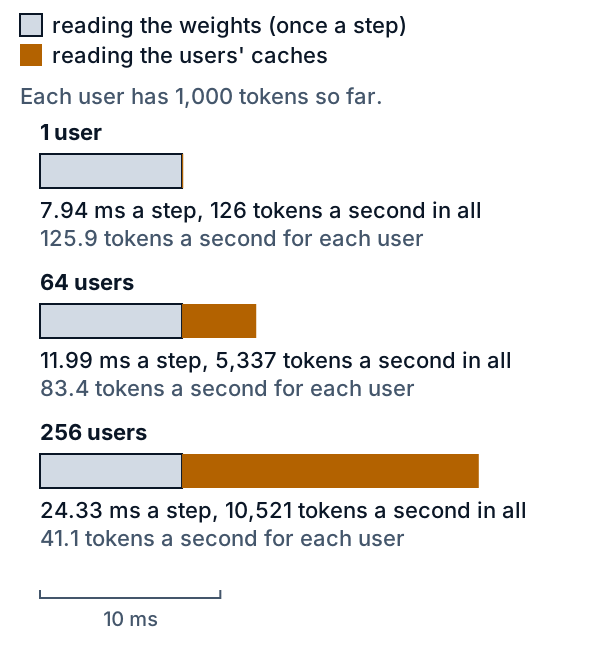
*Figure 1. One step at 1,000 tokens per user. Grey is the weights fetch, the same for everyone; orange is the users' cache reading.*
### Fixed groups waste places
Take four slots and six requests, A to F, that all arrive at once. Their replies run 2, 6, 3, 1, 4 and 2 tokens. With fixed batching, A to D start together. D is done after 1 step, A after 2 and C after 3, but B needs 6, so slots sit empty while E and F wait. They start at step 7, and the job takes 10 steps. With continuous batching, E takes D's slot at step 2 and F takes A's at step 3, and all is done in 6 steps. In this toy every step costs the same. Of the 24 slot-steps (4 slots times 6 steps), continuous batching fills 18; fixed batching fills the same 18 of 40.
A request that joins also has its prompt (the text the person sent) read in the step it joins, which makes that step longer. Go deeper counts that.
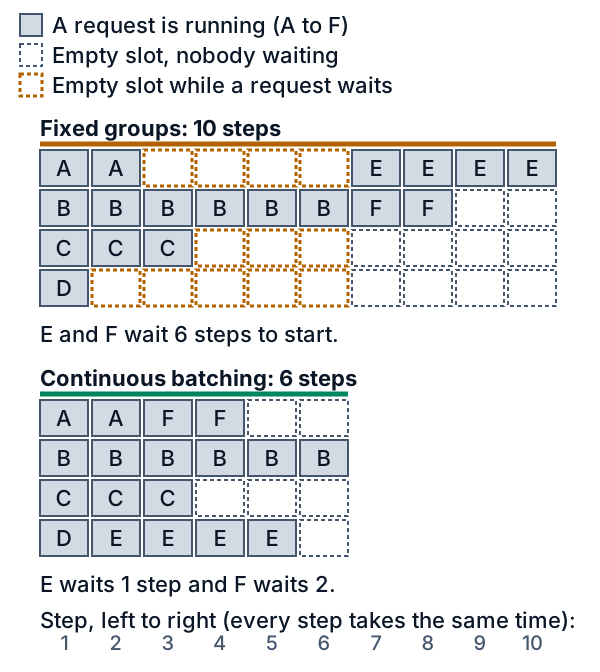
*Figure 2. The same six requests, two ways. Filled cells are replies under way; dashed cells are empty slots, orange when a request waits.*
### What the widget shows
The widget's requests have prompts of 32 to 577 tokens and replies of 10 to 268. At 8 requests a second the fixed server finishes in 14.1 s and writes 349 tokens a second in all; the continuous server finishes in 8.45 s and writes 582. The average wait for the first word, called time to first token, is 3.43 s against 0.03 s, and an average of 38% of slots are in use against 61%.
With light traffic, 0.5 requests a second, both finish at 103.9 s, because each waits for the last request to arrive. Fixed batching still averages 0.19 s to the first word against 0.01 s. With every reply 60 tokens long, fixed batching wastes no slot inside a group, so the gap shrinks: 7.2 s against 6.9 s at 8 requests a second.
### Where it stops
The chip has 80 GB of memory (the data sheet says 80GB; read here as 80 billion bytes, whereas [lesson 18](https://spicyshark.co/learn/model-memory/) reads it as 80 GiB), and the weights take 16.06 GB, which leaves 63.94 GB for caches. The model here is Llama 3.1 8B, an open model with 8 billion weights, and it needs 128 KiB (about 131,000 bytes) of cache for each token, so a 1,000-token chat takes about 131 MB (million bytes), and 487 such users fill the memory. At 2,000 tokens each, 243 fit; at 8,192 each, 59. This is a best case, in which all the rest holds caches. [Lesson 22](https://spicyshark.co/learn/paged-kv-cache/#how-big-it-gets) shows how a server uses that memory.
Short chats meet another limit. At 100 tokens each, arithmetic becomes the slower job from 175 users, and the step then grows with every user added.
## What this means when you build
- **Watch each user's pace, not only the server's total.** Going from 1 to 64 users raised the total from 126 to 5,337 tokens a second, while each user's pace fell from 126 to 83.
- **Cache memory caps the crowd.** Long chats take many places, so cap prompt and reply lengths if you want more users per chip.
- **Choose continuous batching when reply lengths vary.** Fixed batching took 14.1 s for the same 48 requests; continuous batching took 8.45 s. With equal replies the gain was small.
- **A busy server shows up as a longer wait for the first word.** At 8 requests a second, fixed batching added 3.43 s on average, continuous 0.03 s.
- **Test under load.** One user alone shows the best pace and says nothing about a crowd.
## Go deeper
*Optional. This part is for readers who write Python. The code is in the `code/` folder next to this lesson. From inside that folder, `python3 show_numbers.py` prints every number below, and `python3 -B -m pytest -q -p no:cacheprovider` runs the tests.*
### The step time
Let P be the number of weights, c the bytes of cache for one token, and n the number of users writing. A step handles one token for each of them, plus every token of the prompts that join in that step:
```text
tokens = n + joining prompt tokens
flops = 2 P tokens
bytes = 2 P + c (sum of the users' contexts)
step = max(flops / peak, bytes / bandwidth)
```
A user's context is its prompt plus the tokens written so far. For Llama 3.1 8B, P is 8,030,261,248 and 2 P is 16,060,522,496 operations per token. The weights are 2 bytes each, 16.06 GB. The cache needs c = 2 x 32 x 8 x 128 x 2 = 131,072 bytes per token: a key and a value for each of 32 layers and 8 key-value heads, 128 numbers long, at 2 bytes each. Peak is 312e12 operations a second, bandwidth 2,039e9 bytes a second and memory 80e9 bytes, the A100 figures of [lesson 19](https://spicyshark.co/learn/tiled-matmul-roofline/#decode-versus-prefill) and [lesson 23](https://spicyshark.co/learn/why-ai-waits-before-the-first-word/). A step is limited by memory when the bytes take longer than the operations, and by arithmetic otherwise, a tie counting as arithmetic.
Left out are the arithmetic of attention, the cache that a joining prompt writes, and attention among prompt tokens. All are small next to the weights: at 1,000 tokens the attention arithmetic is 4 x 32 x 4,096 x 1,000 operations, about 3% of the 16.06 billion for the weights.
### A worked example at two batch sizes
Each user has 1,000 tokens. In the table, Math and Memory are the two times, and the step is the larger one.
| Time in ms | 1 user | 64 users |
|---|---|---|
| Math | 0.0515 | 3.2945 |
| Memory | 7.9409 | 11.9907 |
| Step | 7.94 | 11.99 |
One user gets 125.9 tokens a second. The 64 users get 5,337.4 in all, 83.4 each. For 64 users the memory side reads 16.06 GB of weights plus 64 x 1,000 x 131,072 bytes = 8.39 GB of cache, 24.45 GB in all, which takes 11.99 ms. The math side needs 64 x 16.06 billion operations over 312 trillion a second: 3.29 ms. Memory is the slower job, and the chip is 3.2945 / 11.9907 = 27.5% busy. The step is 1.51 times as long as one user's, so the server writes 64 x 7.9409 / 11.9907 = 42.4 times as many tokens a second.
Whether arithmetic can win depends on the context. Each user adds 51.5 microseconds of arithmetic. Each user adds cache reading of 64.3 microseconds at 1,000 tokens, which is more, so memory stays the slower job up to the 487 users that fit. At 100 tokens the cache reading is 6.4 microseconds, less than the arithmetic. The first count where arithmetic wins is 175 users, with a step of 9.01 ms. From there the server cannot write more than peak over 2 P, 19,427 tokens a second, however many users are added.
### The scheduler
The whole simulator is a loop over steps. Here it is with its comments left out:
```python
def simulate(requests, slots, policy, cost=step_seconds):
assert policy in ("fixed", "continuous")
n = len(requests)
held, made = [-1] * slots, [0] * n
first, last, steps, join_step = [0.0] * n, [0.0] * n, [], [0] * n
now, nxt, done = 0.0, 0, 0
while done < n:
joined = []
if policy == "continuous" or all(h < 0 for h in held):
if all(h < 0 for h in held) and requests[nxt].arrival > now:
now = requests[nxt].arrival
for s in range(slots):
if held[s] < 0 and nxt < n and requests[nxt].arrival <= now:
held[s] = nxt
joined.append(nxt)
join_step[nxt] = len(steps)
nxt += 1
writing = [h for h in held if h >= 0 and h not in joined]
dt = cost([requests[i].prompt + made[i] for i in writing], sum(requests[i].prompt for i in joined))
start, now = now, now + dt
snapshot, finished = list(held), []
for s, h in enumerate(held):
if h < 0:
continue
made[h] += 1
if h in joined:
first[h] = now
if made[h] == requests[h].reply:
last[h] = now
held[s] = -1
finished.append(h)
steps.append(Step(start, now, snapshot, joined, finished))
done += len(finished)
return Run(steps, first, last, join_step)
```
One line separates the two policies: `policy == "continuous" or all(h < 0 for h in held)`. Continuous batching may refill a slot at the start of every step. Fixed batching refills only when every slot is empty. A request that joins counts its prompt in `cost` and gets its first token at the end of that step; each later step writes one more. An idle server jumps ahead to the next arrival. `cost` is `batch_step(...)`'s time, the formula above in four lines, and the toy example below passes a cost of 1 for every step.
### The toy by hand
With a cost of 1, four slots and replies 2, 6, 3, 1, 4, 2, continuous batching gives this grid. A request takes a slot at the start of a step, in order of arrival, and holds it for as many steps as its reply has tokens. A dot is an empty slot:
```text
step 1 2 3 4 5 6
slot 1 A A F F . .
slot 2 B B B B B B
slot 3 C C C . . .
slot 4 D E E E E .
```
D leaves after step 1, so E takes its slot at step 2; A leaves after step 2, so F takes its slot at step 3. The grid has 18 letters, the 18 tokens of the six replies, in 6 x 4 = 24 cells. Fixed batching writes the same 18 tokens in 10 x 4 = 40 cells.
### How much memory limits the crowd
The users that fit are (80e9 - 16.06e9) / (131,072 x context), rounded down. In the table, Tokens is how many each user has, Cache is the cache of one user, and Users is how many fit.
| Tokens | Cache | Users |
|---|---|---|
| 100 | 13 MB | 4,878 |
| 1,000 | 131 MB | 487 |
| 2,000 | 262 MB | 243 |
| 4,000 | 524 MB | 121 |
| 8,192 | 1.074 GB | 59 |
Cache per user grows with context, so the crowd shrinks in proportion. When the memory is full the step reads almost all of it: 487 users at 1,000 tokens read 79.89 GB and take 39.18 ms, and 243 users at 2,000 tokens read 79.76 GB and take 39.12 ms. That is why the lines in Figure 3 end where they do.
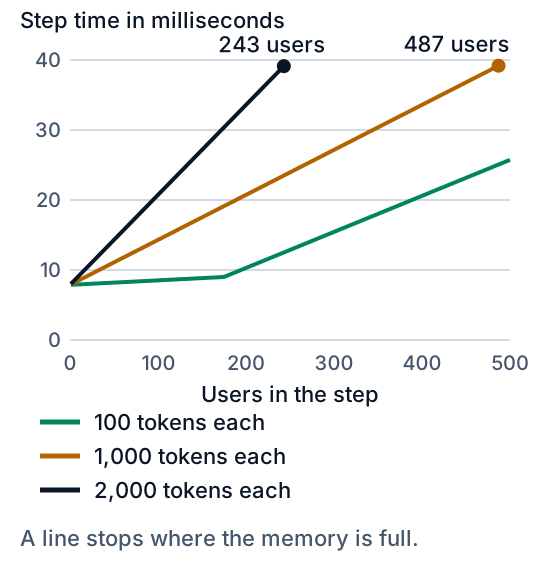
*Figure 3. Step time against users. A line stops where the memory is full.*
This is the best case. The weights and caches are not all the memory a real server uses, and a server that reserves room for each chat's longest possible length fits fewer chats: [lesson 22](https://spicyshark.co/learn/paged-kv-cache/#how-big-it-gets) works that out.
### Light traffic and heavy traffic
The 48 requests are one seeded draw (seed 2026): prompts from 32 to 577 tokens, mean 191.4, and replies from 10 to 268, mean 102.4, 4,914 tokens in all. The traffic setting only scales the gaps between arrivals. These are the results for 8 slots. Rate is new requests a second. The first table gives the seconds until all 48 replies are done, the second the average wait in seconds for the first word.
| Rate | Fixed | Continuous |
|---|---|---|
| 0.5 | 103.9 | 103.9 |
| 1 | 53.6 | 52.9 |
| 2 | 28.9 | 27.4 |
| 4 | 16.5 | 14.7 |
| 8 | 14.1 | 8.45 |
| 16 | 14.1 | 6.32 |
| Rate | Fixed | Continuous |
|---|---|---|
| 0.5 | 0.19 | 0.01 |
| 1 | 0.41 | 0.01 |
| 2 | 0.78 | 0.01 |
| 4 | 1.13 | 0.02 |
| 8 | 3.43 | 0.03 |
| 16 | 5.02 | 0.53 |
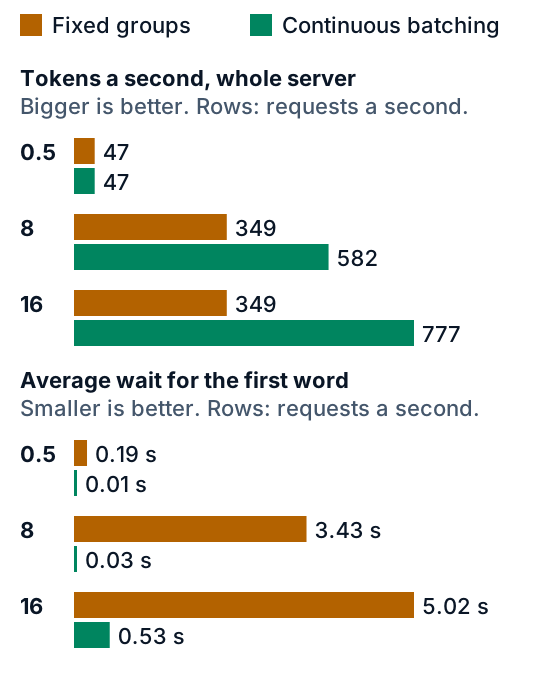
*Figure 4. Light and heavy traffic, 8 slots. Orange is fixed batching and green is continuous batching.*
At 0.5 requests a second the last request arrives at 102.0 s and its reply is 241 tokens long, so both servers finish when it does and sit idle between arrivals; only the wait differs. The fixed server's 14.1 s is the same at 8 and 16 requests a second because it never idles: groups run back to back and it cannot go faster. The continuous server keeps improving, as 16 requests a second fill more of the slots, until all 8 are busy. With very mixed replies (5 to 513 tokens) the gap grows: at 8 requests a second fixed batching finishes in 25.7 s and continuous in 10.4 s. Over all 72 settings tried (3 reply mixes, 4 slot counts, 6 traffic levels), continuous batching was never slower and never made the average or slowest wait longer. That is a result for this workload and this model, not a law.
### What the model leaves out
Network time, the software around the model, and chips running below their data-sheet peak are all missing, as in [lesson 23](https://spicyshark.co/learn/why-ai-waits-before-the-first-word/). So is the memory limit inside the simulator: it never runs out, whereas a real server must decide what to do when the caches fill, for example pausing a request. Real services may also share one model across several chips, which this toy does not.
The model also lets a joining prompt delay everyone else's next word. A 577-token prompt that joins 7 users with 300 tokens each makes that step 30.06 ms and limited by arithmetic, against 8.01 ms without it. The toy adds a joining prompt's whole length to that one step. Sarathi-Serve (Agrawal et al., 2024) splits a long prompt into chunks of near-equal size so that new requests join without pausing the decodes under way; only its abstract was read for this lesson, on 2026-10-19.
### Proof it works
`test_batching_sim.py` pins the numbers above. The constants must equal [lesson 23](https://spicyshark.co/learn/why-ai-waits-before-the-first-word/)'s. A lone user with an empty cache must cost lesson 23's 7.877 ms decode step, and a prompt that joins an empty server must cost its prefill. The step times, memory caps and the 175-user turning point are checked, as is the claim that each user adds more cache reading than arithmetic at 1,000 tokens but not at 100. The toy runs slot by slot under both policies and must match the table. In every one of the 72 settings and for both policies, nobody may sit in two slots at once, each reply must take exactly as many steps as it has tokens, a fixed lane takes newcomers only when empty, and a continuous lane has an empty slot only when nobody waits. `test_widget.py` runs the widget's JavaScript in Node against the Python for all 72 settings and both policies, comparing steps, finish times, summaries and snapshots, and drives the page through a small stand-in for the browser.
### Where this is used in practice
The idea of scheduling one step at a time comes from Orca (Yu et al., OSDI 2022). Its abstract says that earlier systems scheduled whole batches, so finished requests could not be returned early and new arrivals waited for the batch to end; it proposes iteration-level scheduling, one model iteration at a time, and reports that on a GPT-3 175B model it outperforms NVIDIA's FasterTransformer on latency and throughput. The paper does not use the phrase continuous batching, which the Hugging Face blog post below defines as ragged batching combined with dynamic scheduling. The vLLM paper (Kwon et al., SOSP 2023) pairs this kind of batching with paged cache memory and reports 2 to 4 times the throughput of FasterTransformer and Orca at the same latency; those figures are theirs, from their setups, not from this lesson's toy. All of these were read as abstracts or articles on 2026-10-19.
## Skills this lesson builds
- Explain why a step with many users costs little more than a step with one.
- Work out a step time from a model's weights, a chip's data sheet and the users' context lengths.
- Compare fixed batching with continuous batching on a small schedule, slot by slot.
- Find how many chats fit in a chip's memory, and say what limits the number.
- Report a server's speed as the total and the pace for each user, with the wait for the first word.
**Portfolio project:** write a small simulator with your own invented arrival times and reply lengths, and run it with fixed batching and with continuous batching. Compare finish time, average wait for the first word and the share of slots in use, at light and at heavy traffic. Publish the code, one chart and a note on where your results disagree with this lesson's.
## Check yourself
1. Why does a step with 64 users take only about 1.5 times as long as a step with one?
Answer
Every step fetches all the weights from memory, 7.88 ms, however many users are in it. Each added user adds only the reading of their cache, 0.064 ms at 1,000 tokens. That makes 7.94 ms for one user and 11.99 ms for 64.Answer
Request B needs 6 steps, and a fixed group runs until its longest reply ends. So the slots of D, A and C sit empty while E and F wait, and E and F start at step 7. Continuous batching gives D's slot to E at step 2 and A's slot to F at step 3.Answer
The memory side reads 16.06 GB plus 8 x 131 MB = 17.11 GB, which takes 8.39 ms. The math side needs 0.41 ms, so memory sets the time. The server writes 8 / 0.00839 = 953 tokens a second, or 119 for each user.Answer
The cache for one user is 4,000 x 131,072 = 524.3 MB. The memory left after the weights is 80 - 16.06 = 63.94 GB, and 63.94 GB over 524.3 MB is 121.9, so 121 users fit, as a best case.Answer
It makes a difference to the wait, not to the finish time. The last request arrives at 102.0 s, so both servers finish when it does and idle between arrivals. But fixed batching still averages 0.19 s to the first word against 0.01 s.