---
title: "How many GPUs do I need for 1,000 users?"
description: "Size an AI service for its busiest hour, not its user count: chats at once, each GPU's memory and speed limits, a spare, then a load test."
topic: "AI systems"
chapter: "plan-and-measure"
order: 29
minutes: { plain: 5, deep: 17 }
prerequisites: ["Percentages and simple fractions", "Bytes and gigabytes", "Reading short Python functions"]
seo_title: "How many GPUs does an AI service need for 1,000 users?"
date: 2026-10-20
---
# How many GPUs do I need for 1,000 users?
A service with 1,000 users does not need a GPU for each one. It needs enough for the busiest hour. Take a toy service with 1,000 users, 600 of them active in that hour and each receiving 120 replies: 72,000 replies, or 20 new replies a second. The chip is [lesson 28](https://spicyshark.co/learn/what-model-server-settings-change/)'s A100 chip with 80 GB. One such GPU carries about 38 chats at once before the slowest 1 reply in 100 has words more than 50 ms (thousandths of a second) apart ([lesson 27](https://spicyshark.co/learn/why-average-speed-is-misleading/)). The toy plan is 4 GPUs plus a spare.
## In one minute
A town of 1,000 people does not need a restaurant with 1,000 seats. It needs seats for the busiest hour: the parties arriving each minute times the minutes each one stays. That rule is Little's law. For an AI service a party is a chat in progress, and a stay is the time from a question to its last word, so chats at once equal new replies a second times the seconds a chat stays.
Each GPU, like a restaurant, has two limits, and either can run out first. Seats are memory, the pool of notes about chats in progress ([lesson 28](https://spicyshark.co/learn/what-model-server-settings-change/)). Cooks are speed: every added chat makes each user wait longer between words ([lesson 24](https://spicyshark.co/learn/how-an-ai-server-answers-many-people-at-once/)). Divide the demand by what one restaurant carries, keep some room in hand and add a spare for a breakdown. Then test at the planned peak: a paper plan is a guess.
## Explore the numbers
[Open the widget](https://spicyshark.co/learn/how-many-gpus-for-1000-users/widget.html). Set the users, the share active in the busiest hour, the replies each receives and the gap between words you accept. It shows the chats at once, the GPUs speed needs against those memory needs, and a plan with a spare. At the opening setting speed needs 4 and memory 1, so speed sets the limit. Under More settings, pick Long answers: the replies each drop to 30, and memory, now needing 6 GPUs to speed's 4, sets the limit.
## How it works
### Size for the busiest hour
Only some users are present at once. Here 600 of 1,000 are active and each receives one reply every 30 seconds: 20 new replies a second. While a reply is being written its chat is in progress. Little's law: the average number in progress is the arrival rate times the average time each stays, from question to last word. That time depends on how full a GPU runs, so the next sections find it: about 110 chats, not 600 or 1,000. The toy frees a chat's notes at its last word, so a user's next question reads the whole conversation again ([lesson 8](https://spicyshark.co/learn/what-is-prompt-caching/) covers keeping them).
### Two limits on one GPU
Memory: at a 90% share, lesson 28's pool holds 200 chats of the usual length, about 2,000 tokens. Speed: each added chat makes every step read more notes, so words arrive further apart. The toy serves the same chats at ever higher numbers at once and records the p99 time between words. It reaches the 50 ms target at 38.6 chats (38 in the figure), the speed limit, long before memory runs out at 200.
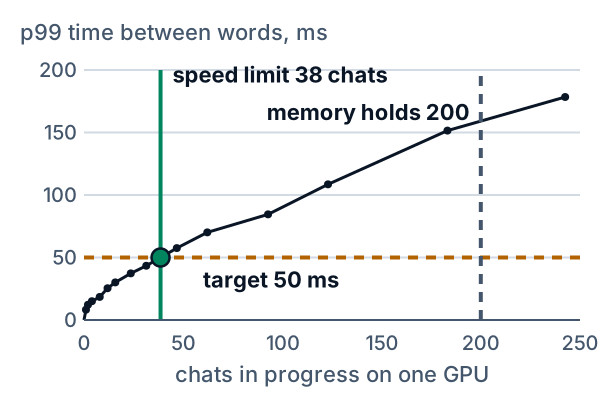
*Figure 1. The p99 time between words against chats in progress on one GPU.*
### Count the GPUs
At its speed limit, 38.6 chats, one GPU finishes 7.0 replies a second, so each chat stays 38.6 / 7.0 = 5.5 s. With 20 new replies a second, about 20 x 5.5 = 110 chats are in progress. The load test on 3 GPUs, each near its limit, counts 109 (Figure 2).
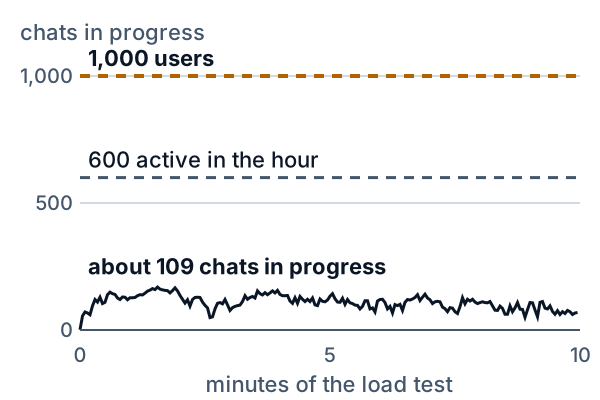
*Figure 2. A 10-minute load test on 3 GPUs. The chats in progress stay near 109; the plan said 110.*
Speed alone gives 110 / 38.6 = 2.85, so 3 GPUs. That leaves no headroom: room kept unused so random bursts do not push users past the target. The plan fills each GPU to 80% of its limit. Speed then needs 110 / (0.8 x 38.6) = 3.56, so 4 GPUs. Memory needs 110 / (0.8 x 200) = 0.69, so 1. The larger, 4, is the plan, and speed binds. One spare makes 5.
### Which limit binds depends on the chats
Long prompts make every reply read a lot, so speed runs out first: with documents of about 27,000 tokens one GPU holds 14 chats but meets the target with only 2, and the crowd needs 55 GPUs. Long replies keep chats open, so memory fills first at this target: with replies of 1,500 to 4,000 tokens memory holds 85 chats and speed 140. A chat on a GPU at its limit then stays 81 s, so there a user gets about 44 replies an hour, not 120. At 30 each, 405 chats are in progress and need 6 GPUs.
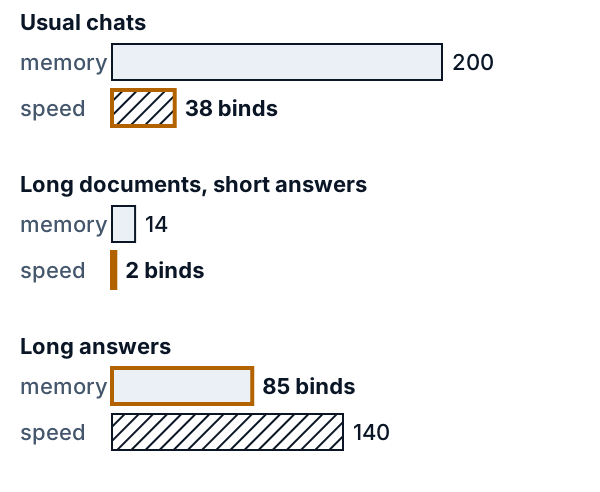
*Figure 3. Memory and speed limits for three kinds of chat, on one scale. The shorter bar binds.*
### Test before you sign
Real arrivals are random and bunch up. A load test sends random arrivals at the planned rate through the planned GPUs and measures what users see. With 3 GPUs the p99 time between words is 52.6 ms, a narrow miss of 50 ms, and the p99 wait for the first word ([lesson 23](https://spicyshark.co/learn/why-ai-waits-before-the-first-word/)) is 4.23 s, a clear miss of 2 s. With 4 it is 36.9 ms and 0.51 s: it passes. With 5, 25.8 ms and 0.38 s. The spare matters when a GPU fails: plan 4 and one failure leaves 3, which misses; plan 5 leaves 4, which passes.
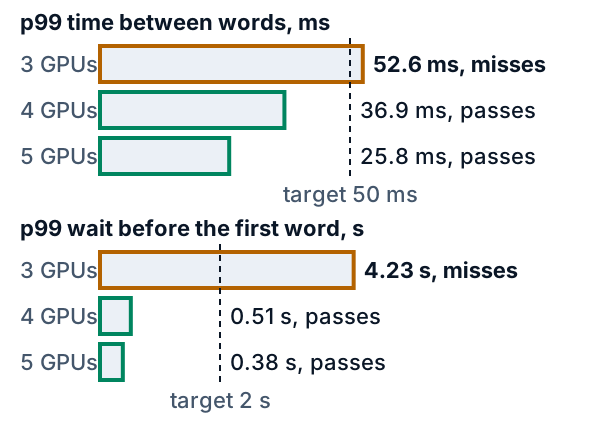
*Figure 4. The load test by number of GPUs, against the targets of 50 ms and 2 s.*
## What this means when you build
- **Ask for the busiest hour, not the user count.** Here 1,000 users became 20 replies a second.
- **Take chat lengths from your own logs.** The same 1,000 users need 4 GPUs for usual chats and 55 for long documents; long answers, at 30 replies each, need 6.
- **Size for a percentile, not the average.** Choose the p99 gap and wait you accept.
- **Find which limit binds before buying.** More memory does not help when speed binds, nor more speed when memory does.
- **Load-test at your planned peak before you sign.** Three GPUs looked enough on paper and missed.
- **Keep headroom and a spare.** The first covers bursts, the second a failure.
- **Plan again when use or chat length grows.** [The next lesson](https://spicyshark.co/learn/should-i-rent-an-api-or-run-my-own/) compares renting an API with running your own.
## Go deeper
*Optional. This part is for readers who write Python. The code is in the `code/` folder next to this lesson. From inside that folder, `python3 show_numbers.py` prints every number below, and `python3 -B -m pytest -q -p no:cacheprovider` runs the tests.*
`capacity_plan.py` does the plan in three steps: demand, the limits of one GPU, the count. It loads lesson 28's server (`settings_calc.serve`), lesson 27's load generator and percentile, and [lesson 26](https://spicyshark.co/learn/why-a-big-model-needs-several-gpus/)'s `least_n` by path.
### Little's law
In symbols L = λW: L is the average number in the system, λ the arrival rate and W the average time one item spends there. Little's 2011 paper (read 2026-10-20) says the law holds whatever the order of service and without assuming steady arrivals, and that over a finite period it is exact, after the fact: it measures, and does not forecast. The reason is one area counted twice. Each reply is in progress from its arrival to its last word, so the area under the in-progress line equals the sum of the reply times. `load_test` computes both sides:
```python
length = max(done for _, done in spans) # the system starts and ends empty
times = [done - arrival for arrival, done in spans]
rate, in_progress = len(spans) / length, sum(times) / length
```
On 3 GPUs it gives 19.99 a second times 5.45 s, 109.1 chats, against the plan's 110.5. The two count differently: the test times a reply from its arrival, queue included, and the plan reads a chat's stay from the moment it joins a batch. Their closeness is partly luck. The 3 GPUs hold 36 chats each, fewer than 38.6, which shortens a stay, and a queue lengthens it. On 4 GPUs each has room, replies come faster and it gives 20.01 times 2.94 s, 58.7 chats. Planning needs W before any test, and W grows with the load, so the plan reads it from a table, at the design point where each GPU is as full as its tighter limit allows.
### The speed table
`step_table` serves a backlog of 600 chats (lesson 28's draw) at ever higher numbers at once, with a pool that never runs out so that only speed shows. Each row holds the chats in progress, the replies a second and the p99 time between words.
| Chats | Replies/s | p99 gap |
|---|---|---|
| 1.0 | 0.744 | 8.3 ms |
| 7.9 | 3.761 | 18.5 ms |
| 15.8 | 5.304 | 30.1 ms |
| 31.4 | 6.687 | 43.4 ms |
| 46.8 | 7.324 | 57.5 ms |
| 62.1 | 7.664 | 70.1 ms |
| 123.0 | 8.290 | 108.5 ms |
Divide a row's chats by its replies to get the time a chat stays, Little's law again: at 31.4 chats, 4.69 s. `stay` reads the table at 38.6 chats: 38.6 / 6.98 = 5.52 s. `speed_limit` interpolates between the two rows around the target. For 50 ms that is between 31.4 and 46.8, at 38.6 chats, which the lesson shows as 38. Lesson 28 chose a cap of 64, with 47.3 ms; that was a mean wait, and at 62.1 chats the p99 is 70.1 ms. The target moves the limit a great deal: 30 ms gives 15 chats and 5 GPUs, 75 ms gives 72 and the same 4.
### The memory limit
`memory_limit` is lesson 28's pool divided by the blocks of an average chat. The usual chats average 1,882 tokens of prompt and 157 of reply, 2,039 in all, which is 128 blocks of 16. The pool at a 90% share is 25,720 blocks, and 25,720 // 128 is 200. Lesson 28's 205 used a chat of 2,000 tokens. The count takes every chat at its average full length.
### The count
```python
def gpus(chats, limit):
return max(1, math.ceil(chats / (HEADROOM * limit) - 1e-9))
```
`HEADROOM` is 0.8, a choice and not a law; the `1e-9` stops a division that is whole in exact arithmetic from rounding up. `plan` takes the smaller limit as the design point, reads W there with `stay`, multiplies by the replies a second and runs `gpus` once for each limit, keeping the larger. Without headroom the arithmetic gives 3, and the load test shows that 3 misses. The three kinds of chat at 50 ms, with the memory limit and then the speed limit in chats:
| Chats | Limits | Replies each | GPUs, spare not counted |
|---|---|---|---|
| Usual | 200 and 38 | 120 | 4 |
| Documents | 14 and 2 | 120 | 55 |
| Answers | 85 and 140 | 30 | 6 |
Speed binds for the usual chats and the documents, memory for the answers. For the documents W is 4.8 s, so 96 chats, and the speed limit is 2.2: 96 / (0.8 x 2.2) = 54.5, so 55 GPUs. For the answers W is 81 s, so 5 new replies a second keep 405 chats in progress: 405 / (0.8 x 85) = 5.96, so 6 GPUs, against 405 / (0.8 x 140.6) = 3.60, so 4 for speed. At 120 replies each that mix would need more chats than there are active users, so it uses 30. The plan overshoots a load test here too, as for the usual chats: on 6 GPUs the test averages 231 chats and 47.5 s a reply, against the plan's 405 and 81 s. The documents have prompts of 24,000 to 31,000 tokens, 27,386 on average, and the answers have replies of 1,500 to 4,000. Length alone does not decide. Speed runs out when each reply makes the GPU read a lot, as with long prompts. Memory runs out when long replies keep many chats open at once.
### The load test
`arrivals` sends 12,000 requests at 20 a second: random gaps from lesson 27's generator (seed 77) and chats drawn with seed 2029. `load_test` sends request k to GPU k mod N, which spreads them evenly, and runs a lesson 28 server on each, with a cap of 38 chats (the speed limit rounded down) and the real pool. A pass is a p99 gap of 50 ms or less and a p99 wait of 2 s or less, both over all requests. Both must hold: with 2 GPUs the cap keeps the gap at 49.3 ms, yet the wait is 249 s.
| GPUs | p99 gap | p99 wait |
|---|---|---|
| 3 | 52.6 ms | 4.23 s |
| 4 | 36.9 ms | 0.51 s |
| 5 | 25.8 ms | 0.38 s |
The chats in progress, averaged over the run, came to 109.1 on 3 GPUs, 58.7 on 4 and 46.6 on 5. Three GPUs finish at most about 21 replies a second against 20 arriving, so each is busy 95% of the time and any burst builds a queue. The busiest minute is 5.8% above the average; random gaps bunch only mildly at this size, and real traffic bunches more.
### How much headroom
The 80% is a choice. Measured against the 7.0 replies a second one GPU finishes at its speed limit, 3 GPUs run at 95%, 4 at 72% and 5 at 57%. The test missed at 95% and passed at 72%, and 5 GPUs at 57% brought the p99 wait down from 0.51 s to 0.38 s. A busier plan buys fewer GPUs and leaves less room for bursts; an idler one costs more and leaves more. Your own traffic and a load test on it tell you where the edge is.
### The spare
Planning for the demand alone leaves no margin for a failed GPU, a restart or an upgrade. With 5 GPUs planned, one failure leaves 4 and the test passes at 36.9 ms; with 4 planned, one failure leaves 3, which misses. In normal hours the spare is not idle: 5 GPUs give 25.8 ms where 4 give 36.9 ms.
### Run the plan backwards
Growth asks the question the other way round: how many users can these GPUs carry? Four GPUs at 80% finish about 22 replies a second against the 20 needed, which is room for about 1,100 users with the same activity and replies each. With one GPU down, 3 GPUs finish about 17 replies a second: about 840 users, short of 1,000, the same reason that test missed. Run the load test again at the new rate before relying on it, because the table was measured on one kind of chat.
### A model too big for one GPU
The 38 and 200 are for the 8-billion-number model on one A100 chip with 80 GB. A model that needs several GPUs for one copy has its own table and its own pool. Lesson 26's `least_n` gives the GPUs for one copy: 1 for the 8B model, 2 for the 70B and 11 for the 405B. `gpus_to_hold` multiplies by the copies: 4 copies take 4, 8 and 44 GPUs.
### What the toy leaves out
- The hour is steady. Real days and weeks rise and fall, and a launch or a campaign adds a burst. Plan from the busiest hour measured, plus growth.
- Reading prompts competes with writing replies. Chunked prefill (lesson 24) changes the speed table.
- A chat's notes are freed at its last word, so each turn reads the whole conversation again. Prefix caching ([lesson 8](https://spicyshark.co/learn/what-is-prompt-caching/)) keeps and shares cached notes, so memory per chat is smaller.
- Quotas ([lesson 11](https://spicyshark.co/learn/how-to-stop-one-user-running-up-the-bill/)) cap the replies one user can ask for, and so cap the demand.
- The toy balances perfectly by taking turns. A real balancer sees uneven chats.
- The chats are invented and the chip runs at its peak speed.
### Proof it works
`test_capacity_plan.py` guards what a reader sees. The 600 usual chats are lesson 28's. Every speed table rises and reaches every target. The chats in progress equal the rate times the mean time, and the sweep that draws figure 2 agrees with a plain count. The limits, W, the chats in progress, the GPU counts with and without headroom and the limit that binds are pinned for the three kinds of chat, with the rounding edge of `gpus`; dividing the rounded numbers the page prints gives the page's counts. The load test misses at 3 GPUs and passes at 4 and 5, and the same holds with one GPU down. With 2 GPUs the gap passes and the wait fails, which guards the rule that both must hold. A model too big for one GPU takes several for each copy. One test checks that every number quoted in this lesson and in the four figures comes from the code, that the figures on disk are the ones `make_figs.py` draws, and that the code holds no web address. `test_widget.py` runs the widget's JavaScript in Node against the Python on a grid of settings, and drives the page with a stand-in for the browser.
### Where this is used in practice
Little's 2011 paper (INFORMS, doi 10.1287/opre.1110.0940; read 2026-10-20) reviews the law's first 50 years. Among its uses it quotes a hospital example of rough sizing: the average in the system from the law, divided by a target utilization such as 90%, suggests the number of beds. That is close to this lesson's headroom. The Google SRE book's introduction (read 2026-10-20) lists regular load testing "to correlate raw capacity ... to service capacity" among the steps of capacity planning, and says that SREs "provision to meet a capacity target at a specific response speed". The vLLM Benchmark CLI page (stable version, read 2026-10-20) says a finite request rate uses a Poisson process by default, with `--burstiness` to make traffic bunchier or more even. For capacity planning it suggests a concurrency limit of 80 to 90% of the reported maximum, where that maximum is the cache size divided by `max_model_len`: for lesson 28's pool, 411,520 / 8,000 = 51. That is a setting for a test, a different quantity from this lesson's headroom. Documentation changes between versions, so check the one you run.
## Skills this lesson builds
- Turn users into new replies a second for the busiest hour, and into chats at once with Little's law.
- Find a GPU's speed limit from a measured table and its memory limit from a pool, and say which binds.
- Turn the limits into a GPU count with headroom and a spare.
- Run a load test with random arrivals and read the p99 gap and wait to pass or fail a plan.
- Say what a plan leaves out: bursts, prompts that compete with replies, shared prefixes and uneven balancing.
**Portfolio project:** write a planner that takes a request log (arrival time, prompt tokens, reply tokens) and a measured table of replies a second and p99 gap against chats in progress, then reports the busiest hour, the chats at once, both limits, the GPU count and a spare. Run a load test on a real server at the planned rate through N-1, N and N+1 copies. Publish the code, one chart of the p99s by count, and a note on where the measured chats in progress differ from the table's.
## Check yourself
1. A service has 1,000 users, 600 of them active in the busiest hour, each receiving 120 replies in it. How many new replies arrive a second?
Answer
600 x 120 = 72,000 replies in 3,600 seconds, which is 20 a second.Answer
20 x 3 = 60 chats, by Little's law. Only the users who are active at the peak create arrivals, and the law counts the chats in progress, not the users.Answer
20 x 5 = 100 chats in progress; 100 / (0.8 x 40) = 3.1, which rounds up to 4. With a spare, 5.Answer
Memory, at the 50 ms target. Replies of 1,500 to 4,000 tokens keep each chat open about 81 s, so the pool fills at 85 chats, before the speed limit of 140.Answer
3 GPUs finish at most about 21 replies a second against 20 arriving, so they are busy 95% of the time. Random arrivals bunch up and a queue builds: the p99 wait is 4.23 s against the 2 s target, a clear miss, and the p99 gap 52.6 ms against 50 ms, a narrow one. With 4 GPUs the test passes.