---
title: "How to stop one user running up your AI bill"
description: "A request limit does not cap cost. Give each signed-in user a money budget, set aside the most a call can cost before it runs, then charge the real cost."
topic: "AI systems"
chapter: "use-an-ai-service"
order: 11
minutes: { plain: 5, deep: 13 }
prerequisites: ["Reading short Python functions", "What a thread is, roughly", "What a token costs (lesson 7)"]
seo_title: "How do I stop one user running up my AI bill?"
date: 2026-10-19
---
# How to stop one user running up your AI bill
A short question to an AI service (60 tokens in, 30 out) costs $0.00042. A long document (50,000 in, 2,000 out) costs $0.12, about 286 times as much. So "5 calls a minute" cannot cap what a user costs. In a toy day with ten users, one sends a long document every few minutes and never meets that limit: that user is 94% of a $9.93 bill. A budget of $0.25 a day for each user cuts the bill to $0.85 and the heavy user's share to 28%, and refuses none of the nine other users' 204 calls. Prices are [lesson 7](https://spicyshark.co/learn/why-ai-bill-is-high/)'s examples. Every number comes from this lesson's code and describes the toy.
## In one minute
Give each signed-in user a budget counted in money, and make your server check it before every call to the AI service: it sets aside the most the call could cost, refuses the call if that does not fit, and afterwards charges what the call really cost. A limit on the number of calls cannot do this, because one call can cost hundreds of times another. Think of the hold a card machine puts on your card at a fuel pump: it reserves a large amount, then charges the real price and releases the rest. The budget belongs to the account, not the internet address: one person can change address, and many share one. A user who runs out gets a clear message and the time the budget refills, not a bare error.
## Explore the numbers
[Open the widget](https://spicyshark.co/learn/how-to-stop-one-user-running-up-the-bill/widget.html). It shows one simulated day for ten users: one heavy (orange) and nine ordinary (green). It opens on Requests per minute, with each user's share of the day's bill. Compare No limit: nothing changes, because the heavy user never nears the limit. Then pick Daily cost budget: the heavy share falls and the ordinary users stay served. Another day draws new calls. More settings changes the calls per minute and the budget.
## How it works
### A call count is not a cost cap
A request limit counts calls. It suits a flood or a stuck loop, and [lesson 9](https://spicyshark.co/learn/api-key-in-the-browser/#limits-only-a-server-can-add) builds one. It says nothing about what a call costs. In the toy, the heavy user sends a long document every 4 to 6 minutes, from 06:00 to 22:00. That is far under 5 a minute, so the limit never fires. Lowering the limit does not help: at 1 call a minute the heavy user is still never refused, and the nine ordinary users lose 69 calls. The heavy user makes 190 of the day's 394 calls, 48%, and 94% of the bill.
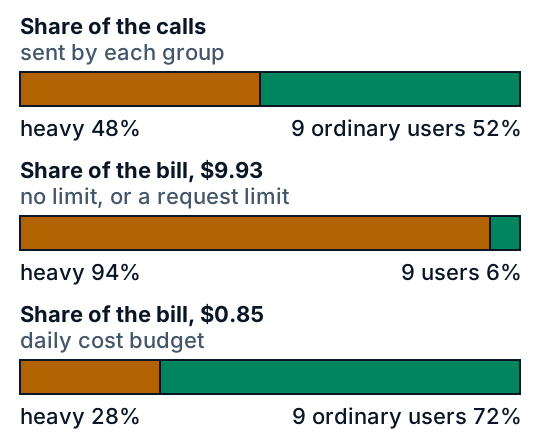
A daily budget changes the bill and not the calls. The heavy user is refused 185 of 190 calls. The nine ordinary users never come near $0.25, so they are refused none of their 204.
### Count money, per signed-in user
The budget is an amount of money (or of model tokens) that one account may use in a period. Key it to an account id your server trusts, read from the sign-in check and never from a field the browser sends. A network address is a poor key: one person can change it, and an office or phone network shares one. The per-address limit from [lesson 9](https://spicyshark.co/learn/api-key-in-the-browser/) keeps its job for visitors who are not signed in. For them, ask for a sign-in before the costly features, or give all signed-out visitors one small shared budget, so a flood cannot spend more than that; the cost is that one visitor can use it up for everyone signed out.
### Set aside first, then charge
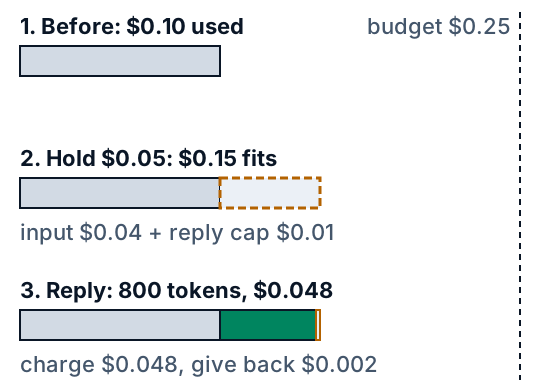
Before it calls the AI service, the server works out the most the call can cost. That is the input it can count, priced as input, plus the reply cap (the longest reply it will allow, [lesson 9](https://spicyshark.co/learn/api-key-in-the-browser/)'s `max_tokens`) priced as output. If that does not fit in what is left of the user's budget, the call is refused. If it fits, the amount is set aside and the call goes ahead. The reply carries usage numbers (input and output token counts), which give the real cost; the server charges that and gives back the rest.
### Why checking is not enough
Suppose the server only checks what is already charged. A user opens 20 calls at once, from a script or a retry loop. Each check sees $0 used, so all 20 pass, and each costs $0.048. The bill is $0.96, almost four times the $0.25 budget. With the set-aside, the first 5 calls each hold $0.05, so five fill the budget, and the other 15 are refused. Each of the 5 then costs $0.048, so the bill is $0.24. The set-aside makes the check count calls that are still running.
### What the user sees
A refused user gets a message such as "Your AI budget has $0.03 left and this call needs up to $0.11. It refills in 1 h 0 min." Add a short code the app can test, `budget_used_up`. Send no short Retry-After header: it tells clients to retry soon, and the budget is back in hours. [Lesson 10](https://spicyshark.co/learn/too-many-requests/) explains why a used-up quota is not a retry case, and Anthropic says its own spend-cap 429 has no retry-after header (read 2026-10-19). A call bigger than the whole budget gets another code and the message "Send less text", because waiting never helps.
## What this means when you build
- **Count money, per account.** Multiply the input and output counts that come back with each reply by your prices, and add them to the account's total.
- **Put a cap on every reply.** Without one, a call has no top cost, so there is nothing to set aside. Hidden reasoning is billed as output but counts toward the cap ([lesson 7](https://spicyshark.co/learn/why-ai-bill-is-high/#where-this-is-used-in-practice)), so the set-aside is still the most a call can cost. For a provider that lesson does not name, check its docs.
- **Size the budget so ordinary users never meet it.** Set it well above what they spend. In the toy, $0.15 to $0.50 a day turned away none of them on any of 200 days. At $0.05, the day shown turns away 77 of their calls.
- **Tell the user when it refills.** A message and a code, not a bare 429.
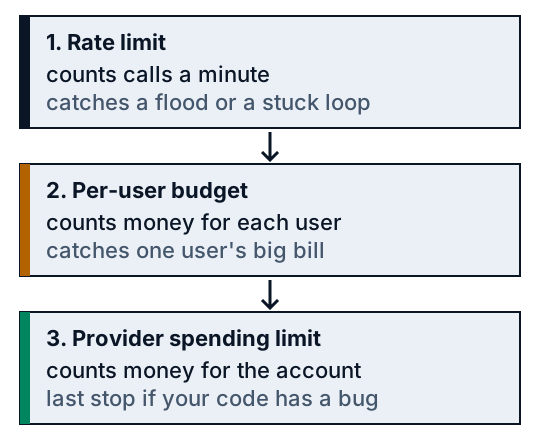
- **Keep the AI company's spending limit as the last stop.** Check that it is a hard limit, not only an alert. It covers the whole account, so when it trips, every user stops.
## Go deeper
*Optional, for readers who write Python. The code is in the `code/` folder: `budget.py` is the budget and the server step, `inflight.py` fires many calls at once, `sim.py` is the toy day, `test_budget.py`, `test_sim.py` and `test_widget.py` are the tests, and `python3 show_numbers.py` prints every number above.*
### Money as whole numbers
Decimal dollars drift in floating point (0.1 + 0.2 is not 0.3), so a budget that adds many small charges would drift too. The code counts micro-dollars, millionths of a dollar, as whole numbers. At the example prices of $2 and $10 per million tokens, one input token is exactly 2 micro-dollars and one output token exactly 10.
```python
PRICE_IN = 2 # micro-dollars per input token
PRICE_OUT = 10 # micro-dollars per output token
```
```python
def cost(input_tokens, output_tokens):
"""Micro-dollars a call costs."""
return input_tokens * PRICE_IN + output_tokens * PRICE_OUT
```
The short question is 60 × 2 + 30 × 10 = 420. The long document is 50,000 × 2 + 2,000 × 10 = 120,000, and 120,000 / 420 is 285.7. The daily budget of $0.25 is 250,000.
### Reserve, settle, release
A `Budget` keeps, for each user, what has been used so far. `reserve` checks and sets aside, `settle` swaps the set-aside for the real cost, and `release` gives everything back when the call failed.
```python
def reserve(self, user, amount, now):
"""Set `amount` aside, or raise OverBudget. The check and the set-aside happen under one lock, so two calls cannot both take the last of it."""
with self._lock:
used, stamp = self._fresh(user, now)
if used + amount > self.limit:
excess = used + amount - self.limit
if amount > self.limit:
wait = None # bigger than the whole budget: waiting never helps
elif self.refill == "daily":
wait = DAY - now % DAY
else:
wait = excess * DAY / self.limit
raise OverBudget(amount, max(0, self.limit - used), wait)
self._state[user] = (used + amount, stamp)
return Hold(user, amount, stamp if self.refill == "daily" else 0)
def settle(self, hold, actual, now):
"""Replace the set-aside with the real cost. If the real cost is higher, the user is charged it all and may go over."""
with self._lock:
used, stamp = self._fresh(hold.user, now)
if self.refill == "daily" and hold.period != stamp:
return # the day this call was set aside in has ended, and its count with it
self._state[hold.user] = (max(0, used + actual - hold.amount), stamp)
def release(self, hold, now):
"""The service answered with an error, or never got the call: give the whole set-aside back."""
self.settle(hold, 0, now)
```
The test is `used + amount > limit`, so a call that fits exactly is allowed. The hand example from the figure has a budget of 250,000, an input of 20,000 tokens, a reply cap of 1,000 and a reply of 800 tokens. The reserve is 20,000 × 2 + 1,000 × 10 = 50,000. The settle is 20,000 × 2 + 800 × 10 = 48,000. The used amount moves like this:
| Step | Used |
|---|---|
| Before | 100,000 |
| Reserve | 150,000 |
| Settle | 148,000 |
If the real cost is higher than the set-aside, `settle` charges all of it and the user can end above the limit. That can only happen when the input count was too low or the reply broke the cap. The set-aside is a promise that is only as good as its estimate.
### One call through the server
`handle_chat` is the step from [lesson 9](https://spicyshark.co/learn/api-key-in-the-browser/), with the budget added. `user` is the account id from your sign-in check. `upstream` calls the AI service and returns the text and its usage numbers; on a timeout it raises Python's own `TimeoutError`.
```python
def handle_chat(budget, upstream, user, request, now, max_reply=MAX_REPLY, count_tokens=input_tokens_upper_bound):
"""Run one chat call for a signed-in user. Returns (status, body).
`user` is the account id from your sign-in check, never a value the browser sends. `upstream(request, max_reply)`
calls the AI service and returns {"text": ..., "usage": {"input_tokens": ..., "output_tokens": ...}}. On a
timeout it must raise Python's own TimeoutError, so map your HTTP library's timeout error to it.
"""
if user is None:
return 401, {"error": "sign_in", "message": "Sign in to use the assistant."}
amount = cost(count_tokens(request["messages"]), max_reply) # the most this call can cost
try:
hold = budget.reserve(user, amount, now)
except OverBudget as refused:
return 429, refusal(refused, budget.limit, now) # no short Retry-After: it tells clients to retry soon, and the budget is back in hours
try:
answer = upstream(request, max_reply)
except TimeoutError:
# the provider may still bill a call that timed out, so keep the set-aside: the safe side.
# It stays counted until the daily reset, or drains with a steady refill.
return 502, {"error": "upstream_timeout", "message": "The AI service did not answer in time. The call may still count against your budget."}
except Exception:
budget.release(hold, now) # the service answered with an error, so give the set-aside back
return 502, {"error": "upstream_failed", "message": "The AI service failed. Try again in a moment."}
usage = answer["usage"]
actual = cost(usage["input_tokens"], usage["output_tokens"])
budget.settle(hold, actual, now)
return 200, {"text": answer["text"], "charged": actual}
```
A visitor who is not signed in gets 401 and costs nothing. A refused call gets 429 with the body from `refusal`: the code `budget_used_up` or `request_too_big`, a message, and for the first one `resets_at`, the time the budget is back as seconds since 1 January 1970. There is no `Retry-After` key, and a test checks that no key in the body mentions retry.
### The overrun, in code
`CheckOnlyBudget` is the first version most people write. It looks at what is already charged and sets nothing aside. It is the same class with one change: it reserves 0.
```python
class CheckOnlyBudget(Budget):
"""The first version most people write: look at what is already charged, make the call, charge afterwards. Nothing is set aside."""
def reserve(self, user, amount, now):
return super().reserve(user, 0, now)
```
`fire` in `inflight.py` starts 20 threads that each send `handle_chat` a call of 20,000 input tokens and 800 output tokens. Every call that gets past the budget waits inside the fake AI service until each other call is either inside or refused, so no call has been charged when the last one is checked. That holds the overlap steady, so the result does not depend on timing.
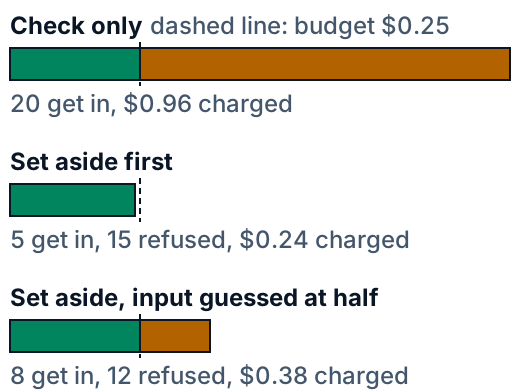
| Version | In | Charged |
|---|---|---|
| Check only | 20 | $0.96 |
| Set aside first | 5 | $0.24 |
| Half estimate | 8 | $0.38 |
Of the 20 calls, the rest are refused. The last row guesses the input at half its size, so the set-aside shrinks and more calls fit. The section on estimating the input comes back to it.
### Refill rules
When does the used amount go back to 0? `_fresh` brings a user's count up to the current time, in one of two ways.
```python
def _fresh(self, user, now):
"""(used, stamp) for this user brought up to `now`. Call it with the lock held."""
used, stamp = self._state.get(user, (0, None))
if self.refill == "daily":
day = int(now // DAY)
return (used if stamp == day else 0), day
if stamp is not None:
used = max(0, used - (now - stamp) * self.limit / DAY)
return used, now
```
A **daily** reset wipes the count at 00:00 UTC. It is easy to state ("$0.25 a day") but it has a cliff: a user can spend a full budget just before midnight and another just after. A **steady** refill drains the count by `limit / 86400` a second, so a spent budget is all back a day later and there is no cliff. Its cost is that "when is it back" depends on how much the next call needs. The widget uses the daily rule; the tests cover both. A hold carries the day it was set aside in. If the day has changed by the time the reply arrives, `settle` and `release` ignore it, because the count it belonged to is gone.
### Where the count lives
The lock in `reserve` makes the check and the set-aside one step, but only inside one process. With two server processes, each with its own count, a user can spend the whole budget in each. The test sends the same 20 calls to two separate `Budget` objects: 10 get in and $0.48 is charged, 1.9 times the budget. A read of the count followed by a write is the check-only bug again, now spread over machines. The count has to live in one shared store that offers an atomic step: check that the amount fits and add it, as one operation that no other call can slip into. Most databases and caches have one, such as a conditional update or a transaction. A count held in memory is also lost when the process restarts, and on hosting where each request may run in a new process there is no memory to share.
### Estimating the input
The set-aside needs the input size before the call. `handle_chat` takes it from `count_tokens`, a function you pass in. The best source is the provider's own counter. Anthropic's token-counting page (read 2026-10-19) says its endpoint takes the same inputs as creating a message and returns the total input tokens, and that the count is an estimate that may differ by a small amount. Google's tokens page (read 2026-10-19) describes a count call before you send. The default here is an upper bound that needs no network:
```python
def input_tokens_upper_bound(messages):
"""A count that never falls short for the text in `messages`: a token covers at least one byte of text, so bytes >= tokens (plus the per-message extra). The caller adds the system prompt and tool definitions."""
return sum(len(m["content"].encode("utf-8")) + MESSAGE_OVERHEAD for m in messages)
```
`MESSAGE_OVERHEAD = 10` is an assumption for the extra tokens a chat format adds to each message; check your provider's counter. The bound over-reserves, by several times for ordinary English, because a token usually covers more than a byte. That costs the user nothing: `settle` gives the surplus back. It only makes the budget look fuller while calls are in flight.
A low estimate is the dangerous one. With the input guessed at half its size, 8 calls fit in place of 5, and the bill is $0.384, 1.5 times the budget. In general, the overshoot is at most the sum of the shortfalls of the calls in flight. A model may also bill input in parts. Anthropic's rate-limits page (read 2026-10-19) says that when prompt caching is on, the `input_tokens` in the usage numbers counts only the tokens after the last cache breakpoint, and the total is `cache_read_input_tokens + cache_creation_input_tokens + input_tokens`. The toy prices all input at one price, so it ignores that.
### Proof it works
```bash
cd lessons/how-to-stop-one-user-running-up-the-bill/code && python3 -m pytest -q -x
```
The tests need no network. Each one guards a failure that the others would miss.
- One call can cost hundreds of times another: `test_one_call_can_cost_hundreds_of_times_another`
- A call that fits exactly is allowed and one micro-dollar more is not: `test_reserve_allows_an_exact_fit_and_refuses_one_micro_dollar_more`
- Settle gives back the surplus, and a reply over the set-aside is charged in full: `test_settle_charges_the_real_cost_and_gives_back_the_rest` and `test_a_reply_that_costs_more_than_the_set_aside_is_charged_in_full`
- A day change drops a stale hold: `test_daily_budget_restarts_at_midnight_and_a_hold_from_yesterday_is_ignored`
- The refusal has a message, a refill time and no retry hint: `test_refused_call_gets_a_clear_message_and_the_refill_time_not_a_bare_429`
- 20 calls at once pass a check-only budget and not the set-aside: `test_twenty_calls_at_once_all_pass_a_check_made_before_any_is_charged`
- Two separate counts each allow the whole budget, and a low estimate overshoots: `test_two_server_processes_with_their_own_counts_each_allow_the_whole_budget` and `test_a_low_estimate_lets_more_calls_in_and_the_budget_is_overshot`
- The check and the set-aside are one step under threads: `test_the_check_and_the_set_aside_are_one_step_under_threads` makes the read slow on purpose, so a lock that is missing shows up
- The toy day: `test_the_numbers_the_lesson_names_for_the_day_it_shows` and `test_over_many_days_the_budget_cuts_the_heavy_share_and_turns_no_ordinary_user_away`
The last test checks the claim that matters most over 200 seeds, not one lucky day: under no limit the heavy user is at least 90% of the bill, under the budget at most 35%, and neither the budget nor 5 calls a minute turns away an ordinary call; nor does any budget from $0.15 to $0.50. Another test adds up the worst day an ordinary user can have in the toy: 40 calls of the dearest size plus the largest set-aside is 195,800 micro-dollars, under the 250,000 budget, so none of them can reach it. The widget's JavaScript is run under Node.js against the Python on 300 runs, and every Python block in this lesson is checked to be a verbatim excerpt of the code.
### What the toy leaves out
- **Streaming.** A reply that streams can be cut off, and the usage numbers arrive at the end. Decide in advance what a cut-off call is charged. The cautious choice is the whole set-aside, which `handle_chat` keeps when a call times out.
- **One price.** Real prices differ by model, and cached input has its own price.
- **Hidden reasoning.** It is billed as output, but the reply cap bounds reasoning and visible reply together ([lesson 7](https://spicyshark.co/learn/why-ai-bill-is-high/#where-this-is-used-in-practice)), so the set-aside stays a true maximum. A cap set too low can cut the visible reply short, so size it for the longest answer you want.
- **A refused call is lost.** The toy's user does not retry or shorten the request.
- **Many accounts per person.** A budget for each account does not stop one person from opening many. Sign-up checks, and the AI company's spending limit, cover that.
- **The clock.** A reset at 00:00 UTC falls at an odd hour for most users, so the message should give the time left, not "tomorrow".
### Where this is used in practice
OWASP's API Security Top 10 (2023), in API4 "Unrestricted Resource Consumption" (read 2026-10-19), says some resources are paid for per request by third-party providers, and lists missing or badly set limits, including the third-party provider's spending limit, as a way for an API to be vulnerable. OWASP's Top 10 for LLM Applications (2025), in LLM10 "Unbounded Consumption" (read 2026-10-19), names Denial of Wallet, an attack on the cost-per-use model of cloud AI services, and lists rate limiting and user quotas as a mitigation. OpenAI's rate-limits page (read 2026-10-19) says spend limits can be set for an organization or a project, that a spend alert only notifies, and that with a hard spend limit the affected requests return a 429. Its error-codes page (read 2026-10-19) lists `project_spend_limit_exceeded`, a 429 that means the project has reached its enforced monthly limit while other projects continue. Anthropic's rate-limits page (read 2026-10-19) says each usage tier has a monthly spend cap and that you may set a lower limit of your own. At the tier cap, requests return 429 with a message that says when access resumes; at a limit you set yourself they return 400 `invalid_request_error`. So read the error body, not only the status.
## Skills this lesson builds
- Explain why a request limit does not cap cost, and show it with numbers from a simulated day.
- Write a per-user budget that sets aside the most a call can cost, refuses what does not fit, and settles the real cost.
- Reproduce a concurrency bug (calls in flight that all pass a check) in a test, and show that the fix closes it.
- Design a refusal that tells the user what is left and when the budget refills, without inviting a retry loop.
- Choose where the count lives and which layer catches what: rate limit, per-user budget, provider spending limit.
**Portfolio project:** add a per-user daily budget to a small chat server that calls a fake AI service. Publish a seeded test that runs one heavy user and nine ordinary users under three rules, a table of each user's share of the bill and the calls refused, and a note on how your server counts when it runs more than one process.
## Check yourself
1. A user stays under 5 calls a minute all day and still runs up most of the bill. How, and what rule would have stopped it?
Answer
A request limit counts calls, not cost, and one call can cost hundreds of times another. The heavy user sent long documents, one every few minutes, so no call was refused while each cost far more than an ordinary one. A budget counted in money for each signed-in user stops it, because it adds up what the calls cost and refuses the call that no longer fits.Answer
Before the call, it sets aside the most the call can cost: the input it can count priced as input, plus the reply cap priced as output. It refuses the call if that amount does not fit in what is left. After the reply, it charges the real cost from the usage numbers and gives back the rest of the set-aside.Answer
The set-aside is 20,000 × 2 + 1,000 × 10 = 50,000 micro-dollars, $0.05. 100,000 + 50,000 = 150,000 is below 250,000, so it fits. The real cost is 20,000 × 2 + 800 × 10 = 48,000, so 2,000 ($0.002) is given back and the count is 148,000, $0.148.Answer
Each process thinks the user has the whole budget, so the user can spend it in each. In the lesson's test, 20 calls at once spread over two counts let 10 in and charge $0.48, 1.9 times the budget. The fix is one shared store with an atomic step that checks that the amount fits and adds it in one operation.Answer
Each set-aside is too small, so 8 calls get in and not 5, and the charge is about $0.384, 1.5 times the budget. Use the provider's own token counter, or an upper bound that never falls short (bytes of text plus a per-message extra). Also leave room between the budget and the provider's spending limit.