---
title: "Why a fast AI chip spends most of its time waiting"
description: "A GPU can calculate far faster than its memory can feed it. See why reusing data sets the speed, and why one chatbot user keeps a chip under 1% busy."
topic: "AI systems"
chapter: "inside-the-chip"
order: 19
minutes: { plain: 5, deep: 22 }
prerequisites: ["Matrix multiplication", "Reading Python and NumPy"]
seo_title: "Why is LLM inference memory-bound?"
date: 2026-10-17
---
# Why a fast AI chip spends most of its time waiting
An NVIDIA A100 is a GPU, a graphics processor and the kind of chip that runs most AI models. It can do 312 trillion calculations every second. Yet while it writes a chatbot reply for one person, with numbers stored in the usual 2 bytes, it reaches at most 0.7% of that speed. The chip is not slow. It sits idle, waiting for numbers to arrive from its memory. This lesson shows why the wait happens, what ends it, and what that means when you build with AI.
## In one minute
A chatbot is memory-bound while it writes a reply: for each new word the chip reads all of the model's billions of stored numbers from memory and uses each one only once, so its calculators wait for memory. Memory-bound means that memory speed, not calculating speed, sets the pace. Picture a workbench fed from a warehouse across town: carry one part per trip and you spend the day walking; carry a crate of parts that belong together and you spend the day working. A long prompt (the text you send), many users sharing each trip, or a big job cut into reusable blocks is the crate.
## Explore the numbers
[Open the widget](https://spicyshark.co/learn/tiled-matmul-roofline/widget.html) and drag the slider from one word at a time to many at once. Watch the "Chip busy" bar: it starts almost empty and is full somewhere between 128 and 256 words, as more words share each trip to memory. Then press "Multiplying in tiles" and drag from small tiles to big ones to see the same rise from cutting one big job into blocks.
## How it works
### Two speed limits
The A100 has two limits. The first is calculation: 312 trillion operations a second, where an operation is one addition or one multiplication. The second is delivery: its memory can send 2,039 billion bytes a second. A byte is the unit memory is counted in, and the delivery rate is called bandwidth. The calculation figure is for numbers stored in 2 bytes each, the compact format AI models often use.
Divide the first limit by the second and you get 153: 312 trillion operations a second divided by 2,039 billion bytes a second. The chip stays busy only if the program does 153 operations on every byte it fetches. That ratio, operations per byte fetched, is called arithmetic intensity.
### Reuse makes the difference
Most of AI is multiplying matrices, which are grids of numbers. Each number in the answer comes from one row of the first grid and one column of the second. The textbook method fetches that row and column from memory every time, even if it fetched the same row a moment ago. Fetched that way, multiplying two grids of 4096 by 4096 numbers does only 0.5 operations per byte, and the A100 reaches 0.33% of its top speed.
The fix is reuse. Cut each grid into small square blocks called tiles. Bring a few tiles into a small, fast memory right beside the calculators, and finish all the work they allow before fetching anything else. Figure 1 shows a small case: the four green results in one corner need 16 numbers. Fetching for each result separately costs 32 fetches. Fetching tiles costs 16. Bigger tiles save more, but the fast memory is small, so a tile can only grow so far.
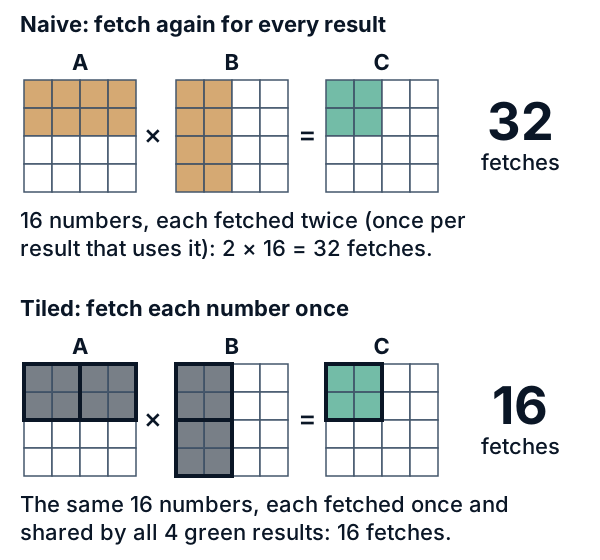
*Figure 1. Computing the four green results in one corner. Top: fetch again for every result, 32 fetches. Bottom: fetch each number once and share it, 16 fetches. In a large multiply the saving equals the tile width.*
### The roofline
Plot speed against work per byte and you get Figure 2, called the roofline: a slope that climbs, then a flat roof. On the slope a job is memory-bound: the chip waits on memory, so faster calculators would not help, but more work per byte would. On the roof a job is compute-bound: calculation is the limit and the chip is busy. The bend between them is the ridge, at 153 for the A100.
Three jobs are marked. The textbook multiply sits low on the slope. Tiles 64 wide reach about 32 operations per byte, and tiles 512 wide reach about 241, past the ridge.
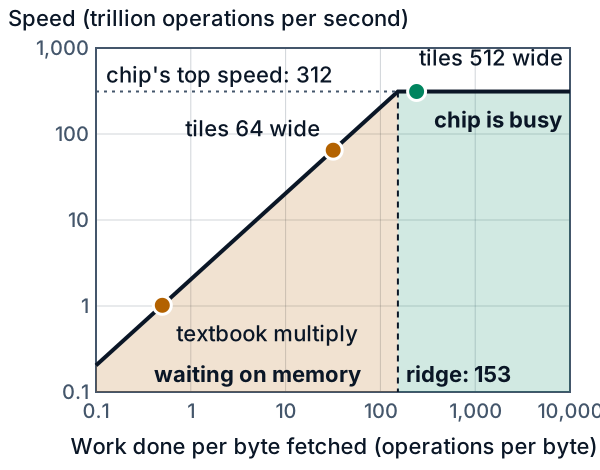
*Figure 2. Speed of one A100 against work per byte fetched, both on scales where each gridline is ten times the last. The orange area waits on memory; the green area is busy. The top speed is 312 trillion operations per second.*
### Why a chatbot waits
A language model writes text one token at a time, where a token is a word or a piece of a word. (Until Go deeper, this lesson says "words" for tokens.) Its knowledge sits in weights, billions of numbers kept in memory. To write one word, a standard model's chip must pull every weight out of memory and use it. Each weight is used about once, so the work per byte is about 1, far left of the ridge at 153. Writing the reply word by word is called decode, and it is memory-bound. Reading your prompt first, called prefill, is different: the model handles all the prompt's words together, so each weight it fetches serves many words. In this example a prompt of 166 words or more puts the chip on the roof; a one-line question is too short to.
A server can also group the next words of many users and run them together, a batch. Each weight fetched then serves the whole batch. Figure 3 shows the effect on one 4096 by 4096 grid of weights: with one word it reaches 0.7% of the A100's top speed, with 128 words 78.7%, and with 166 words the chip is busy.
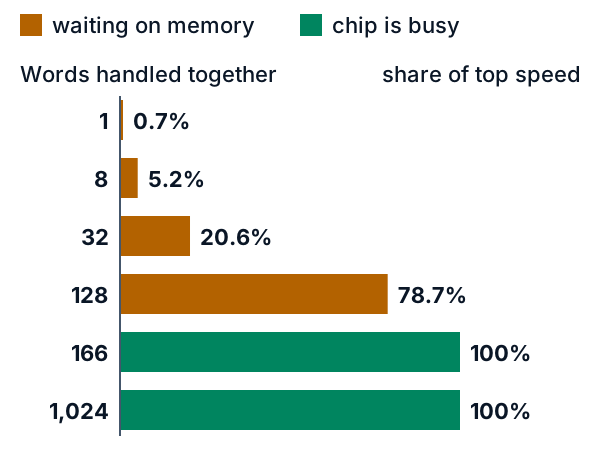
*Figure 3. Share of the A100's top speed against words handled together, for one 4096 by 4096 grid of weights. Orange bars wait on memory; green bars are busy. The words can come from many users in a batch or from one long prompt.*
## What this means when you build
- **Estimate your speed limit before you rent a GPU.** One chat cannot write faster than the memory can deliver the whole model once per word, so divide the memory speed by the model's size in bytes. A model with 7 billion numbers (an example size) stored in 2 bytes each is 14 GB, and the A100's 2,039 GB/s allows at most about 146 words a second. Real servers fall below this, so use it as a ceiling, not a forecast.
- **Smaller numbers buy speed.** Storing each number in 1 byte instead of 2 halves what must be read, so the same ceiling doubles to about 291 words a second, at some cost in quality, so test on your own task. This is called quantization.
- **Share the chip between chats, within memory limits.** In this example about 166 chats at once keep the chip busy, and about 80 if the numbers take 1 byte. Each chat also keeps its own working notes (the attention cache), which cannot be shared and fill the GPU's memory, so the real group is smaller. If you call a hosted model, the provider does the sharing; send independent requests together, not one after another.
- **Long replies cost more than long prompts, and measure before you buy.** A prompt of a few hundred words is read in one pass with the chip mostly busy, but every word of the reply needs a fresh trip through the weights, so a shorter reply saves more time than a shorter prompt. Before paying for a faster chip, check which limit your job hits: if it waits on memory, doubling calculation speed changes nothing. Profilers, tools that show where a program spends its time, report this; NVIDIA's Nsight Compute is one.
## Go deeper
*Optional. For readers who write Python and are comfortable with a little algebra. Numbers are 16-bit floating-point (FP16), 2 bytes each, unless stated. Run `python3 tiled_roofline.py` in `code/` to print most numbers below that cite no source.*
> **Before you start**
> - Matrix multiplication: MIT OpenCourseWare 18.06SC, [multiplication and inverse matrices](https://ocw.mit.edu/courses/18-06sc-linear-algebra-fall-2011/pages/ax-b-and-the-four-subspaces/multiplication-and-inverse-matrices/).
> - Reading Python and NumPy: [NumPy: the absolute basics for beginners](https://numpy.org/doc/stable/user/absolute_beginners.html).
### The naive approach and why it fails
#### Counting work and traffic
- A **FLOP** is one floating-point addition or multiplication. A multiply-add counts as 2 FLOPs, the convention NVIDIA uses for its peak figure.
- **Bytes moved** are the bytes crossing between main memory and a small fast memory beside the arithmetic units. Arithmetic intensity is FLOPs divided by bytes moved.
Reads from fast memory are free in this model; we count only the numbers crossing between the two memories, and the FLOPs.
Take C = A times B with 2 by 2 matrices of 4-byte floats. Each of the four outputs is a dot product of length 2, which is 2 multiply-adds or 4 FLOPs, so 16 FLOPs in all. The least traffic reads A and B and writes C: 12 numbers, or 48 bytes. The intensity is 16 / 48 = 0.333 FLOP per byte.
For n by n matrices the work is 2n³ FLOPs on 3n² numbers. With s bytes per number, the best intensity is 2n / (3s). The code prints these values for 4-byte floats; the 2-byte FP16 numbers used from here on double them:
| n | best-case intensity (FLOP/byte) |
|---|---|
| 2 | 0.333 |
| 16 | 2.667 |
| 256 | 42.667 |
| 4096 | 682.667 |
Work grows as n³ and data as n², so big matrices hold much potential reuse.
#### The roofline
A processor does arithmetic and memory traffic at the same time, and the slower job sets the pace. Call one piece of GPU work, such as this multiply, a **kernel**. A kernel with F FLOPs and D bytes of traffic needs at least F / peak seconds for arithmetic and D / bandwidth seconds for traffic. Dividing F by the larger time gives the speed limit:
```
attainable FLOP/s = min(peak, bandwidth x intensity)
```
The slope and the roof meet at the **ridge point**, where intensity equals peak over bandwidth. Left of it a kernel is memory-bound; at or right of it, compute-bound.
For the A100 we use two numbers from NVIDIA's data sheet (revision "Jun21", 80 GB SXM column): 312 TFLOP/s for dense 16-bit tensor-core math, and 2,039 GB/s of memory bandwidth (GB means 10⁹ bytes). Dense means every number is used; the sheet's 624 figure assumes a sparse mode that skips some zeros.
```python
A100_PEAK_FLOPS = 312e12
A100_BANDWIDTH = 2039e9
def ridge(peak_flops, bandwidth):
return peak_flops / bandwidth # 153.0 FLOP/byte
```
#### The naive multiply on an A100
Here is the textbook multiply, and the traffic we charge it:
```python
def naive_matmul(A, B):
m, k, n = len(A), len(B), len(B[0])
C = [[0.0] * n for _ in range(m)]
for i in range(m):
for j in range(n):
s = 0.0
for p in range(k):
s += A[i][p] * B[p][j]
C[i][j] = s
return C
def naive_traffic(m, n, k):
return Traffic(loads=2 * m * n * k, stores=m * n, flops=2 * m * n * k)
```
In the no-reuse model, every multiply-add fetches `A[i][p]` and `B[p][j]` from slow memory: 2 FLOPs per 2 numbers, so about 1 FLOP per number, or 0.5 FLOP per byte in FP16. For 4096 by 4096 matrices the code reports:
| Quantity | Value |
|---|---|
| FLOPs | 1.3744 x 10¹¹ |
| Bytes moved, no reuse | 2.7491 x 10¹¹ (about 275 GB) |
| Intensity | 0.500 FLOP/byte |
| Attainable speed on the A100 | 1.019 TFLOP/s, which is 0.33% of peak |
| Time floor from the math | 0.441 ms |
| Time floor from the traffic | 134.8 ms |
The traffic floor is about 306 times the math floor, so this multiply would spend nearly all its time waiting for memory. In the best case each number moves once: 100.7 MB, an intensity of 1365.3, and a traffic floor of 0.0494 ms, below the math floor.
Real chips have **caches**, small automatic fast memories, so a real loop already gets some reuse. These numbers show what reuse is worth, not how a program runs.
### The idea behind tiling
Tiling keeps one tile of A, one of B and the C tile being built in fast memory. Each element of A is used b times per load, and each element of B likewise, so loads drop by a factor of b while the FLOPs stay the same.
### A hand-worked example
Multiply two 4 by 4 matrices with 2 by 2 tiles.
```
A = 1 2 0 1 B = 1 2 2 1
3 1 2 0 0 1 1 0
0 1 1 2 2 1 0 1
2 0 1 1 1 2 1 0
```
Each matrix becomes four tiles; A(I,J) is the tile in block-row I and block-column J. The C tile at (I,J) is the sum over P of A(I,P) times B(P,J): two steps per output tile. Each step loads an A tile and a B tile (4 + 4 = 8 numbers) and does 2 x 2 x 2 x 2 = 16 FLOPs. The loop in the next section visits the steps in this order:
| Step | Output tile (I,J) | P | A tile loaded | B tile loaded | Loads this step | Loads so far | FLOPs so far |
|---|---|---|---|---|---|---|---|
| 1 | (0,0) | 0 | A(0,0) | B(0,0) | 8 | 8 | 16 |
| 2 | (0,0) | 1 | A(0,1) | B(1,0) | 8 | 16 | 32 |
| 3 | (0,1) | 0 | A(0,0) | B(0,1) | 8 | 24 | 48 |
| 4 | (0,1) | 1 | A(0,1) | B(1,1) | 8 | 32 | 64 |
| 5 | (1,0) | 0 | A(1,0) | B(0,0) | 8 | 40 | 80 |
| 6 | (1,0) | 1 | A(1,1) | B(1,0) | 8 | 48 | 96 |
| 7 | (1,1) | 0 | A(1,0) | B(0,1) | 8 | 56 | 112 |
| 8 | (1,1) | 1 | A(1,1) | B(1,1) | 8 | 64 | 128 |
After steps 2, 4, 6 and 8 the finished C tile is written once: 4 stores each, 16 in total.
Now follow C(0,0). It uses A(0,0) = [[1,2],[3,1]], B(0,0) = [[1,2],[0,1]], A(0,1) = [[0,1],[2,0]] and B(1,0) = [[2,1],[1,2]]. Each entry is a dot product split across the two steps:
| Entry of C(0,0) | Step 1 (P = 0) | Step 2 (P = 1) | Total |
|---|---|---|---|
| row 0, column 0 | 1x1 + 2x0 = 1 | 0x2 + 1x1 = 1 | 2 |
| row 0, column 1 | 1x2 + 2x1 = 4 | 0x1 + 1x2 = 2 | 6 |
| row 1, column 0 | 3x1 + 1x0 = 3 | 2x2 + 0x1 = 4 | 7 |
| row 1, column 1 | 3x2 + 1x1 = 7 | 2x1 + 0x2 = 2 | 9 |
So C(0,0) = [[2,6],[7,9]]. The other three tiles follow the same pattern, and the full product is:
```
C = 2 6 5 1
7 9 7 5
4 6 3 1
5 7 5 3
```
Count the loads. Without tiles, each of the 16 outputs has 4 terms and each term fetches 2 numbers: 16 x 4 x 2 = 128 loads. With 2 by 2 tiles the table gives 64, so the saving equals the tile size. For C(0,0) alone it is 32 loads against 16. Both ways do 128 FLOPs and 16 stores, so the intensity per number moved rises from 128 / (128 + 16) = 0.89 to 128 / (64 + 16) = 1.6.
### The real implementation
#### The tiled loop
This is the core of `code/tiled_roofline.py`. It computes the product and counts what a two-level memory would see.
```python
def tiled_matmul(A, B, b):
m, k = A.shape
_, n = B.shape
C = np.zeros((m, n), dtype=np.result_type(A, B))
t = Traffic()
for i in range(0, m, b):
for j in range(0, n, b):
acc = np.zeros((min(b, m - i), min(b, n - j)), dtype=C.dtype)
for p in range(0, k, b):
a_tile = A[i:i + b, p:p + b]
b_tile = B[p:p + b, j:j + b]
t.loads += a_tile.size + b_tile.size
t.flops += 2 * a_tile.shape[0] * a_tile.shape[1] * b_tile.shape[1]
acc += a_tile @ b_tile
C[i:i + b, j:j + b] = acc
t.stores += acc.size
return C, t
```
The `acc` tile stays in fast memory while `p` walks along k. When b does not divide a size, the last tile is smaller; the `min` calls handle it.
#### From the loop to a formula
For square matrices of size n and tile size b, there are (n/b)² output tiles. Each takes n/b steps, and each step loads 2b² numbers. So:
```
loads = (n/b)^2 x (n/b) x 2b^2 = 2n^3 / b
stores = n^2
FLOPs = 2n^3
```
With s bytes per number, the intensity is
```
intensity = 2n^3 / (s x (2n^3/b + n^2)) = (b / s) / (1 + b / (2n))
```
When b is much smaller than n, the last factor is close to 1 and the intensity is about b / s, so doubling the tile doubles the intensity. At b = 1 the formula gives the naive count, 2n³ loads. At b = n there is one tile per matrix, every number moves once, and the intensity reaches the best case 2n / (3s).
The code also has a closed form that handles sizes b does not divide. Each element of A loads once per column of output tiles, and each element of B once per row of output tiles:
```python
def tiled_traffic(m, n, k, b):
return Traffic(loads=ceil(n / b) * m * k + ceil(m / b) * k * n,
stores=m * n,
flops=2 * m * n * k)
```
#### Confirming the formula by counting
For n = 128, we run `tiled_matmul`, check that its product equals `A @ B`, and compare the counted loads with 2n³ / b. Intensity uses 2-byte numbers.
| b | Loads counted by the loop | Loads from 2n³ / b | Intensity (FLOP/byte) |
|---|---|---|---|
| 4 | 1,048,576 | 1,048,576 | 1.97 |
| 8 | 524,288 | 524,288 | 3.88 |
| 16 | 262,144 | 262,144 | 7.53 |
| 32 | 131,072 | 131,072 | 14.22 |
| 64 | 65,536 | 65,536 | 25.60 |
| 128 | 32,768 | 32,768 | 42.67 |
The counts match exactly. Each row has 16,384 stores and 4,194,304 FLOPs. Stores put the intensity below b / s by the factor 1 + b / (2n), which is 1.5 at b = n = 128: 64 / 1.5 = 42.67, the best case 2n / (3s).
Now scale up to n = 4096 in FP16. Traffic is shown as a multiple of the minimum, 100.7 MB.
| Tile size b | Traffic against the minimum | Intensity (FLOP/byte) | Fast memory for three tiles |
|---|---|---|---|
| 1 | 2,731 times | 0.5 | 6 bytes |
| 4 | 683 times | 2.0 | 96 bytes |
| 16 | 171 times | 7.98 | 1,536 bytes |
| 64 | 43 times | 31.75 | 24,576 bytes |
| 256 | 11 times | 124.12 | 393,216 bytes |
| 512 | 5.67 times | 240.94 | 1,572,864 bytes |
| 4096 | 1 time | 1365.33 | 100,663,296 bytes |
Doubling b nearly halves the traffic and quadruples the fast memory, so reuse is cheap at first and costly later.
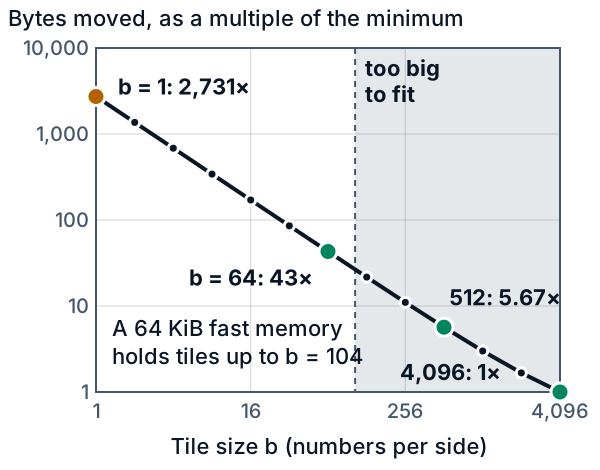
*Figure 4. Traffic against tile size b, and the largest tile an example 64 KiB memory holds.*
#### Fast memory limits the tile
Three b by b tiles of s-byte numbers need 3b²s bytes. Given a capacity, the largest tile is the integer square root of capacity / (3s):
```python
def max_tile(fast_bytes, elem_bytes):
return isqrt(fast_bytes // (3 * elem_bytes))
```
For FP16 numbers and four example capacities, the code prints:
| Fast memory | Largest tile b | Intensity at n = 4096 (FLOP/byte) |
|---|---|---|
| 16 KiB | 52 | 25.8 |
| 64 KiB | 104 | 50.6 |
| 256 KiB | 209 | 99.9 |
| 1024 KiB | 418 | 195.0 |
Because b grows with the square root of capacity, quadrupling the memory doubles the intensity. Hong and Kung (1981) proved that no way of computing the n³ products of the standard method beats this square-root law by more than a constant factor. Methods such as Strassen's, which use fewer multiplications, follow different bounds.
How large must the tile be to reach the ridge on the A100? Setting b / s equal to the ridge gives b = 306. At n = 4096 the exact answer is larger, for two reasons. Writing C adds a term, which alone moves the answer to 318. The tile count must also be a whole number: 13 tiles per side give 151.7 and 12 give 163.8, against a ridge of 153.0, so b must be at least 4096 / 12 = 341.3, which is 342. Three such tiles need 701,784 bytes, about 0.7 MB.
#### What the model leaves out
A real GPU has several fast memories: registers and shared memory (small memories on the chip itself) and caches. Fast libraries tile at several levels at once, so read 342 as a model result, not a setting to copy. The A100 figure is also the dense 16-bit peak; other formats have other ridges.
### Decode versus prefill
A large language model is mostly multiplications between activations (the numbers flowing through the network) and weights (the stored parameters, read from memory on every use).
In prefill, with M prompt tokens, each weight matrix multiplies an M-row activation matrix: matrix times matrix. In decode, each step multiplies one token's vector by every weight matrix: matrix times vector. A server that decodes several requests together has M equal to the batch size.
Take one weight matrix of 4096 by 4096 FP16 numbers and M tokens. The FLOPs are 2 x M x 4096². The weights take 4096² x 2 bytes, about 33.6 MB, and dominate the traffic when M is small. At M = 1 each weight is used once, so tiling finds no reuse. For small M the intensity is close to M (1.00, 7.97 and 31.51 in the table), so each extra token moves the point about one unit to the right. With every number moved once, the code reports:
| Tokens M | Intensity (FLOP/byte) | Verdict on the A100 | Attainable (TFLOP/s) | Share of peak |
|---|---|---|---|---|
| 1 | 1.00 | memory-bound | 2.04 | 0.7% |
| 8 | 7.97 | memory-bound | 16.25 | 5.2% |
| 32 | 31.51 | memory-bound | 64.24 | 20.6% |
| 128 | 120.47 | memory-bound | 245.64 | 78.7% |
| 165 | 152.70 | memory-bound | 311.35 | 99.8% |
| 166 | 153.55 | compute-bound | 312.00 | 100.0% |
| 1024 | 682.67 | compute-bound | 312.00 | 100.0% |
The table uses 2-byte numbers. With 1-byte weights, M = 1 gives an intensity of 2.0 and 1.3% of peak, and the roof starts at M = 80 (`gemm_intensity(1, 4096, 4096, 1)` and `batch_to_reach_ridge(4096, 4096, 1, A100_PEAK_FLOPS, A100_BANDWIDTH)`).
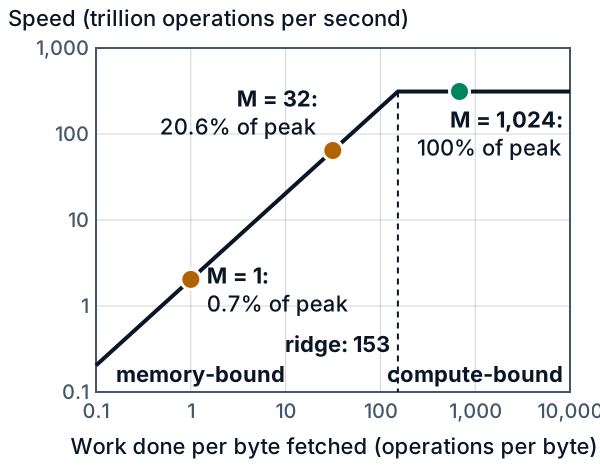
*Figure 5. One weight matrix times M tokens: M = 1 on the memory slope, M = 1024 on the roof.*
The same fact in time: a dense model (every weight is used for every token) with 7 billion parameters (an example size) in FP16 has 14 GB of weights, and reading them once takes 6.87 ms at 2,039 GB/s. If each token needs every weight once, one decoding request cannot exceed 146 tokens per second on this chip. Real servers fall below this bound. The bound ignores attention, where each new token looks back at the earlier ones: the model keeps their keys and values in an **attention cache** (KV cache) and reads all of it for every new token.
#### Try it on your machine
Run `python3 code/tiled_roofline.py --time` to time a Python loop, NumPy multiplies and a matrix-vector product on your machine. That product does 2 FLOPs per 4-byte element, so its GFLOP/s is half the printed GB/s; compare that GB/s with your memory bandwidth.
### Proof it works
Run `python3 -m pytest -q code/` from the lesson folder. Each test in `code/test_tiled_roofline.py` guards one failure; more tests pin every printed table to the code.
- **Odd sizes.** The tiled product equals NumPy's `A @ B` when b does not divide the sizes, where a wrong edge slice raises no error.
- **Loop and formula agree.** Counted loads, stores and FLOPs equal the closed form, odd shapes included. Tile size 1 gives the naive count; a tile as large as the matrix gives the minimum.
- **The worked example.** 64 loads, 16 stores, 128 FLOPs and the partial products above.
- **Units and capacity.** The A100 ridge is 153.0, which catches a TFLOP/GFLOP slip. A 64 KiB memory allows b = 104, not 128 (two tiles) and not 105 (rounded up).
- **The ridge.** The smallest tile reaching it at n = 4096 is 342, not the rule-of-thumb 306 or the 318 that the C stores alone give.
- **Decode and batching.** One token is memory-bound, 4096 tokens are compute-bound, and 166 is the first batch size at the ridge.
The second test:
```python
def test_counted_loop_matches_closed_form(shape, b):
m, k, n = shape
A, B = np.ones((m, k)), np.ones((k, n))
_, counted = tr.tiled_matmul(A, B, b)
assert counted == tr.tiled_traffic(m, n, k, b)
assert counted.flops == tr.matmul_flops(m, n, k)
```
### Where this is used
- **The roofline.** Williams, Waterman and Patterson published it in 2009 for multicore chips. Their paper calls the ratio operational intensity and counts the bytes at main memory, after the caches. NVIDIA's guides call the ridge the `ops:byte ratio`.
- **Matrix libraries.** NVIDIA's open-source CUTLASS decomposes GPU matrix multiplication into a hierarchy of tiles. Goto and van de Geijn (2008) describe blocking the matrices to fit each CPU cache level.
- **Attention.** FlashAttention (Dao and coauthors, 2022) computes attention block by block, so intermediate results stay on the chip.
- **LLM serving.** vLLM (Kwon and coauthors, 2023) stores the attention cache in pages so more requests fit in one batch.
## Skills this lesson builds
- Compute arithmetic intensity (FLOPs per byte moved) for a kernel, compare it with a chip's ridge point, and say whether the kernel is memory-bound or compute-bound.
- Derive the traffic of a tiled matrix multiply, 2n³ / b loads, confirm it by counting in a loop, and state its limits.
- Choose the largest tile for a given fast-memory size and explain the square-root law.
- Place decode, prefill and batching on a roofline, and bound tokens per second from weight bytes and memory bandwidth.
- Say what a simple model leaves out: caches, several memory levels and other number formats.
**Portfolio project:** extend `tiled_roofline.py` to time NumPy matrix-vector and matrix-matrix products over a range of sizes on your own machine, estimate its memory bandwidth and peak speed, and plot your measurements under a roofline built from them. Write up where the points fall below the model, and say that the plot describes your machine, not a data-centre GPU.
## Check yourself
**1.** A friend runs a language model on a powerful GPU, only for themselves, and says the chip is barely working. Are they right, and what would make the chip do more useful work?
Answer
They are right. For one user each weight is fetched and used about once, so the chip does about 1 operation per byte against a ridge of 153 and mostly waits on memory. To do more useful work it needs more words for each fetch of the weights: run several chats at once, or feed it long prompts. On the A100 in this lesson the chip is busy at 166 words handled together. One chat on its own still goes no faster than memory can deliver the weights.
Answer
The ridge doubles, from 153 to about 306 on the A100's numbers. A memory-bound job's speed is set by memory speed and work per byte, and neither changed, so it runs no faster. A compute-bound job may now be memory-bound.
Answer
The intensity is 6 / 12 = 0.5 FLOP per byte. The ridge is 10 TFLOP/s / 500 GB/s = 20 FLOP per byte. So the kernel is memory-bound, at 500 GB/s x 0.5 FLOP/byte = 250 GFLOP/s, which is 2.5% of peak.
Answer
Three tiles need 3 x b² x 4 bytes. Setting that equal to 49,152 bytes gives b² = 4,096, so b = 64. The intensity is about b / s = 16 FLOP per byte. At n = 4096 the code gives 15.9.
Answer
Tiled: 2n³ / b = 2 x 64³ / 16 = 32,768 loads. Naive: 2n³ = 524,288 loads. The ratio is 16, the tile size. The code's `tiled_traffic(64, 64, 64, 16)` and `naive_traffic(64, 64, 64)` return exactly these counts.