---
title: "What 'too many requests' means, and what your app should do"
description: "A service caps how fast you may call it. When it says too many requests, wait longer each time, with a random part, so retries do not land together."
topic: "AI systems"
chapter: "use-an-ai-service"
order: 10
minutes: { plain: 5, deep: 12 }
prerequisites: ["Reading short Python functions", "What an HTTP request and response are", "What a random seed does"]
seo_title: "What does a 429 Too Many Requests error mean?"
date: 2026-10-19
---
# What "too many requests" means, and what your app should do
A service that answers 3 calls a second gets 20 calls in the same second, and the other 17 hear "too many requests". In a toy test, 20 clients (programs that call a service) that retry the moment they are refused make 57 refused calls, and 2 of them give up after 6 tries. Give each client a wait that grows and has a random part, and the same crowd gets 25 refused calls, and nobody gives up. These numbers come from the code in this lesson and describe the toy, not a real service.
## In one minute
A 429 "Too Many Requests" error means the service caps how fast you may call it, so wait before you try again, wait longer each time, and add a random part to each wait. (429 is a status code: a number in every reply that says how the call went.) Picture a crowd redialling a busy phone line. If everyone redials the moment the line frees up, it jams again. If each person waits a different, growing time, the calls spread out and get through. A program does the same: it doubles its wait after each refusal (backoff) and picks a random time up to that wait (jitter), so a crowd of programs does not come back together. If the service says how long to wait, wait at least that long. If it says your quota or spend cap is used up, a few seconds of waiting will not help.
## Explore the numbers
[Open the widget](https://spicyshark.co/learn/too-many-requests/widget.html). A tick is one step of the toy's clock; read it as one second. It starts with 20 clients under Retry at once, and the tall bars are refused calls. Pick Backoff: the bars spread out, but the refused total stays 57. Pick Backoff with jitter and it falls. Press Another random run to check it was not luck. More settings changes the crowd size, the calls answered per tick and the tries before a client gives up.
## How it works
### Why a service says no
A service has limited capacity, so it sets a rate limit (a cap on how often one customer may call; [lesson 9](https://spicyshark.co/learn/api-key-in-the-browser/) shows one). OpenAI's guide (read 2026-10-19) says limits guard against abuse, share access fairly and manage load. A call over the cap gets status code 429, defined in RFC 6585 (a public internet standard). The reply may also carry a Retry-After header (an extra labelled line in the reply) that says when to try again, defined in RFC 9110.
### A toy to test retry rules
The code runs a toy service that answers 3 calls in each tick and refuses the rest with 429. All 20 clients call at tick 0. A refused client waits and calls again, and gives up after 6 calls. A seed (a number that fixes the random choices, so a run can be repeated) is set to 1. Four rules set the wait:
- **Retry at once:** wait 1 tick.
- **Fixed wait:** wait 4 ticks every time.
- **Backoff** (short for exponential backoff): wait 4 ticks after the first refusal, then 8, then 16, the longest wait.
- **Backoff with jitter:** wait a random whole number of ticks, from 1 up to the backoff wait.
### Retrying at once makes a wave
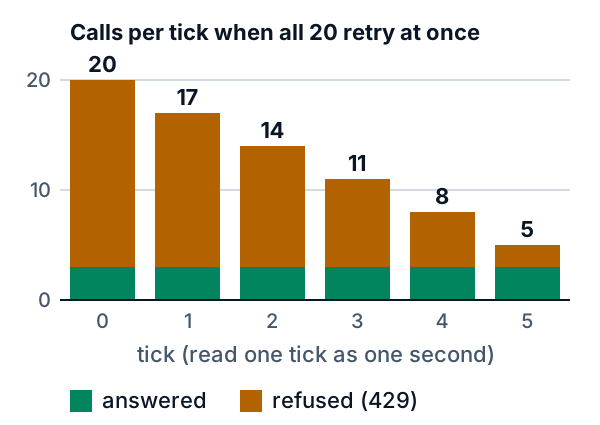
The 17 refused clients all come back at tick 1. Then 14 are refused, then 11, 8, 5 and 2: 57 refused calls in all. Two clients use up their 6 calls and give up. The run ends at tick 5 only because it dropped them.
### Waiting longer is not enough
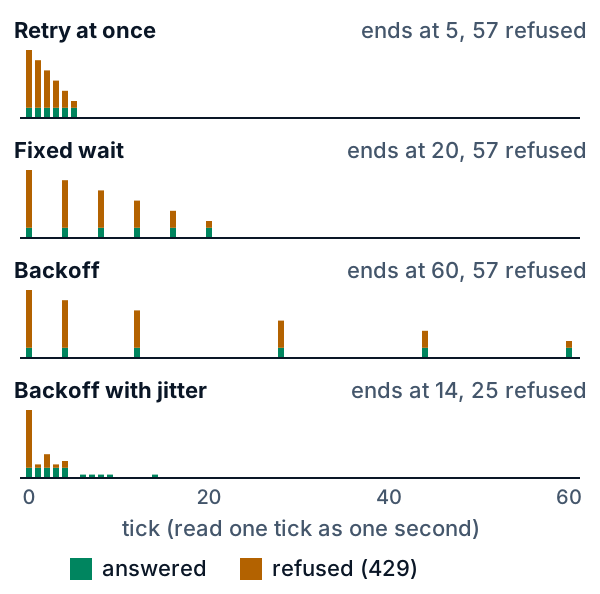
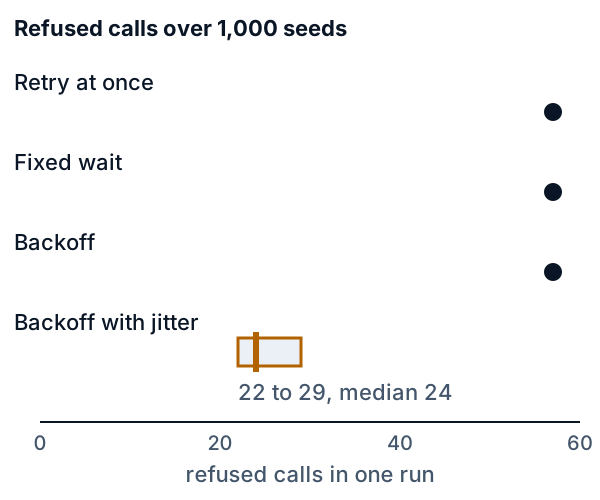
Fixed wait and backoff spread the calls over more ticks, but every client waits the same time as the others, so they all return together. Each still has 57 refused calls and loses 2 clients, and backoff runs to tick 60. The service sits idle for 55 of those 61 ticks.
### Why a random wait helps
Jitter gives each client its own wait, anywhere from 1 tick up to the backoff time, so the crowd breaks up. After the 20 calls at tick 0, no tick has more than 7. The run has 25 refused calls, nobody gives up, and the last call is at tick 14. The cost is time: retry at once ends at tick 5, but only by dropping 2 clients.
### Does it hold on other runs?
One run could be lucky. The three rules with no random part give the same run for every seed. For jitter, the code ran 1,000 seeds. Refused calls ranged from 22 to 29 (the middle run had 24) against 57, and no client gave up. Jitter always ended after retry at once, and before fixed wait in 963 of the 1,000 runs.
## What this means when you build
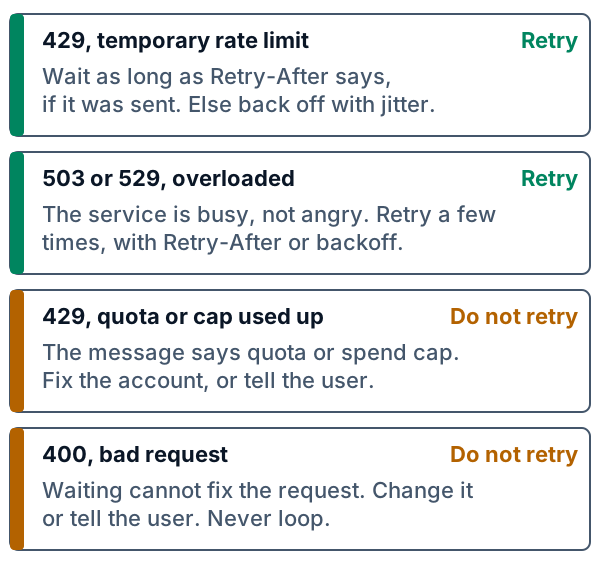
- **Read the reply first.** If a temporary rate-limit 429 has a Retry-After header, wait at least that long. OpenAI's guide (read 2026-10-19) calls it a minimum and suggests a small random extra. With no header, use backoff with jitter.
- **Limit your own retries.** Cap the number of tries and the longest wait, then show an error. Endless retries load a service that is already busy.
- **Retry only errors that can pass.** A temporary 429 and an "overloaded" error (the service says it is busy) clear with time. A 400 means the request itself is wrong, so change it. A 429 whose message says your quota, billing limit or spend cap is used up does not clear within a retry loop. It ends at a reset time or when the account changes, so fix the account, raise the limit or tell the user. OpenAI says not to retry quota or billing errors, and Anthropic says its spend-cap 429 has no retry-after header and fails until access resumes (both read 2026-10-19).
- **Do not stack retry loops.** A provider's SDK (a code library it supplies) may retry for you. OpenAI says to turn that off, or count it, if you also retry yourself, or the loops multiply the calls.
- **Do not resend at once.** OpenAI says refused calls count toward your per-minute limit, so a tight loop keeps you refused.
## Go deeper
*Optional, for readers who write Python. The code is in the `code/` folder: `sim.py` is the toy, `test_sim.py` and `test_widget.py` are its tests, and `python3 show_numbers.py` prints every number above.*
### The four rules as formulas
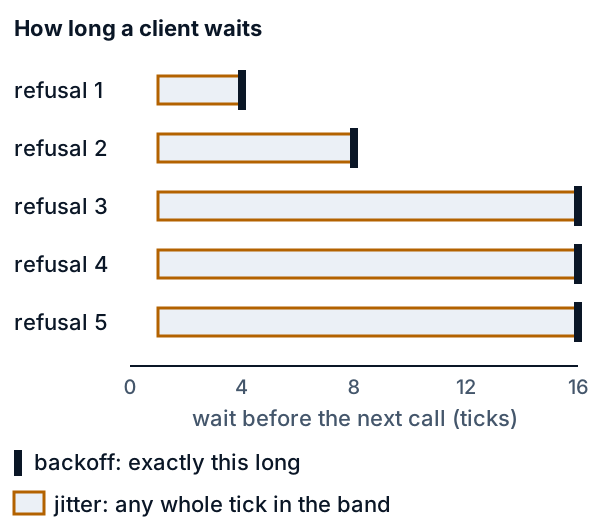
Retry at once always waits 1 tick. Fixed wait always waits 4. Write L(k) = min(16, 4 × 2^(k − 1)) for the backoff wait after the kth refusal (k = 1 for the first). The constants are `BASE = 4` and `CAP = 16` in `sim.py`. Backoff waits L(k) ticks, and jitter waits any whole number of ticks from 1 up to L(k). The table gives both for each k.
| k | Backoff | Jitter |
|---|---|---|
| 1 | 4 | 1 to 4 |
| 2 | 8 | 1 to 8 |
| 3 | 16 | 1 to 16 |
| 4 | 16 | 1 to 16 |
| 5 | 16 | 1 to 16 |
Jitter draws `1 + int(u × L)`, where u is a random number from 0 up to but not including 1. Every whole number from 1 to L is equally likely, so the average wait is (L + 1) / 2. The AWS Architecture Blog post "Exponential Backoff And Jitter" (Marc Brooker, 4 March 2015, read 2026-10-19) names a rule Full Jitter: a random wait from 0 up to the current backoff. The toy's rule is a small variant of it: it starts at 1 and not 0, because its clock moves forward one whole tick at a time, so a wait must be at least 1.
### Why a crowd stays together
A refusal does not tell clients apart. Two clients refused in the same tick under a rule with no random part come back in the same tick, so a crowd that starts together stays together. This pile-up is often called a thundering herd. Each wave is smaller by what the service answered, 3 per tick, so the refused calls are 17 + 14 + 11 + 8 + 5 + 2 = 57. With these three rules, that sum depends on the crowd size, the limit and the number of tries, and not on how long the clients wait. Waiting changes when the waves arrive, not how big they are. Only a difference between clients, such as a random wait, splits the crowd.
The AWS post's own test (read 2026-10-19) had 100 clients contending to write to a database, not to a rate limit. It found that exponential backoff without jitter helps only a little because clusters of calls remain, and that adding jitter cut the number of calls by more than half and shortened the time to finish. The Amazon Builders' Library page on retries (read 2026-10-19) adds that retries can raise the load on a service that is already overloaded, and that capped backoff alone leaves every client retrying at the capped rate.
### Worked example by hand
Take 5 clients, a service that answers 2 calls per tick, and 4 tries each. Under retry at once:
| Tick | What happens | Refused |
|---|---|---|
| 0 | Clients 0 to 4 call. Clients 0 and 1 are answered, and 2, 3 and 4 are refused. | 3 |
| 1 | Clients 2, 3 and 4 call. Clients 2 and 3 are answered, and 4 is refused. | 1 |
| 2 | Client 4 calls and is answered. | 0 |
That is 3 + 1 = 4 refused calls, and the last call is at tick 2. Under backoff, the first wait is 4 ticks and the second is 8:
| Tick | What happens | Refused |
|---|---|---|
| 0 | Clients 0 to 4 call. Clients 0 and 1 are answered, and 2, 3 and 4 are refused and call again at tick 4. | 3 |
| 4 | Clients 2, 3 and 4 call. Clients 2 and 3 are answered, and 4 is refused and calls again at tick 12. | 1 |
| 12 | Client 4 calls and is answered. | 0 |
The same 4 refused calls, and the last call is at tick 12 instead of 2. Under jitter with seed 1, the first three random numbers are 0.627074, 0.002736 and 0.527447. Clients 2, 3 and 4 are refused at tick 0, in that order, and L = 4, so their waits are 1 + int(0.627074 × 4) = 3, 1 + int(0.002736 × 4) = 1 and 1 + int(0.527447 × 4) = 3.
| Tick | What happens | Refused |
|---|---|---|
| 0 | Clients 0 to 4 call. Clients 0 and 1 are answered, and 2, 3 and 4 are refused and call again at ticks 3, 1 and 3. | 3 |
| 1 | Client 3 calls and is answered. | 0 |
| 3 | Clients 2 and 4 call and are answered. | 0 |
Only 3 refused calls, and the last call is at tick 3.
### What jitter costs
The average jitter wait after the kth refusal is (L(k) + 1) / 2, which is 2.5, 4.5, 8.5, 8.5 and 8.5 ticks, against 4, 8, 16, 16 and 16 for plain backoff. So jitter is not a longer wait: on average it is about half as long, and what it adds is spread. `show_numbers.py` draws 20,000 waits for each refusal and prints averages of 2.50, 4.51, 8.48, 8.49 and 8.52. That is why jitter ends at tick 14 in the run above and plain backoff at tick 60. Fixed wait ended at tick 20, and jitter did not finish before it in 37 of the 1,000 seeds. Jitter's slowest run ended at tick 25.
### How a server counts
The toy's limiter is the simplest one: count the calls in each tick and refuse those above the limit (a fixed window). A fixed window has an edge: a client can send a full allowance at the end of one window and another at the start of the next. The token bucket from [lesson 9](https://spicyshark.co/learn/api-key-in-the-browser/#the-token-bucket-by-hand) gains tickets at a steady speed and spends one per call, so it allows a short burst and then a steady rate. Anthropic's documentation (read 2026-10-19) says it uses the token bucket algorithm, and that a limit per minute may be enforced over shorter spans, so a short burst can get a 429 even when the minute's total is under the limit. Limits for your own users come in [the next lesson](https://spicyshark.co/learn/how-to-stop-one-user-running-up-the-bill/).
### The code
`wait_after` holds the four rules. It takes the rule, the number of refusals so far, and `draw`, a function that returns the next random number.
```python
def wait_after(rule, refusals, draw):
"""Ticks to wait before the next call, after this many refusals so far (1 after the first)."""
if rule == "once":
return 1
if rule == "fixed":
return FIXED
longest = min(CAP, BASE * 2 ** (refusals - 1))
if rule == "backoff":
return longest
return 1 + int(draw() * longest) # jitter: any whole number of ticks from 1 up to the longest wait
```
Only jitter calls `draw`, so the other three rules never use a random number and give the same run for every seed. `simulate` runs the crowd. `due[c]` is the tick of client c's next call, and `None` once it is served or has given up.
```python
def simulate(rule, seed=SEED, clients=CLIENTS, limit=LIMIT, tries=TRIES):
draw = random_numbers(seed).__next__
due = [0] * clients # the tick of each client's next call; None once it is served or has given up
refusals = [0] * clients
served, refused, gave_up, tick = [], [], 0, 0
while any(d is not None for d in due):
calling = [c for c in range(clients) if due[c] == tick]
for c in calling[:limit]:
due[c] = None
for c in calling[limit:]:
refusals[c] += 1
if refusals[c] == tries:
due[c] = None
gave_up += 1
else:
due[c] = tick + wait_after(rule, refusals[c], draw)
served.append(min(len(calling), limit))
refused.append(max(len(calling) - limit, 0))
tick += 1
return Run(rule, tuple(served), tuple(refused), gave_up)
```
Each tick, `calling` lists the clients due now. The first `limit` are answered. Each of the rest adds 1 to its refusals, gives up if that equals `tries`, and otherwise waits `wait_after(...)` ticks. A tick with no calls still adds a 0 to both lists, which is how the idle ticks show up. Clients go in number order, so the random numbers are drawn in a fixed order and one seed always gives one run. `random_numbers` is a 32-bit generator called mulberry32. `widget.html` holds the same generator in JavaScript, and the tests run both and compare.
### Proof it works
```bash
cd lessons/too-many-requests/code && python3 -m pytest -q -x
```
The tests need no network. Each check below has a test that fails when the check is removed.
- Backoff doubles, then stops at the cap: `test_backoff_doubles_until_the_cap`
- Jitter waits are whole ticks from 1 to the backoff wait: `test_jitter_waits_are_whole_ticks_from_one_up_to_the_backoff_wait_and_reach_both_ends`
- The first three rules ignore the random numbers: `test_the_three_rules_with_no_random_part_give_the_same_run_for_every_seed`
- The service answers at most its limit: `test_every_call_is_counted_once_and_the_server_never_answers_more_than_its_limit`
- A client gives up after its last try, not before: `test_a_client_gives_up_after_its_last_try_and_not_before`
- The lesson's numbers for one run: `test_the_lessons_one_run_for_the_rules_with_no_random_part` and `test_the_lessons_one_jitter_run`
- Jitter wins on every seed: `test_waiting_longer_does_not_cut_refused_calls_but_jitter_does_on_every_seed`
- The hand example: `test_a_small_crowd_by_hand_matches_the_lessons_table`
- Same random numbers in Python and JavaScript: `test_the_generator_gives_the_same_numbers_everywhere` and `test_widget_rules_match_the_python_sim`
The test of the seeds checks the claim that matters most. For every one of 1,000 seeds, jitter serves every client, its refused calls are fewer than the other rules', and its biggest retry wave is smaller. Another test fixes the honest cost: retry at once finishes first only because it drops 2 clients. Other tests check that the widget's data block matches the code, that its script finds every element it looks up, that it asks for nothing online, and that every Python block in this lesson is a verbatim excerpt of `sim.py`.
### What the toy leaves out
- **Refused calls are free.** In the toy a refusal costs a client only one of its tries. OpenAI says refused calls count toward the per-minute limit (read 2026-10-19), so a real service can be harsher on a client that resends at once.
- **One burst.** All clients start at tick 0. Real traffic arrives all the time, from clients that do not know about each other.
- **Ticks are not seconds.** The numbers show the shape, not real delays. A different crowd, limit, cap or number of tries gives different numbers, and the claim is only that the three fixed rules stay in step and jitter does not.
- **No Retry-After.** The toy never tells a client how long to wait. A real Retry-After is a number of seconds or a date (RFC 9110), and a client that is told should follow it, as OpenAI and Anthropic both say.
- **Ties go to the lowest number.** The service answers the lowest client numbers first, and real services do not.
- **Sudden jumps.** OpenAI and Anthropic (both read 2026-10-19) say a 429 can also come when your rate rises sharply, even below the stated limits. Both advise raising it gradually.
### Where this is used in practice
OpenAI's rate-limit guide (read 2026-10-19) says its official SDKs retry eligible 429 and 503 errors on their own. For your own client it says to follow Retry-After if it is valid, else use exponential backoff with jitter, and to limit both the number of attempts and the total time spent retrying. It says Retry-After may be present on 429s caused by a temporary rate limit, that quota and billing errors cannot be resolved by retrying, and that other errors can share a status code, so the error body should be inspected before choosing a recovery action. Anthropic's rate-limit page (read 2026-10-19) says to wait the number of seconds in the retry-after header, and that at a spend cap the API returns 429 with no retry-after header and retrying fails until access resumes. Its errors page lists a 529 `overloaded_error`. Google's Gemini documentation (read 2026-10-19) measures limits in requests per minute, tokens per minute and requests per day, applied per project, and says going over any one of them triggers an error. It says requests-per-day quotas reset at midnight Pacific time, so a daily quota that is used up stays used up until then. The AWS blog post above (March 2015) says most AWS SDKs support exponential backoff and jitter, as of its May 2023 update.
## Skills this lesson builds
- Read a 429 reply and its Retry-After header, tell a temporary rate limit from a used-up quota or spend cap, and decide whether an error is worth retrying.
- Write a retry loop with a cap on tries, a longest wait, backoff and jitter.
- Test a retry loop without waiting, by passing in the random source and counting ticks and not seconds.
- Measure retry rules against a limited server over many seeds, and report refused calls, time to finish and clients that gave up.
- Explain why clients that start together stay together, and what jitter changes.
**Portfolio project:** build a fake rate-limited server and three clients (no retry, fixed wait, backoff with jitter). Publish a seeded test that runs 1,000 seeds, a table of refused calls, finish time and clients that gave up for each client, and a note on how your client treats Retry-After.
## Check yourself
1. A service replies 429 and the reply has a Retry-After header that says 30 seconds. What should your program do, and what if there is no header?
Answer
Wait at least 30 seconds, then try again. With no header, wait a time that grows after each refusal and has a random part (backoff with jitter), and stop after a set number of tries or a longest total wait. All of this is for a temporary rate limit. If the message says a quota, billing limit or spend cap is used up (usually with no Retry-After), do not retry: fix the account, raise the limit or tell the user.Answer
Every client waits the same time, so the clients refused together come back together and are refused together again. Waiting changes when the waves arrive and not how big they are. A random part gives each client its own wait, which splits the crowd.Answer
L(3) = min(16, 4 × 2^2) = 16. The shortest wait is 1 tick and the longest is 16. The average is (16 + 1) / 2 = 8.5 ticks, about half the 16 of plain backoff.Answer
At tick 0, clients 0, 1 and 2 are answered and clients 3 and 4 are refused. They call again at tick 1 and are both answered, so there are 2 refused calls and the last call is at tick 1.Answer
It ends at tick 5 only because 2 clients use up their 6 tries and give up, so they are never served; jitter serves everyone. Also, the toy's refused calls cost a client nothing but a try, while OpenAI says refused calls count toward the per-minute limit, so resending at once can keep a real client refused.