---
title: "What do a model server's settings change?"
description: "A GPU's memory is one fixed budget. A model server's main settings only move room between the weights, a reserve and the chats in progress."
topic: "AI systems"
chapter: "plan-and-measure"
order: 28
minutes: { plain: 5, deep: 15 }
prerequisites: ["Percentages and simple fractions", "Bytes and gigabytes", "Reading short Python functions"]
seo_title: "What do an AI model server's settings change?"
date: 2026-10-19
---
# What do a model server's settings change?
A model server has settings, and three of them decide how many chats it holds at once. Take an AI model with 8 billion numbers inside, called weights, on one A100 chip with 80 GB (gigabytes, billions of bytes) of memory. A token is a small piece of text, often a word. Set to use 90% of the memory and accept chats of up to 8,000 tokens, the server has room for 205 chats of 2,000 tokens at once. A server that set aside the full 8,000 for each chat would hold 51. This lesson shows what each setting moves, and what it takes from something else.
## In one minute
A server's settings do not add memory. They move a fixed amount of it between the model's weights, a working reserve, the notes for every chat in progress and an unused part. Picture a restaurant with a fixed floor: the kitchen takes one part, a working corner stays clear for the cooks, a strip is left for the neighbours and tables fill the rest. Using more of the floor adds tables but shrinks the strip. Seating more parties at once keeps the cooks busier but makes each party wait longer for its next dish. Allowing long dinners costs nothing until someone stays long, unless a table is held for the longest dinner from the start. Measure your own crowd to pick the numbers.
## Explore the numbers
[Open the widget](https://spicyshark.co/learn/what-model-server-settings-change/widget.html). It runs a toy server on a chip like [lesson 24](https://spicyshark.co/learn/how-an-ai-server-answers-many-people-at-once/)'s, with 600 invented chats, and draws the memory as a bar. Set the longest chat to 128,000 tokens and lower the memory share: below 44% the server will not start. Then set the share back to 90%, raise the most chats at once from 64 and watch the total stop rising as the wait, in ms (thousandths of a second), grows. It shows a model at the chip's peak speed, not a measurement.
## How it works
### One floor, four parts
The chip has 80 GB of memory. The weights take 16.06 GB, whatever the settings. The server also keeps a working reserve for the calculations inside each step; the toy sets 2 GB, an invented figure, as a real server measures its own. The memory share is the part of the chip the server may use. At 90% that is 72 GB, which leaves 53.9 GB after the weights and the reserve. That is the cache pool, the room for the notes about every earlier token in every chat ([lesson 22](https://spicyshark.co/learn/paged-kv-cache/)). The other 8.0 GB stays unused, for other programs and for safety. Each token takes 131,072 bytes of cache, so the pool holds 411,520 tokens.
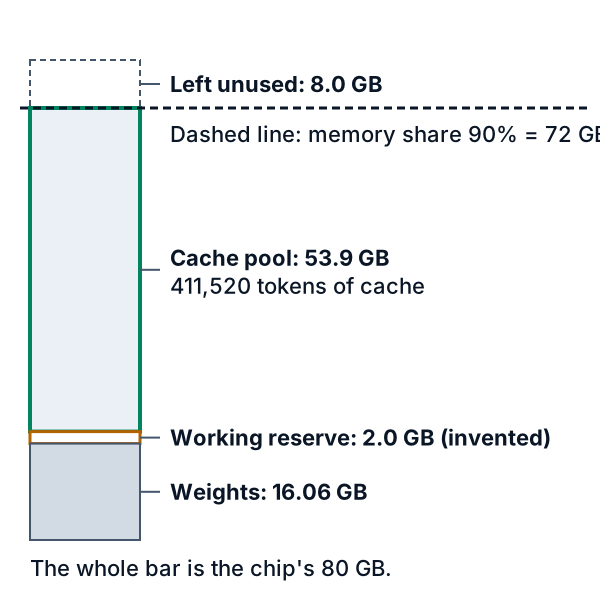
*Figure 1. The chip's memory at a 90% memory share. A higher share moves the line right and turns unused room into pool.*
### The longest chat is a ceiling, not a slice
The longest chat is the most tokens one chat may reach, prompt and reply together. A good server hands out cache in small blocks of 16 tokens, only as a chat grows ([lesson 22](https://spicyshark.co/learn/paged-kv-cache/)), so an 8,000-token ceiling takes no room until a chat gets there. The pool holds 205 chats of 2,000 tokens. A server that set aside the full 8,000 for every chat on arrival would hold 51, and at 32,000 tokens only 12.
The ceiling still matters twice. The toy turns away a chat that would pass it. And the server will not start if the pool cannot hold one chat of that length: for 128,000 tokens the toy needs a memory share of at least 44%.
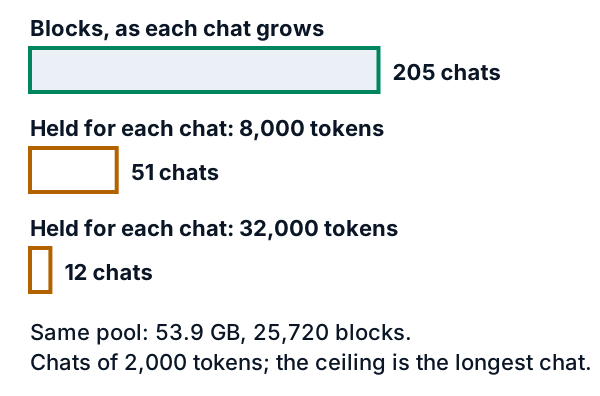
*Figure 2. Chats of 2,000 tokens that fit in the 53.9 GB pool. Green hands out blocks as chats grow; orange holds the full ceiling for every chat.*
### More chats at once helps, then stops
The most chats at once caps how many chats the server works on in one step. Each added chat shares the same trip to read the model, so the total rises. The server also reads every chat's cache, so each wait between words grows. The toy serves 600 chats at each cap. With one chat at a time it writes 117 tokens a second and a user waits 8.0 ms between words. At 64 it writes 1,202 and the wait is 47.3 ms. Doubling to 128 adds only 8% to the total and makes each wait 1.7 times as long, 79.4 ms. The total flattens because every chat's prompt must still be read once, and that work does not shrink.
At 256 the chats in progress need more cache than the pool holds. The server pauses the newest chat, frees its room and rebuilds its notes later (vLLM calls this preemption): 11 pauses, 21,333 tokens of cache rebuilt. A cap of 512 gives the same result, because now the pool, not the cap, decides how many run.
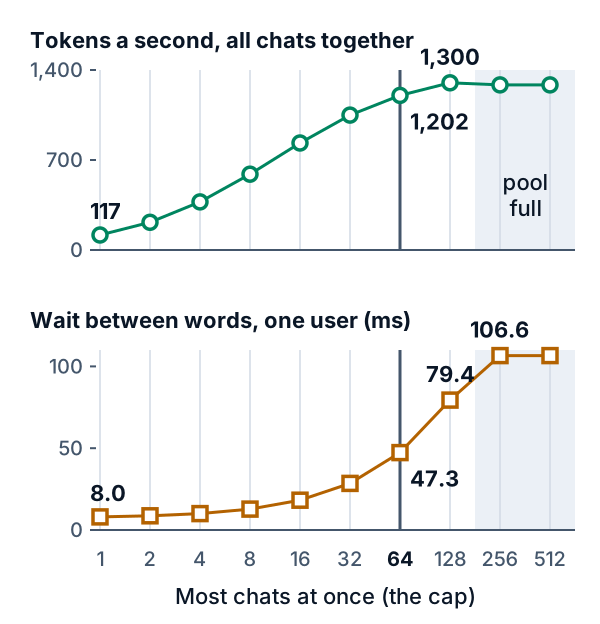
*Figure 3. The toy server at a 90% share and an 8,000-token ceiling. The grey line marks a cap of 64, the last before a doubling adds under 10%.*
### The share has a price too
A higher memory share gives the pool more room: 21.9 GB at 50% and 53.9 GB at 90%, or 167,376 and 411,520 tokens. That room comes out of the unused part, which other programs need too, and two servers on one chip must split the share. A small pool can also cancel a high cap: at 50% the total is 1,202 tokens a second at a cap of 64 but 1,168 at 128, because chats pause.
## What this means when you build
- **Know which part each setting moves.** The memory share moves room between the pool and the unused part. The longest chat is a ceiling on one chat. The most chats at once caps how many share the pool. None adds memory.
- **Set the longest chat to what users need.** In the toy, a ceiling of 8,000 tokens starts at a 24% share, 32,000 at 28% and 128,000 at 44%.
- **Raise the most chats at once until the pool is full or the wait passes your target, then stop.** Here 64 to 128 added 8% and made each wait 1.7 times as long.
- **Leave room if anything else runs on the chip.** The shares of two servers must add up to less than the whole.
- **Watch the server's pause messages, and measure at your load.** A paused chat shows up as a delay, not an error. Measure the slowest users, not the average ([lesson 27](https://spicyshark.co/learn/why-average-speed-is-misleading/) says why), with chats like your users send.
## Go deeper
*Optional. This part is for readers who write Python. The code is in the `code/` folder next to this lesson. From inside that folder, `python3 show_numbers.py` prints every number below, and `python3 -B -m pytest -q -p no:cacheprovider` runs the tests.*
vLLM, an open-source model server, calls the three settings `gpu_memory_utilization` (the memory share), `max_model_len` (the longest chat) and `max_num_seqs` (the most chats at once), and calls a chat a request or a sequence.
### The pool sum
Let G be the card's memory, u the memory share (`gpu_memory_utilization`), W the weights, R the reserve and c the bytes of cache for one token. A block holds 16 tokens, the default of the vLLM paper:
```text
allowed = u G
pool = allowed - W - R
blocks = pool // (16 c)
tokens = 16 blocks
```
G is 80e9 bytes, the A100 data sheet's "80GB" read as in [lesson 24](https://spicyshark.co/learn/how-an-ai-server-answers-many-people-at-once/). W is 2 bytes for each of 8,030,261,248 weights, 16,060,522,496 bytes, and c is 131,072, the figures of lessons [22](https://spicyshark.co/learn/paged-kv-cache/) and [24](https://spicyshark.co/learn/how-an-ai-server-answers-many-people-at-once/) (lessons [18](https://spicyshark.co/learn/model-memory/) and [26](https://spicyshark.co/learn/why-a-big-model-needs-several-gpus/) read the card as 80 GiB, lesson 24 and this lesson as 80 billion bytes; lesson 22 counts cache sizes in GiB). A block is 2,097,152 bytes. R is 2 GB and invented. `memory_parts` does this sum and rounds the pool down to whole blocks; each row of the table is one call. Under lesson 18's reading, 80 GiB, `memory_parts(90, GPU_BYTES_GIB)` gives a pool of 59.2 GB, or 28,252 blocks, with room for 226 chats of 2,000 tokens, against 53.9 GB, 25,720 and 205. The card is 7.4% larger and the pool 9.8%, because the weights and the reserve do not change.
| Share | Pool | Chats of 2,000 |
|---|---|---|
| 30% | 5.9 GB | 22 |
| 50% | 21.9 GB | 83 |
| 90% | 53.9 GB | 205 |
| 98% | 60.3 GB | 230 |
At 90% the pool is 25,720 blocks, or 411,520 tokens, and a chat of 2,000 tokens takes 125 blocks, so 205 fit. Below a 23% share the weights and the reserve leave no block at all. The vLLM engine-arguments page (the "latest" version, read 2026-10-19) describes `gpu_memory_utilization` as "the fraction of GPU memory to be used for the model executor, which can range from 0 to 1" and gives "0.92" as the default when it is unspecified (the stable docs give the same 0.92). It is a per-instance limit: for two servers on one GPU the page suggests 0.5 each. In the source (main branch, read the same day), `request_memory` in `vllm/v1/worker/utils.py` multiplies the total memory by the share, and `determine_available_memory` in `vllm/v1/worker/gpu_worker.py` profiles a test pass and subtracts what it used from the request.
### The server that will not start
One chat of the longest length must fit. The toy starts only if its blocks reach the blocks of that length, and a 128,000-token ceiling needs 8,000. At a 40% share the pool is 13.9 GB, or 6,646 blocks, so the server will not start. At 44% it has 8,172 blocks and starts. The lowest working share is 24% for ceilings of 4,000 and 8,000 tokens, 26% for 16,000, 28% for 32,000, 34% for 64,000 and 44% for 128,000. The `max_model_len` entry says "Model context length (prompt and output)." When the pool is too small, the source raises an error whose text includes: "To serve at least one request with the model's max seq len", the cache needed, the cache available, "Try increasing `gpu_memory_utilization` ... or decreasing `max_model_len`".
### Blocks against reserving the full length
This is `room`, comments removed:
```python
def room(share: int, longest: int, reserved: bool = False) -> dict:
parts = memory_parts(share)
per_longest = blocks_for(longest)
per_typical = blocks_for(min(TYPICAL_CHAT, longest))
at_longest = parts["blocks"] // per_longest
return {**parts, "starts": at_longest >= 1, "at_longest": at_longest, "typical": at_longest if reserved else parts["blocks"] // per_typical,
"per_typical": per_typical, "per_longest": per_longest}
```
With blocks, chats of 2,000 tokens take `per_typical` blocks each and the ceiling does not change the count. With reserving, every chat takes `per_longest`. At a 90% share, chats at once by longest chat in tokens, reserved against blocks:
| Longest | Reserved | Blocks |
|---|---|---|
| 4,000 | 102 | 205 |
| 8,000 | 51 | 205 |
| 32,000 | 12 | 205 |
| 128,000 | 3 | 205 |
The speed follows. With the cap out of the way (512), the block server writes 1,284 tokens a second at either ceiling, with 194.9 chats running on average. The reserving server writes 1,161 at 8,000 with 49.7 running, and 732 at 32,000 with 11.9 running. Its users wait less per word, 39.9 ms and 15.6 ms against 106.6 ms, but only because fewer run at once.
### The scheduler
`serve` is [lesson 24](https://spicyshark.co/learn/how-an-ai-server-answers-many-people-at-once/)'s continuous batching plus a pool of blocks. This is its memory part, comments removed:
```python
paused_now = False
k = 0
while k < len(running):
i = running[k]
if not reserved and (requests[i].prompt + made[i]) % BLOCK_TOKENS == 0:
if free == 0:
j = running.pop()
free += held[j]
held[j] = 0
waiting.appendleft(j)
paused += 1
paused_now = True
continue
free -= 1
held[i] += 1
k += 1
joined = []
while not paused_now and waiting and len(running) < cap:
i = waiting[0]
need = blocks_for(longest) if reserved else blocks_for(requests[i].prompt + made[i] + 1)
if need > free:
break
waiting.popleft()
free -= need
held[i] = need
running.append(i)
joined.append(i)
```
A running chat whose next token starts a new block takes one. If none is free, the newest running chat gives up all its blocks and goes to the front of the queue, keeping the tokens it wrote. Nobody joins in that step. A waiting chat joins, oldest first, only while fewer than `cap` run and the pool has the blocks for its next token; the first that does not fit holds up the rest. A chat that joins has its prompt and the tokens it wrote before read in that step, which [lesson 24](https://spicyshark.co/learn/how-an-ai-server-answers-many-people-at-once/)'s step time already counts. With the pool set to a billion blocks, `serve` gives lesson 24's `simulate` the same times.
### The cap sweep
The 600 chats are one seeded draw (seed 2026), all waiting at time zero, so the server never runs short of work: prompts of 305 to 5,965 tokens, mean 1,882, and replies of 40 to 400, mean 157. The pool is the 90% share with an 8,000-token ceiling. Tokens/s is tokens a second for everyone together; the wait is between words for one user.
| Cap | Tokens/s | Wait |
|---|---|---|
| 1 | 117 | 8.0 ms |
| 8 | 590 | 12.8 ms |
| 32 | 1,049 | 28.5 ms |
| 64 | 1,202 | 47.3 ms |
| 128 | 1,300 | 79.4 ms |
| 256 | 1,284 | 106.6 ms |
A cap of 512 equals 256. Every doubling up to 64 adds at least 14.6% to the total, and 64 to 128 adds 8.2% while the wait grows 1.68 times. The code defines "stops paying" as the first cap whose doubling adds under 10% (`stops_paying`), and it returns 64. Ten percent is a choice; a target for the wait picks a cap too, 32 for 30 ms and 64 for 50 ms.
The flattening has a floor under it. Reading the 1,129,059 prompt tokens takes at least 58.1 s of arithmetic at 51.5 microseconds a token, so no cap can pass 94,117 reply tokens over 58.1 s, 1,619 tokens a second. The wait per word also grows because a step that reads a new prompt is long: a prompt of the mean 1,882 tokens takes 96.9 ms of arithmetic.
A smaller pool moves the knee. At a 50% share, with 167,376 tokens, a cap of 64 writes 1,202 tokens a second with no pauses and a cap of 128 writes 1,168 with 26. At 35% (75,824 tokens) a cap of 32 writes 1,038 with 4 pauses, and caps of 64 and up write 1,018 with 39.
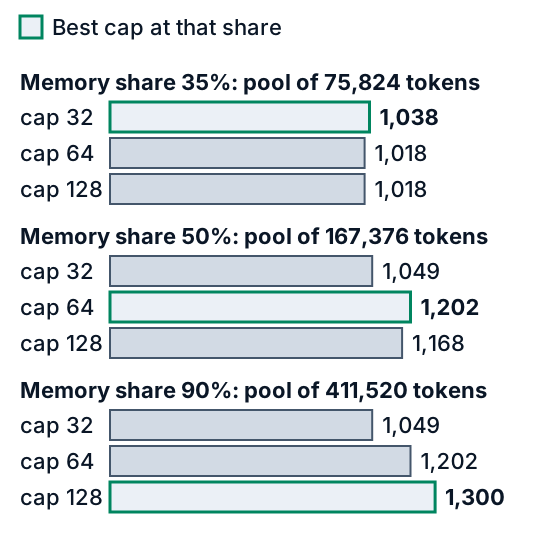
*Figure 4. The best cap depends on the pool.*
### Preemption
When blocks run out the toy pauses the newest running chat. The vLLM paper (Kwon et al., SOSP 2023) says that vLLM serves requests first come, first served and that "the latest requests are preempted first", and that it evicts all of a sequence's blocks or none. It names two ways back, swapping the blocks to CPU memory and recomputing them; the toy recomputes. The optimization page (read 2026-10-19) says: "Preempted requests are recomputed when sufficient KV cache space becomes available again." and "In vLLM V1, the default preemption mode is RECOMPUTE rather than SWAP". It warns that preemption "can adversely affect end-to-end latency". For frequent preemptions it advises more `gpu_memory_utilization`; a lower `max_num_seqs` or `max_num_batched_tokens`; or more GPUs ([lesson 26](https://spicyshark.co/learn/why-a-big-model-needs-several-gpus/)). The count shows in Prometheus metrics, or in the log with `disable_log_stats=False`.
A hand-worked case is pinned by the test. Two chats have 30 tokens and will write 10, in a pool of 4 blocks, 2 each. After the second step each is at 32 tokens and needs a third block. None is free, so the newer chat is paused and its blocks are freed. The older one finishes. The newer one rejoins and reads its 32 tokens in one step. The run takes 18 steps, against 10 with room for both.
### The second server's names
Text Generation Inference (TGI), Hugging Face's server, documents its launcher arguments on one page (the "main" docs, read 2026-10-19). The names differ, and not one to one.
- **Memory share.** `--cuda-memory-fraction`: "Limit the CUDA available memory. The allowed value equals the total visible memory multiplied by cuda-memory-fraction". Default 1.0, against vLLM's 0.92.
- **Longest chat.** `--max-total-tokens`: "the most important value to set as it defines the "memory budget" of running clients requests", with a default of "min(max_position_embeddings, 4096)". The page says that the larger the value, "the less effective batching can be". It does not say whether the server holds that many tokens for each chat, so Figure 2 is a claim about the toy, not about TGI.
- **Most chats at once.** No twin. `--max-batch-total-tokens` counts tokens in a batch, "the largest possible amount that fits the remaining memory (after the model is loaded)", and the page says TGI "cannot infer this number automatically". `--max-concurrent-requests` (default 128) refuses new clients when full instead of making them wait.
### What the toy leaves out
The reserve is fixed at 2 GB. A real server measures it at start-up: in the source, the start-up message splits the used memory into "consumed memory (weights + non-torch)", "peak activation" and "CUDAGraph memory". The `max-num-active-seqs` entry says "max_num_seqs sizes the model runner (per-request buffers and CUDA graph capture)", so in a real server the cap can change the reserve and so the pool. The chats are invented and all waiting at the start, with the same mean length; real traffic arrives over time and changes. The toy turns away a whole chat whose prompt and reply together pass the longest chat. vLLM differs: `_validate_prompt_len` in `vllm/v1/engine/input_processor.py` rejects only a prompt that leaves no room for a reply token, and `check_stop` in `vllm/v1/core/sched/utils.py` ends a reply that reaches `max_model_len` as length-capped. A server that stored each cached number in fewer bits would have a smaller c: at 8 bits it would be 65,536 and the pool would hold twice the tokens. Other settings matter. `max_num_batched_tokens` is the "maximum number of tokens that can be processed in a single iteration". The optimization page says smaller values such as 2048 give better inter-token latency and larger ones a better time to first token. The toy has no chunked prefill ([lesson 24](https://spicyshark.co/learn/how-an-ai-server-answers-many-people-at-once/)) and no second GPU.
### Proof it works
`test_settings_calc.py` pins the numbers above: the bar adds up to the card at every share; the chats that fit and when a server will not start; reserving against blocks; [lesson 24](https://spicyshark.co/learn/how-an-ai-server-answers-many-people-at-once/)'s `simulate` matched on an unlimited pool; the pause case above, replayed step by step, and a chat of exactly the longest length, which is still served; the sweep's gains, the stop at 64 and the smaller pool. A last test finds every number this lesson quotes in the code's output and in the figures. `test_widget.py` runs the widget's JavaScript in Node against the Python on a grid of settings, and drives the page, pools that fill included, with a stand-in for the browser.
### Where this is used in practice
The vLLM paper (Kwon et al., SOSP 2023; read in full on 2026-10-19) states the problem as this lesson does. Its Figure 1 shows a 13B model on a 40 GB A100 with about 65% of memory for the weights and close to 30% for the requests' states. It says earlier systems "statically allocate a chunk of memory for a request based on the request's maximum possible sequence length", and its profiling found only "20.4% - 38.2%" of the cache memory holding actual token states in them. It reports 2 to 4 times the throughput of those systems at the same latency; that is their setup, not this toy. Documentation changes between versions, so check the one you run.
## Skills this lesson builds
- Split a GPU's memory into weights, reserve, cache pool and unused part, and work out the pool from a memory share.
- Say how many chats of a given length fit, and whether a server with a given longest chat will start.
- Explain why a longest-chat ceiling costs little with blocks and a lot when the full length is reserved for each chat.
- Read a sweep of the most chats at once, find where it stops paying, and say what a full pool does.
- Match one server's memory settings to another's from their documentation.
**Portfolio project:** write a calculator that takes a model's config file and a GPU's data sheet, then reports the weights, the cache for one token and the pool at three memory shares, with the chats of 1,000, 4,000 and 16,000 tokens that fit. Run [lesson 24](https://spicyshark.co/learn/how-an-ai-server-answers-many-people-at-once/)'s simulator with a pool and a cap on your own invented chats. Publish the code, one chart of the total and the wait per word against the cap, and a note on where your knee differs from this lesson's.
## Check yourself
1. A server has 80 GB of memory, weights of 16.06 GB, a 2 GB reserve and a memory share of 90%. How big is the cache pool, and how much is left unused?
Answer
The server may use 0.9 x 80 = 72 GB. After the weights and the reserve, 72 - 16.06 - 2 = 53.94 GB is the pool. The other 80 - 72 = 8 GB is left unused.Answer
With blocks, a chat takes room only as it grows, so the ceiling takes none until a chat reaches it. A server that held the full length for every chat would fit 51 chats at 8,000 and 12 at 32,000. A ceiling can also stop the server from starting if the pool cannot hold one chat of that length.Answer
The server may use 32 GB. After 16.06 GB of weights and 2 GB of reserve, 13.94 GB is left, which is 6,646 blocks of 2,097,152 bytes, or 106,336 tokens. One chat of 128,000 tokens needs 8,000 blocks, so the server will not start. At 44% the pool is 8,172 blocks and it starts.Answer
At 256 the chats in progress already need more cache than the pool holds, so the server pauses chats (11 times) and about 195 chats run on average. The pool, not the cap, limits how many run, and a higher cap changes nothing.Answer
The toy pauses the newest running chat, frees its blocks, keeps the tokens it wrote and reads them again when the chat rejoins. The documentation says vLLM can preempt requests, that preempted requests are recomputed when space returns, and that V1 defaults to recompute. It advises more `gpu_memory_utilization` or a lower `max_num_seqs` or `max_num_batched_tokens`.