---
title: "Why is the average speed of an AI service a misleading number?"
description: "Slow replies hide in a good average. Report the middle and the slowest 1 in 20 and 1 in 100. If users arrive on their own, send test requests on a schedule."
topic: "AI systems"
chapter: "plan-and-measure"
order: 27
minutes: { plain: 5, deep: 14 }
prerequisites: ["Prefill and decode", "Division and ratios", "Reading short Python functions", "Continuous batching (lesson 24)"]
seo_title: "Why is the average speed of an AI service misleading?"
date: 2026-10-19
---
# Why is the average speed of an AI service a misleading number?
Take a toy AI server that is handling 17 requests a second. A request takes 0.74 seconds (s) on average, yet 1 request in 20 takes more than 2.36 s and 1 in 100 more than 3.46 s. People feel the slow ones, and the average hides them. This lesson shows why, using a simulation that runs inside one Python program and uses no network, and what to report instead.
## In one minute
Picture 10 shoppers at a checkout. Eight wait 1 minute and two wait 16, so the average is 4 minutes. Nobody waited 4 minutes: eight waited far less and two far more. A few slow cases pull the average up, yet it stays far below what the slowest meet.
A percentile fixes this. Sort every wait from shortest to longest. The p50 is the middle one, the typical wait. The p95 is the wait that 95 of every 100 requests beat, so 1 in 20 is slower. The p99 is the wait that 99 in 100 beat, so 1 in 100 is slower. Report all three, worked out from every request, and report the wait before the first word ([lesson 23](https://spicyshark.co/learn/why-ai-waits-before-the-first-word/)) apart from the total time, from send to last word.
## Explore the numbers
[Open the widget](https://spicyshark.co/learn/why-average-speed-is-misleading/widget.html). It sends 2,000 invented requests to a toy server with 8 slots, the places that serve requests at the same moment ([lesson 24](https://spicyshark.co/learn/how-an-ai-server-answers-many-people-at-once/)). Drag the load from 4 to 19 requests a second; this server tops out near 19.7. The curve is every request's time, fastest to slowest, with the average as a dashed line and p50, p95 and p99 as dots. The buttons switch between total time, from send to last word, and the wait before the first word, called time to first token. At the opening 17 a second, the total time averages 0.74 s, but p95 is 2.36 s and p99 is 3.46 s. Under More settings you can freeze the server for 5 s and change how the tester sends. It is a toy at a chip's peak speed, not a real service.
## How it works
### Many fast, a few slow
At 17 requests a second, 1,355 of the 2,000 requests take the average of 0.74 s or less and 645 take longer. In Figure 1 most requests sit on the low, flat part of the curve and the last few shoot up. That thin end is the tail, and the long waits in it are tail latency. Replies explain part of it: 217 of the 2,000 are long, 100 tokens or more, against at most 60 for the rest, and a long reply holds its slot. Waiting in line for a slot adds more as the load grows.
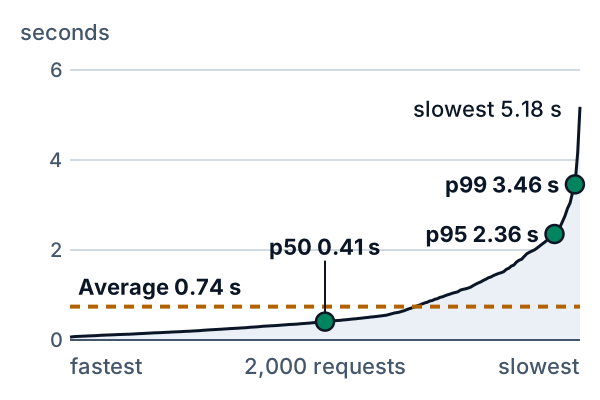
*Figure 1. Every request's total time. The dashed line is the average; green dots mark p50, p95 and p99.*
At every load the order is the same: p50 below the average, the average below p95, p95 below p99. The average is pulled above the typical request and stays far below the tail.
### Load widens the gap
Figure 2 shows the wait before the first word; the gap between the average and the tail, in seconds, grows with load. At 12 requests a second the average is 0.059 s, p95 is 0.39 s and p99 is 0.73 s. At 19 the average is 1.06 s and p99 is 4.04 s. From 4 to 12 a second the p50 wait barely moves, from 0.014 to 0.016 s, while the p99 rises from 0.036 to 0.73 s. The tail moves first, and an average of 0.059 s looks healthy while 1 request in 20 already waits more than 0.39 s.
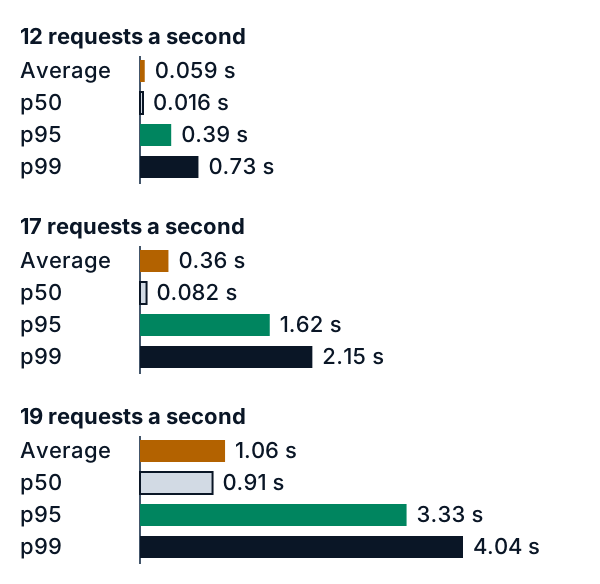
*Figure 2. Wait before the first word. Orange is the average, the outlined bar p50, green p95 and the dark bar p99.*
### One user, many requests
A chat sends many requests, and a rare slow one becomes common for the person. If 1 request in 20 is slower than p95, a session of 10 requests meets at least one with chance 1 minus 0.95 to the power 10, which is 40%. For a session of 20 it is 64%. This assumes each wait is independent of the others.
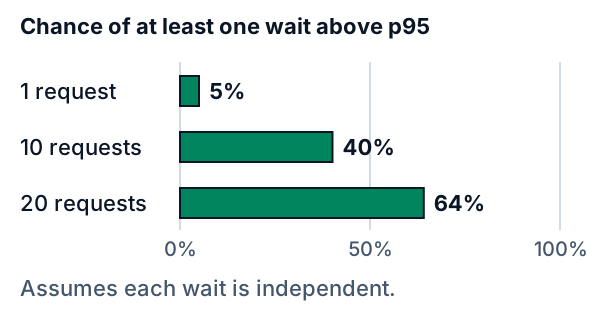
*Figure 3. The chance that a session meets at least one wait above p95.*
## What this means when you build
- **Report p50, p95 and p99, not the average alone.** At 17 a second the average is 0.74 s and the p99 is 3.46 s.
- **Report the wait before the first word apart from the total time.** At 17 a second the average wait is 0.36 s and the p99 wait is 2.15 s, against 0.74 s and 3.46 s for the total.
- **Set targets as percentiles.** "Average under 1 s" passes at 0.74 s while 1 request in 20 takes over 2.36 s. "p95 under 2 s" fails there, and it says how many may be slow: 1 in 20.
- **Measure at and above the expected load.** The p99 wait is 0.036 s at 4 a second and 4.04 s at 19. Include the cases you expect, such as prompts that hit a cache (see the [lesson on prompt caching](https://spicyshark.co/learn/what-is-prompt-caching/)) and users who reach a usage limit (see the [lesson on usage limits](https://spicyshark.co/learn/how-to-stop-one-user-running-up-the-bill/)), since either can change the waits. Test your own service, in a test setting, within its limits.
- **If your users arrive on their own, each when they please, send test requests on a schedule, not one after another.** A tester that waits for each reply sends less while the server is stuck, so it misses the slow requests, a flaw called coordinated omission. In the toy, with a 5 s freeze, the p99 wait is 4.23 s for a tester on schedule and 0.040 s for one that waits.
- **Keep every sample, or a histogram you can merge.** Two servers' p99 waits of 0.036 s and 4.04 s average to 2.04 s, but all 4,000 requests together have a p99 of 3.75 s. Percentiles cannot be averaged.
- **When a provider quotes one speed number, ask which percentile, which measure and at what load, and how the test sent its requests (on a schedule, or one after another).**
## Go deeper
*Optional. This part is for readers who write Python. The code is in the `code/` folder next to this lesson. From inside that folder, `python3 show_numbers.py` prints every number in this lesson, and `PYTHONDONTWRITEBYTECODE=1 python3 -m pytest -q -p no:cacheprovider` runs the tests. Nothing in it sends a request over a network: the tester and the server are two parts of one program.*
### How a percentile is computed
A percentile is read from a sorted list. The nearest-rank rule takes the value at rank ceil(p x n / 100) among n sorted times, counting from 1:
```python
def percentile(values, p):
ordered = sorted(values)
return ordered[-(-p * len(ordered) // 100) - 1]
```
The expression `-(-a // b)` rounds a / b up, and 1 is taken off because Python counts from 0. For 2,000 times, p99 is the 1,980th, so 20 times are slower. How many times lie above depends on how many samples there are. In the table, Rank is the position of the p99 and Slower is the number of times above it:
| Requests | Rank | Slower |
|---|---|---|
| 50 | 50 | 0 |
| 100 | 99 | 1 |
| 200 | 198 | 2 |
| 1,000 | 990 | 10 |
| 2,000 | 1,980 | 20 |
From 50 requests the p99 is just the slowest one, and from 100 it is the second slowest, so one odd request sets it. A p99 with more than one request above it needs at least 200 requests. Other tools use other rules. `numpy.percentile` interpolates between neighbouring values by default, so for the numbers 1 to 50 its p99 is 49.51 where nearest rank gives 50; with `method="inverted_cdf"` it gives nearest rank. On this lesson's 2,000 times the default differs by less than a thousandth of a second. A report should say which rule it uses.
### The load sweep
The toy sends the same 2,000 requests at every load, one seeded draw (seed 2027) with prompts of 30 to 599 tokens and replies of 8 to 396. A load only scales the gaps between sends. The server is [lesson 24](https://spicyshark.co/learn/how-an-ai-server-answers-many-people-at-once/)'s continuous batching with 8 slots, rewritten in `tail_sim.py` as `serve` so that it can freeze and can send in two ways; a test checks that on a schedule it gives that lesson's times for every request. It can finish at most 19.7 requests a second, so the loads stop at 19. Total time is the last word minus the send time, and the wait is the first word minus the send time. Load is the number of requests sent a second, and the tables give seconds. Running `show_numbers.py` prints the p50, the p95 and the slowest time as well.
| Load | Average | p99 |
|---|---|---|
| 4 | 0.38 | 2.80 |
| 8 | 0.39 | 2.85 |
| 12 | 0.44 | 3.02 |
| 15 | 0.53 | 3.21 |
| 17 | 0.74 | 3.46 |
| 19 | 1.45 | 4.81 |
| Load | Average | p99 |
|---|---|---|
| 4 | 0.016 | 0.036 |
| 8 | 0.020 | 0.12 |
| 12 | 0.059 | 0.73 |
| 15 | 0.15 | 1.22 |
| 17 | 0.36 | 2.15 |
| 19 | 1.06 | 4.04 |
The first table is total time and the second the wait before the first word. The total-time tail is long even at 4 a second, a p99 of 2.80 s, because the long replies take that long to write. The wait before the first word is the one that load changes.
These numbers belong to one order of requests. The widget's Shuffle button reorders the prompts, replies and gaps, and over its 8 orders at 17 a second the average total time runs from 0.62 to 0.78 s and the p99 from 3.20 to 3.55 s. One run is a sample, so repeat it and report the spread.
### The chance a session meets a slow request
If a share s of requests is slower than some cutoff and each wait is independent of the others, the chance that a session of k requests meets at least one slow request is 1 - (1 - s)^k, because (1 - s)^k is the chance of missing them all. With s = 0.05, the share above p95, the chance is 5% for 1 request, 40.1% for 10 and 64.2% for 20. Adding shares to get 50% for 10 requests would count sessions with two slow requests twice.
The same arithmetic is used across servers: if each of 100 servers is slower than the cutoff for 1 request in 100, a request that waits for all 100 is slower with chance 1 - 0.99^100, which is 63.4%. Independence is an assumption. A busy minute slows many requests in a row, so for a real service this chance is a rough guide.
### Two ways to send test requests
A tester that sends on a schedule sends each request at its planned time, whatever the server is doing. A tester that waits for each reply keeps a fixed number of connections, here 8, and each sends its next request when its last reply is complete, or at the planned time if that is later. Real tools offer both. Compare them on one server with one fault: at 12 requests a second, well below its limit, the server freezes for 5 s at 40 s. The table gives how many requests each tester sends during the freeze, and its p99 wait. Waiting is the tester that waits for each reply.
| Tester | Sent | p99 wait |
|---|---|---|
| On schedule | 58 | 4.23 s |
| Waiting | 2 | 0.040 s |
When the server freezes, the connections of the waiting tester all wait for replies that do not come, so it stops sending, and when the freeze ends it sends the requests it held back in a rush. Only 2 requests go out in the freeze instead of 58. Even with no freeze, 772 of its 2,000 requests go out later than planned, because the last reply on their connection is not yet complete at the planned time; the freeze adds 107, so 879 in all. It records almost no slow waits: 2 of its requests wait over 1 s for the first word, against 178 for the tester on schedule, and its p99 is 0.040 s. Its one worst wait, 5.01 s, shows the freeze, but a p99 over 2,000 requests ignores the worst 20. It also never has more than 8 requests out, so it never queues the way people who arrive on their own do.
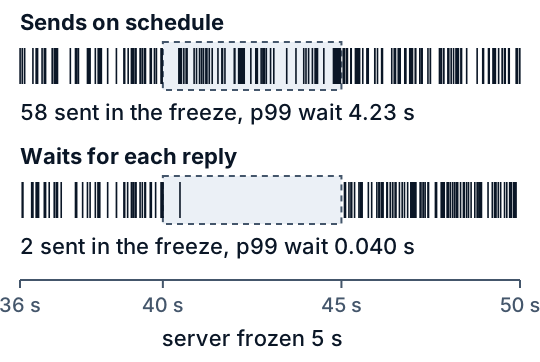
*Figure 4. When each tester sent its requests. The dashed box is the 5 s freeze.*
This flaw is called coordinated omission: the tester coordinates with the server, and omits the measurements it should have taken while the server is slow. A tester can time each request from its planned send time, not its actual one, so that the tester's own delay counts as waiting. This lesson's code does not compute that and gives no numbers for it.
### Averaging percentiles
Take two servers that handled the same 2,000 requests, one at a quiet 4 a second and one at a busy 19. Their p99 waits are 0.0360 s and 4.0375 s, and the average of the two is 2.0367 s. Pool all 4,000 waits and the p99 is 3.7473 s. The 40 slowest of the 4,000 all come from the busy server, so the pooled answer sits near its tail, and the averaged 2.04 s matches neither server. To combine servers, compute the percentile from all the samples, or keep a histogram, a count of requests in each band of time. Counts from many servers add up, and the percentile can be read from the sum to within the width of a band.
### What the toy leaves out
Real clients may retry a slow request, which adds load just when the server is slow. A request that gathers answers from many servers is as slow as the slowest of them. Network time between the person and the server is not here, and neither are the memory limits [lesson 24](https://spicyshark.co/learn/how-an-ai-server-answers-many-people-at-once/) mentions. The load is steady, with gaps drawn once and scaled, whereas real traffic rises and falls, and a quiet hour's p99 says little about a busy one. The server's step times are lesson 24's best case at a chip's peak speed, so the seconds are not those of a real service. The shape, though, is what matters: the average sits low, the tail sits high, and the gap in seconds grows with load.
### Proof it works
`test_tail_sim.py` pins the numbers above. On a schedule, the toy must give [lesson 24](https://spicyshark.co/learn/how-an-ai-server-answers-many-people-at-once/)'s times for every request at three loads. The percentile function must give the 1,980th of 2,000 with 20 slower, the slowest of 50, and the same values as NumPy's `inverted_cdf`. At every load p50 < average < p95 < p99 < slowest for both measures. The session chance must equal one minus the product of the misses. The waiting tester must never send early, never have more than 8 requests out, and must show a p99 more than 100 times lower than the tester on schedule. The averaged p99 must stay under 0.6 of the pooled one. A last test reads this page and the four figures and checks that each number they quote is the one the code gives. `test_widget.py` runs the widget's JavaScript in Node against the Python over 38 settings, and drives the page through a small stand-in for the browser.
### Where this is used in practice
The Tail at Scale (Dean and Barroso, Communications of the ACM, February 2013) says that rare slow replies affect a significant fraction of requests in large systems and that layers of queueing amplify the variability. Its example is a server with a typical reply of 10 ms and a p99 of 1 s; a request that needs 100 such servers in parallel is, it says, slower than 1 s for 63% of user requests. The Google SRE book's chapter on service level objectives (Jones, Wilkes and Murphy with Smith, page copyright 2017 Google) says that averaging request times "obscures an important detail", that most metrics are better thought of as distributions, and that a high percentile shows a plausible worst case while the p50 shows the typical one. It gives an example in which a typical request takes about 50 ms while 5% take 20 times longer, and says that watching only the average would show no change over a day in which the tail changed a lot. It also says that the effect of high variance is made worse at high load by queueing.
The wrk2 README (Tene, undated) says that wrk, which sends the next request on a connection only after a reply, shows a strong coordinated omission effect, and that wrk2 measures from the time a request should have been sent at the configured constant rate. The vLLM project's benchmark documentation defines time to first token as the time from sending a request to receiving its first streamed output, notes that metric names are not standardized across benchmarking tools, and describes an option that reports the time requests spend waiting for the benchmark client's own limit on concurrent requests. All of these were read on 2026-10-19. The figures in this lesson are the toy's, not theirs.
## Skills this lesson builds
- Explain why the average hides the slow requests, and say what to report instead.
- Read p50, p95 and p99 from a sorted list, and say how many requests a p99 needs.
- Work out the chance that a session meets at least one slow request.
- Tell a tester that sends on a schedule from one that waits for each reply, and say what the second misses.
- Say why percentiles from different servers cannot be averaged.
**Portfolio project:** write a small simulation of your own, entirely inside one program, with invented request times and a server that serves a few at a time. Compute the average, p50, p95 and p99 at a light and a heavy load, then add a freeze and compare a tester that sends on a schedule with one that waits for each reply. Publish the code, one chart and a note on where your results differ from this lesson's.
## Check yourself
1. Ten shoppers wait: eight for 1 minute and two for 16. What are the average and the p50?
Answer
The average is (8 x 1 + 2 x 16) / 10 = 4 minutes. The p50 is the middle wait, the 5th of 10 sorted, which is 1 minute. The average matches nobody's wait.Answer
100 requests, 1 in 20. A session of 20 meets at least one of them with chance 1 minus 0.95 to the power 20, about 64% (Figure 3), if the waits are independent.Answer
No. The average of two percentiles is not a percentile of the pooled requests. In the toy, the pooled p99 of 4,000 requests is 3.75 s, because the 40 slowest all come from the busy server. Compute it from all the samples or from a merged histogram.Answer
The 4.23 s of the tester that sends on a schedule shows what people sending during the freeze meet: 58 requests went out. The tester that waits for each reply sent only 2 in the freeze, so it recorded almost no slow waits. Its worst wait, 5.01 s, still shows the freeze.Answer
By nearest rank the p99 of 50 sorted times is the one at rank ceil(0.99 x 50) = 50, the last. Nothing lies above it. From 200 requests the p99 has 2 requests above it.