---
title: "Why does a chatbot forget?"
description: "A chatbot keeps no memory between replies. Each reply re-reads the chat up to a fixed limit, so early instructions fall out and long chats cost more."
topic: "AI systems"
chapter: "how-ai-answers"
order: 3
minutes: { plain: 5, deep: 14 }
prerequisites: ["Reading short Python functions", "Bytes, KiB, MiB and GiB (powers of 1,024)"]
seo_title: "Why does ChatGPT forget what I said earlier?"
date: 2026-10-17
---
# Why does a chatbot forget?
You tell a chatbot at the start of a long chat to answer in French. After forty messages and a few pasted files, it answers in English, and it never says that it forgot. It did not forget like a person: the cause is simpler, and it has a price tag. Take Qwen3-8B, an AI model whose makers published its design, so anyone can check the numbers. Its settings file allows chats of up to 40,960 tokens (a token is a chunk of text, often a short word or part of a longer one). To follow a chat that long, the computer running it must hold about 6 gigabytes of working notes in the memory of its graphics chip (GPU). Company chatbots rarely publish the design details this sum needs, so this lesson uses an open model.
## In one minute
A chatbot forgets because it keeps nothing between replies: the chat app sends it the whole conversation again each time, and whatever does not fit its size limit is left out. Picture a helper who knows the world but nothing about your chat. Before each reply the app hands the helper a printed copy of the conversation so far, and the helper writes the next line. The helper's desk is small, so when the copy gets too long the oldest pages slide off, and the helper never learns they existed. A longer copy also takes longer to read, needs more memory and costs more.
## Explore the numbers
[Open the widget](https://spicyshark.co/learn/why-chatbots-forget/widget.html). It is a calculator for the two costs in this lesson, and it starts from the Qwen3-8B settings saved in `code/`. Every figure it prints comes with the formula and your numbers substituted into it.
- **Cache memory.** The formula is `2 x layers x kv_heads x head_dim x bytes per value x tokens x chats`. Edit the layers, KV heads, head size and value type (16, 8 or 4 bits), set the context length on a log scale up to 1,048,576 tokens, and set the number of concurrent chats. Then pick a GPU size. The widget subtracts the weights (parameters times bytes per weight, 8.2 billion times 2 bytes at the start) and tells you how many chats of that length fit in what is left. Try 32 KV heads to see the cache without grouped-query attention, or switch the value type to 8-bit and watch the bytes per token halve.
- **Re-sending history.** Pick the number of replies, the tokens per message and a window. The chart and table compare three cases after those replies: the whole history sent every time (`tokens per message x replies^2`), the history cut to the window, and every token processed once, which is the case where the provider keeps repeated text on its side. The strip under the table shows which messages the window keeps at the last reply, and from which reply message 1, the first instruction, is gone.
With the starting values the widget gives the numbers in this lesson: 147,456 bytes per token, 5.625 GiB at 40,960 tokens, and 5,000 tokens read for 1,000 written (3,500 with a 450-token window). All messages have the same size, as in `tokens_read`. The memory view counts only weights and cache: activations and framework overhead also take GPU memory, so treat "fits" as an upper bound.
## How it works
### The model keeps nothing between replies
A chatbot has two parts. The model is the program that writes the reply: text goes in, text comes out, and it does not learn from your chat. The app is the software around the model: it shows you the chat and stores your messages. When you press send, the app does not send only your new message. It sends the whole conversation so far, called the history, with your message at the bottom, and the model writes one reply.
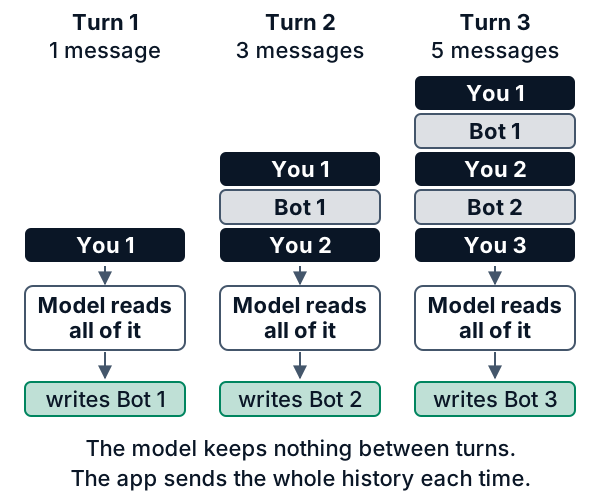
So when a bot uses your name twenty messages later, the name was not stored inside the model. It was in the text the app sent again.
### The window has a fixed size
The model can read only so much at once. This limit is the context window, counted in tokens. Google's documentation says that for its Gemini models a token is about four characters, and 100 tokens are about 60 to 80 English words. Windows are large: Google lists 1,048,576 tokens for its Gemini models, roughly 630,000 to 840,000 English words, and the Qwen3-8B card says 32,768. A chat of short messages rarely fills one. Pasted files and long code listings do. For Qwen3-8B and Google's newest Gemini models, the history you send and the reply share one window; older Gemini models set separate input and output limits.
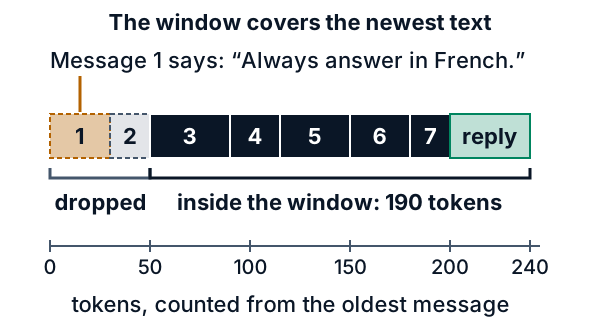
In the picture, message 1, the French rule, is the oldest, so it is the first to be dropped. The model is not told a page is missing, so it answers as if the rule never existed.
### What happens at the edge
When a chat outgrows the window, many apps use one or both of two tricks. They drop the oldest messages. Or they replace old messages with a short summary, which keeps the gist and loses details such as exact numbers. Even inside the window, a 2023 study (Liu and colleagues) found that models often use the middle of a long text less reliably than its start and end.
### Why long chats cost more
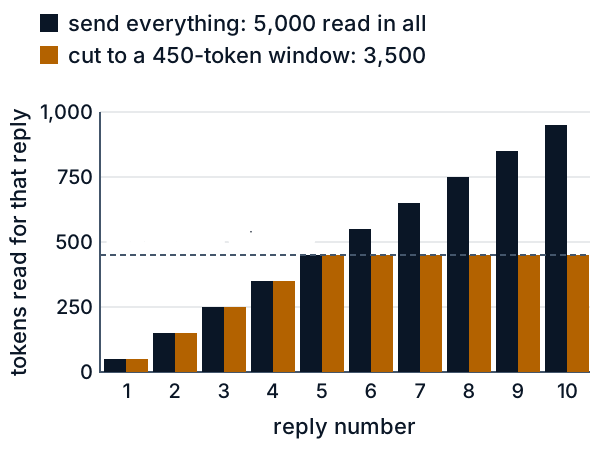
Because the app sends the whole conversation every time, the model reads the early messages again at every reply. A server, the computer in a data center that runs the model, does this reading. In the next picture every message is 50 tokens. Reply 1 reads 50 tokens, and reply 10 reads 950. Over ten replies it reads 5,000 tokens, although only 1,000 were written. A window puts a ceiling on the growth (the orange bars): a 450-token window holds nine messages, so replies 5 to 10 each read 450 tokens and the ten replies read 3,500 in all.
Reading also needs memory. For every token in the window, the server stores a set of numbers about it (the working notes), so it does not have to work them out again for each new word it writes. These notes sit in GPU memory and grow with every token: for Qwen3-8B, 147,456 bytes per token. A full 40,960-token conversation needs the 6 gigabytes from the opening, and a busy server holds many conversations at once.
## What this means when you build
- **Long sessions drift.** A session is one continuous chat with a coding tool. Files the tool reads fill the window fast. Once it is full, the tool drops or summarizes the oldest text, and early instructions go with it. Restate a key rule in a recent message, since models use the start and end of a long text best. To test a tool, plant a made-up fact in your first message, work a while, then ask for it back.
- **Keep key facts in a file the tool re-reads.** Some tools add a project instructions file to every request. GitHub's Copilot documentation describes one, `.github/copilot-instructions.md`, and other tools have their own versions. Put your rules, names and decisions there. Because the tool adds the file again each time, it is much less likely to fall off the desk, but it still uses room in the window, so keep it short.
- **Start fresh sessions on purpose.** When a task is done, write down what is true, open a new session, and give it only that. A short history is cheaper, and the model tends to use it more reliably.
- **Expect cost to grow with history length.** Services you pay for by usage price by the token (Google's price page quotes dollars per million tokens), and a re-sent history is made of tokens. Some providers can keep repeated text on their side to cut that cost; Google's page lists context caching.
- **Do not trust a summary with your numbers.** A summary drops details, so put anything exact, such as a version number or a rule, in your notes file as well.
## Go deeper
*Optional. This part is for readers who write Python. The code is in the `code/` folder next to this lesson, and `python3 show_numbers.py` prints every number below.*
### The naive approach: send everything every time
The simplest chat loop keeps a list of messages and sends all of it on every turn. This is a sketch, where `model` stands for any call to a chat model:
```python
history = []
def chat(user_text):
history.append({"role": "user", "content": user_text})
reply = model(history) # the whole list, every time
history.append({"role": "assistant", "content": reply})
return reply
```
It fails in two ways. Past the window the call is refused or cut, and until then the total reading grows with the square of the number of replies. Take messages of 50 tokens each. Before reply `k` the history holds `2k - 1` messages (`k` from yours, `k - 1` from the bot), so reply `k` reads `50 x (2k - 1)` tokens:
| reply | messages sent | tokens read | running total |
|---|---|---|---|
| 1 | 1 | 50 | 50 |
| 2 | 3 | 150 | 200 |
| 3 | 5 | 250 | 450 |
| 4 | 7 | 350 | 800 |
| 5 | 9 | 450 | 1,250 |
The odd numbers 1 + 3 + 5 + ... + (2n - 1) add up to n squared, so `n` replies read `50 x n^2` tokens. `tokens_read` in `code/context_window.py` simulates the loop and agrees: 10 replies read 5,000 tokens for 1,000 written, and 20 replies read 20,000 for 2,000. Doubling the chat quadruples the reading. With a 450-token window (nine messages), 40 replies read 17,000 tokens instead of 80,000: 50 x (1 + 3 + 5 + 7 + 9) = 1,250 while the window fills, then 450 for each of the other 35 replies, 15,750 in all.
**Tokens here are words.** `count_tokens` counts whitespace-separated words, one word for one token. This is a toy. Real tokenizers cut text into pieces learned from data, for example with byte-pair encoding (Sennrich and colleagues, 2015), so the same text gets different counts under different models, languages and kinds of content. Google's documentation gives a rule of thumb for its own models only (about four characters per token), and this lesson invents no ratio of its own. To budget a real model, pass that model's tokenizer as the `counter` argument.
### A sliding window by hand
A sliding window keeps the newest messages that fit, and drops the oldest first. Three design choices matter. The system message, which holds standing rules, is pinned and never dropped. The kept messages are one unbroken run of the newest, with no holes: the walk goes from newest to oldest and stops at the first message that does not fit. And if the cut leaves a reply at the front of the run, that reply is dropped too, because a reply whose question was cut makes no sense on its own. Nothing is dropped if nothing was cut.
Take six messages, counted in words, with a limit of 12 tokens and a pinned system message:
| # | role | text | tokens |
|---|---|---|---|
| 1 | system | Reply in French. | 3 |
| 2 | user | My cat is Biscuit. | 4 |
| 3 | assistant | Joli nom. | 2 |
| 4 | user | I like tea. | 3 |
| 5 | assistant | Moi aussi. | 2 |
| 6 | user | What is my cat called? | 5 |
The pinned message costs 3, so the budget for the rest is 12 - 3 = 9.
| step | message | cost | budget before | result |
|---|---|---|---|---|
| 1 | #6 | 5 | 9 | keep, 4 left |
| 2 | #5 | 2 | 4 | keep, 2 left |
| 3 | #4 | 3 | 2 | does not fit: stop |
| 4 | #5 | 2 | | a reply at the front, and its question #4 was cut: drop |
The kept list is #1 and #6, 8 tokens in all. Message #3 would fit in the 2 spare tokens, but the walk has already stopped. Skipping #4 to keep #3 would leave a hole. Message #2, with the cat's name, is gone, so the bot cannot answer. Without the pin (`keep_system=False`) the walk keeps #6, #5, #4 and #3, which fills all 12 tokens. Then #3, a reply whose question #2 was cut, is dropped, which leaves 10 tokens, and the French rule is lost.
```python
def truncate(messages, limit, keep_system=True, counter=count_tokens, per_message=0):
def cost(m):
return counter(m["content"]) + per_message
rest = list(messages)
pinned = []
if keep_system:
n = 0
while n < len(rest) and rest[n]["role"] == "system":
n += 1
pinned, rest = rest[:n], rest[n:]
budget = limit - sum(cost(m) for m in pinned)
if budget < 0:
raise ValueError("the pinned system messages alone exceed the limit")
kept = []
for m in reversed(rest):
if cost(m) > budget:
break
kept.append(m)
budget -= cost(m)
kept.reverse()
if len(kept) < len(rest): # the walk cut something
while kept and kept[0]["role"] == "assistant":
kept.pop(0) # a reply whose question was cut
if rest and not kept:
raise ValueError("the newest message does not fit in the limit")
return pinned + kept
```
(The docstring is left out here.) The `limit` you pass is the window minus the room kept for the reply. The `per_message` argument stands for the extra tokens that the chat format adds around every message; Hugging Face's chat-template guide shows that a template wraps each message in role markers. The two `raise` lines make the failure loud. Answering without the newest message, or without the pinned rules, would fail silently, which is worse.
### How much memory the cache takes
When the model reads a token, each attention layer computes a key and a value for it, in each key/value head, and keeps them so that later tokens can look back. This is the attention cache, also called the KV cache. The [paged KV cache lesson](https://spicyshark.co/learn/paged-kv-cache/) covers it in depth. Its size per token follows from the model's published settings:
```text
bytes per token = 2 x layers x kv_heads x head_dim x bytes per value
```
The 2 is one key plus one value. For Qwen3-8B, the [config.json](https://huggingface.co/Qwen/Qwen3-8B/resolve/main/config.json) on Hugging Face (Apache-2.0 model; a saved copy is in `code/`) gives `num_hidden_layers` = 36, `num_key_value_heads` = 8, `head_dim` = 128 and `torch_dtype` = bfloat16, which takes 2 bytes per value:
```python
def kv_bytes_per_token(cfg: dict) -> int:
head_dim = cfg.get("head_dim") or cfg["hidden_size"] // cfg["num_attention_heads"]
kv_heads = cfg.get("num_key_value_heads", cfg["num_attention_heads"])
dtype = cfg.get("torch_dtype") or cfg["dtype"]
return 2 * cfg["num_hidden_layers"] * kv_heads * head_dim * BYTES_PER_VALUE[dtype]
```
By hand: 2 x 36 x 8 x 128 x 2 = 147,456 bytes, or 144 KiB, for every token. This assumes the server stores the cache at the model's own precision, which is a server setting, and that every layer keeps keys and values for all tokens (full attention); models with sliding-window layers or latent attention store less or differ. The config's `max_position_embeddings` is 40,960, which the card explains as 32,768 tokens of output room plus 8,192 for a typical prompt, while it lists the native context as 32,768. The table shows both:
| tokens kept | bytes | in MiB or GiB |
|---|---|---|
| 1,000 | 147,456,000 | 140.625 MiB |
| 4,096 | 603,979,776 | 576 MiB |
| 32,768 | 4,831,838,208 | 4.5 GiB |
| 40,960 | 6,039,797,760 | 5.625 GiB |
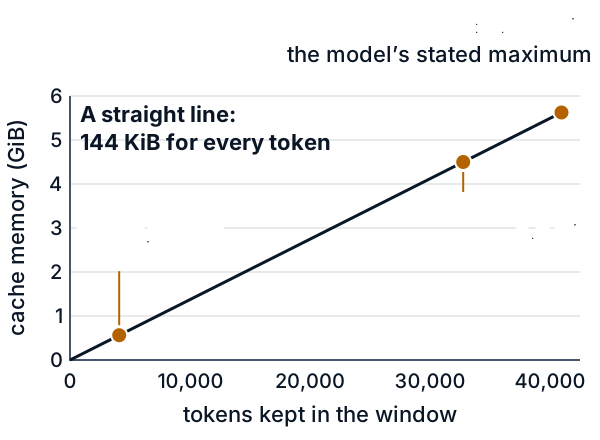
The line is straight, so the cache costs the same for every token. The model's weights are a separate bill: the card gives about 8.2 billion parameters, and at 2 bytes each that is about 16.4 GB (decimal). The model has 32 query heads but only 8 key/value heads (grouped-query attention, where several query heads share one key/value head), which divides the cache by 4. With one key/value pair per query head it would be 589,824 bytes per token and 22.5 GiB at the maximum.
The cost of computing is not linear. Full attention compares each token with every token up to and including itself: n(n + 1)/2 pairs per head and layer (`attention_pairs`). That is 500,500 pairs for 1,000 tokens and 2,001,000 for 2,000, about four times as many for twice the text.
### Proof it works
```bash
python3 -B -m pytest -q -p no:cacheprovider code/
```
The 21 tests check these claims. The worked example above gives exactly the kept messages in the table, with and without the pin. A reply whose question was cut is dropped, and a chat that fits is sent whole. The oldest message is dropped first, with no holes, and a big message in the middle blocks the smaller older ones. A 400-trial random test checks that the result never goes over the limit, never starts with a reply after a cut, is the pinned prefix plus a run of the newest messages, and is maximal, meaning the next older message would not have fit; it also counts its cases, so it cannot pass by checking nothing. The errors are loud. `tokens_read` matches the hand count (90 for three replies of 10 tokens, and 50 x n^2), and a window stops the growth. A window that would hold eight messages sends seven, because the eighth would be a reply without its question. The memory tests compare against hand-computed values: 147,456 bytes per token, 6,039,797,760 bytes at 40,960 tokens, and 4,831,838,208 at 32,768. One test fails if code uses the 32 attention heads instead of the 8 key/value heads, because it would give 589,824. Others cover the `dtype` fallback and the cache question in Check yourself.
### Where this is used in practice
- Hugging Face's `apply_chat_template` turns a list of role-and-content messages into the single text the model reads.
- LangChain has a `trim_messages` function that cuts a chat history down to a token or message count: the dropping trick.
- vLLM's `--max-model-len` setting caps the length of prompt plus output.
- StreamingLLM (Xiao and colleagues, 2023) studied the cache inside the server: keeping only the newest tokens breaks once the text outgrows it, and also keeping the first few tokens largely repairs it.
- MemGPT (Packer and colleagues, 2023) moves text in and out of the window the way an operating system moves data between fast and slow memory, and summarizes old text: the summary trick.
- Lost in the Middle (Liu and colleagues, 2023) is the measurement behind "models use the middle less reliably".
## Skills this lesson builds
- Budget a context window with the model's own tokenizer, and explain why input and output share it.
- Write and test history truncation: oldest dropped first, rules pinned, no holes, loud errors.
- Estimate attention-cache memory from a model's `config.json` and compare it with GPU memory.
- Explain why cost grows with history length, and weigh the fixes: a window, a summary, a notes file, a fresh session.
- Test recall with a planted fact, and report where recall breaks.
**Portfolio project:** build a small command-line chat wrapper around any model with a published tokenizer. It truncates with that tokenizer, pins a rules message, shows a live meter of tokens and estimated cache memory, and runs a planted-fact test. Publish a chart of recall against the position of the planted fact.
## Check yourself
1. A bot follows your "answer in French" rule at message 5 but ignores it at message 40, after you pasted three long files. You never changed the rule. Why?
Answer
The rule is only text in the history. If the history outgrew the window, the app cut the oldest text, rule included, and the model cannot tell. If it still fits, the model can follow a rule in the middle of a long history less reliably than the newest text. Restating the rule in a recent message helps in both cases.Answer
Not from the model, which keeps nothing between replies. The app sent the whole history again with every message, and the name was in that text. If the app had cut that message, the bot would not know the name.Answer
The pinned message costs 2, so the budget is 8. The newest message (3) leaves 5, and the one before it (4) leaves 1. The 6-token message does not fit, so the walk stops. The 4-token reply is now first in the run, and its question (the 6-token message) was cut, so it is dropped. Kept: the system message and the newest message, 5 tokens in all. The 1-token message would fit in the last spare token, but keeping it would leave a hole.Answer
2 x 28 x 4 x 128 x 2 = 57,344 bytes (56 KiB) per token. For 8,192 tokens that is 57,344 x 8,192 = 469,762,048 bytes, which is 448 MiB.Answer
Without a window: 40 x 12^2 = 5,760 tokens. With a window of 200 (five messages): replies 1, 2 and 3 read 40 + 120 + 200 = 360 tokens, and each of the other 9 replies reads 200, which is 1,800. Total 2,160 tokens.